Search results for tag #homelab
![[?]](https://whitespashe.uk/system/accounts/avatars/000/000/014/original/0013482b488b3928.jpg)
Tonight, I started looking at automated deployment of services within my homelab.
I've been using ansible already, so I figured I would just start by going through my current virtual machines, harvest the config files, create ansible roles and templates, then go from there.
But then I wondered about my containerized services.
I've just migrated from Portainer to Arcane, and I realized all of my precious compose files weren't stored or tracked anywhere.
So, I did what any normal person would do, and set up a new Gitea organisation to handle my compose files and went ahead and set up each compose file (with example .env files) in new repositories. Now, a change in a compose.yml file in gitea causes the appropriate container stack to redeploy.
This is great, but how would I get these container hosts to point at arcane and get their relevant projects?
Easy! Ansible.
I can use a module to run a compose file, which links my machine to Arcane for management.
But now, I'll need to manually create an entry in Arcane for each new host before I deploy the agent. Can I automate that?
I can. Using Arcane's API, I can programmatically register a new environment, thus allowing my new device to have new gitea projects deployed to it.
So much to do!
![[?]](data:image/png;base64, iVBORw0KGgoAAAANSUhEUgAAAEAAAABAAQAAAACCEkxzAAAAUUlEQVQoz43R0QkAMQwCUDdw/y3dwEvsvzlL4X1IoQkAisKmwfAFT3RgJHbQezpSRoXEqeqCL9BJBf7h3QbOCCxV5EVWMEMwG7K1/WODtlvxAYTtEsDU9F34AAAAAElFTkSuQmCC)
I just need to share that I've "discovered" and started using the #MooseFS distributed file system on my local LAN and its really quite fantastic. As a professional #sysadmin I didn't find it hard to install or use, I think its quite straightforward but I'm coming at it from a different perspective perhaps than 'average' users. I will point out: it works for #immich storage, as well as steam games, believe it or not. Great for my #photography needs too. Ask anything!
#Linux #homelab #storage
![[?]](https://social.dk-libre.fr/social/oldsysops/s/7e93fa6bf16b47da4f57ddf9072aff8c.png)
![[?]](https://toot.dusepo.co.uk/system/accounts/avatars/109/377/447/486/578/029/original/523b0f2b12fced7d.png)
<StarCraft 2 voice> Hell, it's about time.
$ sudo do-release-upgrade
Checking for a new Ubuntu release
= Welcome to Ubuntu 26.04 LTS 'Resolute Raccoon' =
So I spent a number of hours last night trying to figure out why my beautifully crafted firewall rules in pfSense suddenly stopped blocking outbound traffic when my VPN gateway was down.
It turns out newer versions of pfSense changed the firewall rule behaviour so that if you have a rule such as "if traffic source is (LAN subnet) and destination is not(LAN subnet), use VPN gateway" to force traffic over the VPN, then when the VPN gateway is down it *silently* changes the "use VPN gateway" to "use default gateway", and makes you start leaking encrypted traffic. It's so upsettingly shit 😅
Anyway, I found the relevant setting in "System -> Advanced -> Miscellaneous" and now all my firewall rules don't suddenly drinking silly-juice whenever the VPN blips.

Alt...
A screenshot of the pfSense web UI showing the "Gateway Monitoring" options. One option is highlighted in red:
"Skip rules when gateway is down
Do not create rules when gateway is down By default, when a rule has a gateway specified and this gateway is down, the rule is created omitting the gateway. This option overrides that behavior by omitting the entire rule instead. "
This is disabled by default and causes the aforementioned absolutely cursed behaviour
![[?]](https://mastodon-static.macalinao.org/accounts/avatars/109/330/633/417/143/725/original/b2a047b10cd86d63.png)
Well that's one way to fill up your server rack. (Not fully off-grid yet, but hopefully soon.) #homelab

Alt...
A server rack with two LFP battery packs installed.
Well that's one way fill up your server rack. (Not fully off-grid yet, but hopefully soon.) #homelab

Alt...
A server rack with two LFP battery packs installed.
![[?]](https://media.unkn.uk/media/93c623e5ca6ef1733dc32bfc8131585ea59c17056f30a823b95ba32a8c9aff4c.png)
Navidrome is great for streaming self-hosted FLACs, but checking what my kids are listening to meant constantly logging in and out of different accounts and since playback history lives entirely in client apps, past history vanishes into the void.
Instead of fighting third-party scrobblers or writing complicated webhooks, I just pointed a tiny Python script straight at the local SQLite DB. Now, a regular cron job drops a clean, zero-tracker static HTML dashboard into an Nginx container. No cloud services, no telemetry, just a local page to see family play counts.
Navidrome Dashboard can be found on my tools page here:
🔗 https://unknownuniverse.uk/tools
#SelfHosting #HomeLab #Navidrome #Python #Linux #FOSS
![[?]](https://runespaces.com/fileserver/0188DSE5C4BZX20MVPDMNYVE65/attachment/original/01M0K01KPEN4GNMA8GV1SGTC40.jpeg)

Extending my #Garage #S3-cluster to a third physical node at my parent’s house - what a great piece of software this gem is!
Finally stopped YOLO-ing my AI coding agents. 😆 Moved them into agent-sandbox pods under gVisor, and built a Headlamp plugin so I can poke at them from my phone. Wrote up the setup and the quirks that bit me:
https://jj.macalinao.org/moving-my-coding-agents-into-kubernetes/
![[?]](https://media.bsd.cafe/bsdmmedia01/accounts/avatars/114/439/967/181/871/365/original/9c94f4a4076e444d.jpg)
Well that's interesting. Nagios' own #documentation for installing on #FreeBSD includes steps for #SELinux. 🤔
#sysadmin #homelab #tech #monitoring #funny #hmmm

Alt...
Steps for installing Nagios4 on FreeBSD also includes info on SELinux. Why?!?!
![[?]](https://social.thelab.uno/system/accounts/avatars/115/452/842/009/459/746/original/e03f8feb07ed87b0.jpg)
Gone is the Summer, back on #selfhosting
New additions:
✅ TinyCld
https://tinycld.org
(needed a WebDav for #Grapheneos backups)
✅ FeedEcho
https://github.com/jcrabapple/feedecho
(used to feed news to some profiles on this instance)
✅ MailFlow
https://github.com/maathimself/mailflow
(Nice Gmail-looking web client)
✅ Updated most of the #Proxmox LXC to Ubuntu 26.04.1
ToDo:
👊 Replace media HDD on main server with 2TB (that's a task for a Sunday)
This morning after reading the #FreeBSD Handbook chapter on Jails I had a massive realization. Look, I've dabbled in jails over the years but it was really just scratching the surface. But after reading about VNET Jails....this is some deep, mind-expanding awesomeness. One can run entire workloads completely segregated by a complex virtual network with VLAN tagging, independent network stacks, routing, and switching internally on one OS on a single kernel. Not that I have a use for it (yet) but this is truly exponentially mind blowing.
It's clear FreeBSD is *the* infrastructure operating system.
#BSD #RunBSD #tech #homelab #vnet #Jails #FreeBSDJails #infrastructure #networking
![[?]](https://static.mamot.fr/accounts/avatars/000/192/056/original/8cb22b2bab8c2bb7.png)
New in my #homelab
When Renovate bumps a Helm chart, the PR gets a comment showing what will actually change in my cluster: not a diff of the upstream chart, but of the final manifests rendered with my values.yaml, old vs new, before I merge.
HowTo? on each PR, the CI checks out main and the PR branch and swaps SOPS values for typed placeholders. Then flate renders the #Flux HelmReleases on both sides with my values, and the diff is posted as a PR comment.
https://github.com/home-operations/flate


![[?]](https://cdn.masto.host/genomicsocial/accounts/avatars/109/365/188/107/868/184/original/21a1b65fc2a8077b.png)
#HomeLab
#SelfHost
#Networking
Hive mind, do any of your run an #OpenBSD #FireWall on a mini PC? I ran one in the past on a multi-nic midtower. I may need to build a firewall again.
I know the BSD support is *very* hit or miss for hardware specifics. I was curious if any of you had luck so I don't have to find a used PC and put two supported NICs in it.
![[?]](https://media.infosec.exchange/infosec.exchange/accounts/avatars/109/302/783/570/510/744/original/f24405e5ddc5416c.png) Ryan Castellucci (they/them) 🎃
Ryan Castellucci (they/them) 🎃  [they/them] » 🌐
@ryanc@infosec.exchange
Stuff for sale, boosts welcome, I can't be arsed to ship so exchange would need to take place at/near Liverpool Street station:
Ubiquiti US-16-XG (early hardware revision) with rack ears, functional, £250 - 8x SFP+ ports, 4x 10GBASE-T ports.
Netgear S3300-28X with rack ears, functional, modded with quieter fans, £80 - 24x 1000BASE-T ports, 2x SFP+ ports, 2x 10GBASE-T ports.
Willing to consider trade, check my post history for things I might like.
![[?]](https://media.infosec.exchange/infosec.exchange/accounts/avatars/000/070/798/original/d20ead2f85c91066.jpg)
I love getting #TheOnion in print, but this time they’ve gone too far. I don’t know how they broke into my basement but I did not give them permission to use photos of my stuff in their mock ads.
#selfhosting #homelab

Alt...
Photo of a printed coupon in the onion. It pretends to be from Best Buy and shows a big cardboard box full of random computer cords like USB and power cables. The coupon says “good for one free pull from the Tub O’ Cords”
![[?]](https://mastodon.blablalinux.be/system/accounts/avatars/113/675/429/104/963/472/original/6baf4240c1614c5a.jpg)
🚫 Nouvelle page d'erreur maison sur mon instance OnlyOffice : un joli 403 "Accès Interdit" façon Matrix, dans la lignée de mes pages 404/410/503 habituelles.
👀 https://onlyoffice.blablalinux.be/welcome/
📖 Le pattern complet (404, 410, 503, 403) est documenté ici pour les autres admins NPM :
https://wiki.blablalinux.be/fr/catalogue-modeles-erreurs-404-npm
🔧 Mise à jour de la page wiki "Scripts d'auto-update LXC/VM sous Proxmox" !
Au programme : notifications Gotify désormais optionnelles (toggle simple), heartbeat même sans mise à jour, et quelques fiabilisations sous le capot. 🐧
👉 https://wiki.blablalinux.be/fr/script-update-lxc-vm-proxmox
La suite du programme de ce samedi matin ! 🚀
À 11h, c'était au tour du deuxième script d'entrer en piste pour mettre à jour tous mes conteneurs LXC sur le cluster pvenocl. Résultat impeccable : tous les conteneurs sont à jour, et aucun redémarrage n'était requis. L'automatisation tourne comme une horloge ! 😎☕️
#Proxmox #Homelab #Automation #LXC #SysadminSaturday #Containers

Mon petit rituel du samedi est réglé comme une horloge ! ⏰ Mon script d'automatisation des VM sur mon cluster Proxmox a encore fait des merveilles aujourd'hui 🎉
👉 Résultat : Mes VM sur pvenocl mises à jour et zéro redémarrage nécessaire (RAS sur le reste). La vie est belle quand tout roule toute seule ! Et ce n'est que pour les VM... Attendez un peu dans deux ans quand il y aura la même chose pour les Elixirs ! 🚀
#Proxmox #Homelab #Automation #SamediSysadmin #Scripting #ZeroDowntime

![[?]](https://media.burningboard.net/accounts/avatars/109/892/422/024/311/931/original/f22e604f554272c0.png)

RHEL 10 on ARM64. No convenient native Proxmox Backup Client package.
Obviously, I borrowed the client from an old server container, introduced it to SELinux, and pointed it at the host filesystem.
40.6 GiB processed in five minutes. Encrypted. Incremental. Mildly cursed.
“No Proxmox Backup Client for RHEL? Hold My Container Runtime”
![[?]](https://object.ceph-waw3.hswaw.net/mastodon-prod/accounts/avatars/109/360/274/978/913/890/original/30fe75c6bcdfe430.gif)
![[?]](https://gts.tumfatig.net/fileserver/01FJ093H6Y5VGN20G998J7KN1M/attachment/original/01JZTJV1P9RVJ502PCXKN68R1F.jpeg)
Reposting this because I got  #RunBSD stickers at #EuroBSDcon2026 and can now illustrate the post with a proper image :D Also updated the temperatures screenshot.
So that's basically how much watts are #NetBSD and #OpenBSD using by default on this AOOSTAR WTR Pro NAS machine and how to have #FreeBSD use less watts as possible while still operating Jail and #bhyve services.
https://www.tumfatig.net/2026/overview-of-aoostar-wtr-pro-on-bsd/
I have some questions for the #FreeBSD folks in the room:
1.) What are the best practices for Poudriere and Packages. I understand one shouldn't mix Ports and packages, but I want to have some custom builds for my machines, like vim, zsh, wget, mutt, nano, while not relying on compiling everything. Is there a safe way to do this? Presumably one tracks the same quarterly ports tree as packages. But is there more to it?
2.) When managing software using Poudriere and Ports, how does one manage emergency OOB patches? I would imagine switching Poudriere to use LATEST is an operational death wish.
🐧 Le mystère du jour : une vidéo qui refuse de jouer... mais seulement dans UN navigateur. Coupable improbable : Chrome ✅, Firefox ✅, mobile ✅... Vivaldi ❌ 🕵️
Spoiler : ce n'était ni Mastodon, ni PeerTube, ni NPM. Le vrai coupable ? Des codecs propriétaires Flatpak qui ont fait des siennes après une mise à jour. 🎬💥
Enquête complète (avec fausses pistes et vrai bug CORS trouvé en chemin) 👉 https://wiki.blablalinux.be/fr/video-illisible-vivaldi-mastodon-peertube
![[?]](https://media.bsd.cafe/bsdmmedia01/accounts/avatars/113/300/614/913/892/778/original/cf48c2129213cbbd.png)

Looking for anyone who has successfully installed Proxmox on an HP ProLiant DL380 G6 with a Smart Array P411 controller. I have tried Proxmox 7, 8, and 9. Most attempts end in a black screen or kernel panic. Debian itself also fails to detect the RAID 0 logical drive. I have tried both the older CCISS driver and the modern HPSA driver with no luck. Ubuntu installs without issues and sees the array fine, but I do not want Ubuntu running bare metal. I chose Proxmox because the original ESXi install is full of security vulnerabilities and ongoing problems, and I need something better supported. Has anyone got Proxmox working on this exact hardware, or found a reliable way to make the P411 visible during install?
PS. unfortunately I cannot update the firmware right now and since it is not mine and it is for the place that are work in, this is the test hardware that they gave me to try proxmox and see if it's better than EXSI or not.
#Proxmox #ProxmoxVE #HPProLiant #DL380G6 #SmartArray #P411 #Homelab #SelfHosting #Linux #Virtualization
![[?]](https://media.hachyderm.io/accounts/avatars/110/951/731/365/927/189/original/b2c68992ae4f02d2.jpg)
After 3 retries because I haven't plugged the power cable to the SSD, then I hit enter instead of space to disable the desktop environment, I have finally installed Debian 13 on the new server in my homelab.
![[?]](https://img.mstdn.jp/accounts/avatars/117/077/805/015/163/928/original/071b2fd42172d194.png)
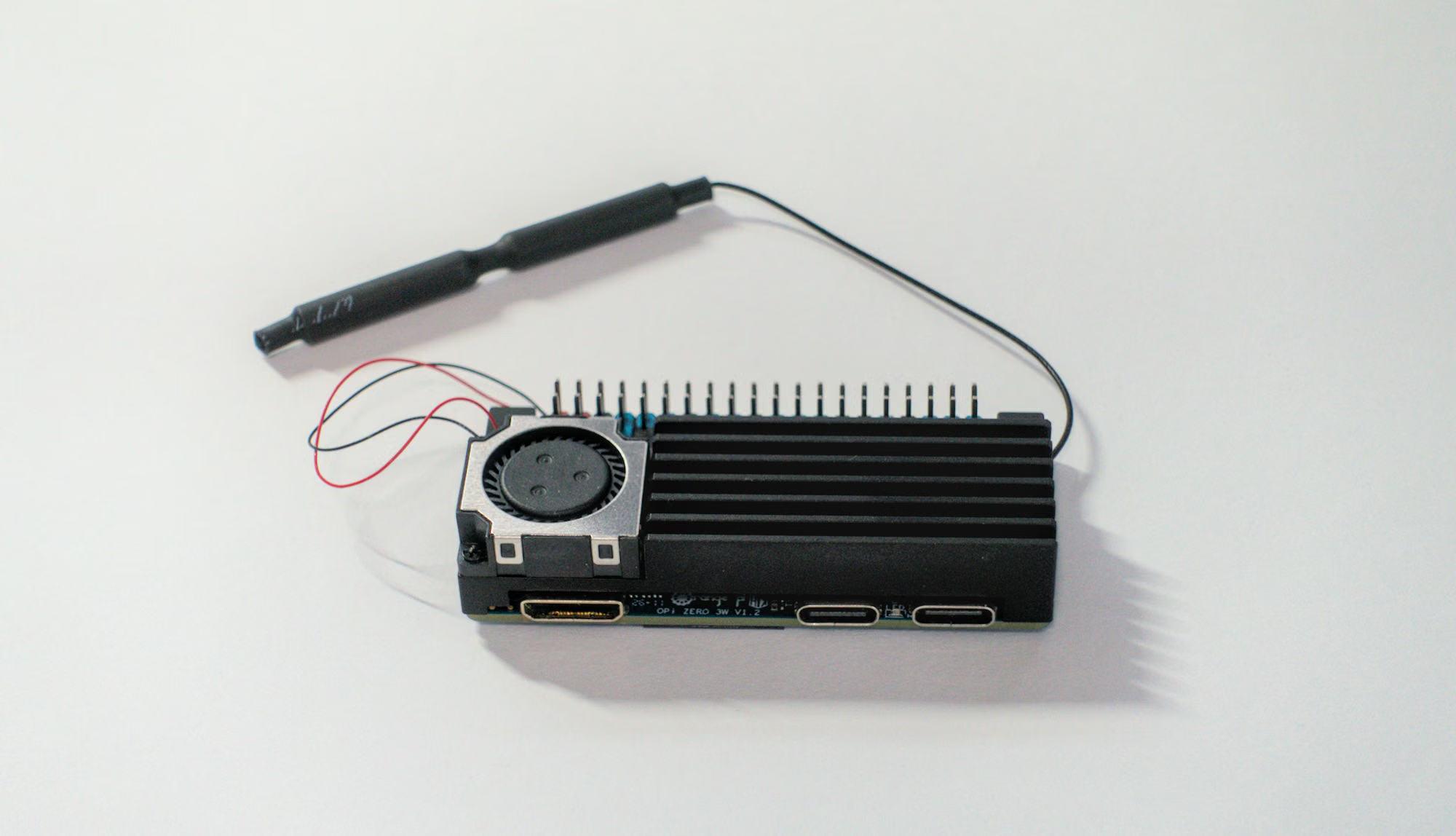
Tiny board, massive punch. We tested the OrangePi Zero 3W — 65×32mm of Allwinner A733 power with Wi-Fi 6, silent fan cooling and ~2.5W idle.
It runs Pi-hole + Jellyfin + Immich + Minecraft server at once on 4GB RAM. This is pocket-size home-server heaven.
Full review: https://boilingsteam.com/orange-pi-zero-3w-review-tiny-yet-powerful/
#orangepi #sbc #review #homelab #tiny #linux #hardware
![[?]](https://files.mastodon.social/accounts/avatars/108/195/975/333/001/997/original/03def2f2b3aef9de.jpeg) boosted
boostedRyan Castellucci (they/them) 🎃 [they/them] » 🌐
@ryanc@infosec.exchange
I wanted another computer as a sandbox, I don't really trust VMs, and fucking chip shortages, so to the boneyard it is. I have a disused ASRock Rack J1900D2Y with 8GB of RAM and a PicoPSU that used to be my mail server. Somehow, at some point, I modded the 1U case to mount the rack ears on the back. Annoying. So I dig up the original rack ears which I apparently still have, and try to flip things around, except the drive tray doesn't work the other way around somehow. What. Fine. I have a drill and a file. Sorted. While I'm at it, I splice an INA219 current sensor into the power connection for funzies and hook it up to the BMC's I2C bus. I then root the BMC so I can access it. So then I set about setting up Debian on it on a mirrored pair of Intel enterprise SSDs with encrypted ZFS. The board claims to support UEFI booting. This was determined to be a lie. Whatever. A problem for later. I put GRML (which is my new favorite rescue "CD" since it also has aarch64 builds available) on a flash drive, remove the case from the false drive, solder it to a motherboard header cable, and plug it into the internal USB hub I at some point added to the case. Boots fine, but only as a BIOS drive. I do a manual ZFS setup and debootstrap install, then I fuck around with GRUB for... a while... and eventually get it working on a system partition I've set up mirrored with mdadm (metadata v1.0 - at the end of the partition). Then comes the part where I get ZFSBootMenu working with SSH unlock. ZFSBootMenu is intended to boot via UEFI, but as I said, that doesn't work, but that's what GRUB is - I can chainload. Eventually that works, but I cannot manage to type the passphrase via the janky BMC's Java IPKVM. Fine. I have a file server I already set up SSH unlock with, but that means I'll have to build my own ZFSBootMenu files. After a while, I finally get that working, only to be immediately prompted for the passphrase a second time (on the screen, via the IPKVM, where I keep failing to type it, and it takes abour 90 seconds to check because I cranked up pbkdf2 iterations) when Debian starts. Right, need to bake the key into the encrypted initramfs that ZFSBootMenu loads. More chroot bullshit. I get that working, and Debian shits a brick and drops into a root shell because it can't find /sbin/init. Apparently I needed to install systemd-sysv for that. So I sigh, boot back into the GRML environment, mount the chroot for the fifteenth time, run the apt install, and rebuild the initramfs. I unmount everything, cross my fingers, and type reboot. The janky Java IPKVM refreshes. BIOS POSTs. GRUB chainloads ZFSBootMenu. The SSH unlock actually works perfectly. The boot process finally gets past the init stage, and a beautiful flood of green [ OK ] messages starts cascading down the screen. The login prompt finally appears. I go to type my username, but the BMC drops the connection again. I frantically reload the applet, but instead of the console, the screen glitches out, showing a live camera feed of my street just as a yellow car pulls up outside. I whistled for a cab and when it came near, the license plate said 'Fresh' and it had dice in the mirror. If anything I could say that this cab was rare, but I thought 'Nah, forget it, yo, holmes, to Bel-Air!' I pulled up to the house about seven or eight, and I yelled to the cabbie, 'Yo holmes, smell ya later!' I looked at my domain, I was finally there, to sit on my throne as the Heir of Bel-Air.
Radxa says ROCK 5 ITX board I returned can't be repaired, and will be scrapped. They're refunding me, but I was counting on having two of them.
Anyone have a ROCK 5 ITX or ROCK 5 ITX+ they'd be willing to sell me for non-scalper prices?
Would also be happy to buy an Orion O6.
![[?]](https://cdn.fosstodon.org/accounts/avatars/000/318/425/original/3fcd89aabe111e3e.jpg)

For several days now my DSL Internet at home is broken (because I moved the cabinet?), so my #homelab and its web infrastructure is unavailable - even locally because of CSRF and https annoyances. 🙄
Single point of failure, huh...
At least anything  #gitAnnex is reliable as ever - that's what it's built for: reliably moving files between machines even if not all of them are connected. Thanks @joeyh ❤️
This aimed to be a simple #RunBSD post about the AOOSTAR WTR Pro NAS system. But it ended being nearly a "Tune #FreeBSD for power consumption" one :p
Anyway, I very like this tiny #HomeServer. And it fits wells in my #HomeLab closet.
https://www.tumfatig.net/2026/overview-of-aoostar-wtr-pro-on-bsd/
![[?]](https://cdn.masto.host/socialwildeboernet/accounts/avatars/000/000/001/original/7a247866b9436e4b.jpeg)

I have added a shortcut to all my blog articles on #Selfhost and #Homelab topics. I will go through all of them in the next few weeks and update where necessary. Might also result in marking some as "outdated".
After a month of testing I can say that this player is the best I've ever found for self hosted servers such as navidrome and jellyfin (it also has plex but I have abandoned). On the site reports that there is also a linux desktop version but not yet tested. That will be my paradise for self hosted music 🥹
@selfhostingsh @homelab #selfhost #homelab #navidrome #jellyfin #music
![[?]](https://gnulinux.social/system/accounts/avatars/109/296/430/358/252/790/original/cc8a99fb944ed95a.jpg)
 Haack's Networking
✍️ Hijacking DNS & Stopping DoH
🔗 https://tech.haacksnetworking.org/2026/09/06/hijacking-dns-stopping-doh/
🧻 This tutorial is designed for #openwrt users and #pihole / #unbound users looking for a clean way to protect your LAN's DNS. This tutorial used a dedicated vlan/subnet with 4 Wyze v4 cams but/and can easily be extended to any IoT devices one chooses. There are three types of actions covered in this tutorial:
- Hijacking plain-text udp 53 and udp 853 DNS requests
- Hijacking tcp 853 (DoT) requests
- Dropping DoH requests for specified upstream DNS ips
📜 I hope people find this tutorial helpful. Feedback and comments are welcome. For those seeking assistance and/or if you want to chat about setup or other Linuxy stuffs, feel free to swing by the GNU/Linux Club Matrix over at https://matrix.to/#/#introductions:gnulinux.club
#OpenWrt #PiHole #Unbound #DNS #DoH #DoT #DoQ #Firewall #TrafficRules #PortForward #tcpdump #VLAN #IoT #Privacy #SelfHosted #Homelab #AWSIoT #NetworkSecurity #FOSS #Debian #floss #freesoftware #opensource
![[?]](https://mastodon.me.uk/system/accounts/avatars/108/194/335/107/125/473/original/08bcb0c0ba1c0346.png)
 🍵
🍵@krans Excellent question for the #homelab @homelab community!
IMO:
- Set boundaries on what you are going to do with it, on a scale of: Personal-NAS -> family-ISP -> AV platform -> mini supercomputer system (eg: ML training).
- This will give an idea of scale: one machine or a rack of 'em?
- That determines software a bit, such as RAID array or cluster file system...
Family-ISP here: One Dell T20 tower server, soon to be replaced with a much smaller Beelink Me Pro NAS, NetBSD+services.
boostedRyan Castellucci (they/them) 🎃 [they/them] » 🌐
@ryanc@infosec.exchange
There seems to be some interest, so I'm going to stream at ~4ish UK time on Twitch (sorry, don't have the energy to figure out a new platform today).
Repeating the rough plan:
- Hook up the Pi with a TTL serial cable, Ethernet, and power it through a relay board.
- Build a minimal U-Boot that chainloads a full U-Boot over serial, flash that to the SD card
- Build a full U-Boot (with my patches) that sets up netconsole and loads a signed FIT image with kernel, initramfs, and maybe devicetree from my TFTP server
- Cross-compile a Linux kernel and modules for the Pi
- Statically (musl) cross-compile BusyBox (with patches) for the Pi
- Statically (musl) cross-compile Dropbear for the Pi
- Statically (musl) cross-compile rsync (and whatever dependencies it has) for the Pi
- Statically (musl) cross-compile gpsd for the Pi
- Statically (musl) cross-compile chrony for the Pi
- Statically (musl) cross-compile my temperature logger for the Pi
- Script up something to build the initramfs
- Set up runit as the init system and script an overlayfs setup
- Iterate until it works properly.
#linux #embedded #embedded_systems #embeddedsystems #homelab
The rough plan, which will probably be immediately amended upon contact with reality:
- Hook up the Pi with a TTL serial cable, Ethernet, and power it through a relay board.
- Build a minimal U-Boot that chainloads a full U-Boot over serial, flash that to the SD card
- Build a full U-Boot (with my patches) that sets up netconsole and loads a signed FIT image with kernel, initramfs, and maybe devicetree from my TFTP server
- Cross-compile a Linux kernel and modules for the Pi
- Statically (musl) cross-compile BusyBox (with patches) for the Pi
- Statically (musl) cross-compile Dropbear for the Pi
- Statically (musl) cross-compile rsync (and whatever dependencies it has) for the Pi
- Statically (musl) cross-compile gpsd for the Pi
- Statically (musl) cross-compile chrony for the Pi
- Statically (musl) cross-compile my temperature logger for the Pi
- Script up something to build the initramfs
- Set up runit as the init system and script an overlayfs setup
- Iterate until it works properly.
I've done most of this before, and already have configs for several parts, so it should be relatively smooth. In theory.
#linux #embedded #embedded_systems #embeddedsystems #homelab
Interest check: I'm considering doing a stream at around 4-6pm UK time this afternoon (Saturday September 5th) building an minimal netboot-into-ram Linux image for my Raspberry Pi NTP server.
Boosts welcome.
#linux #embedded #embedded_systems #embeddedsystems #homelab
| Would definitely watch: | 10 |
| Would probably watch: | 9 |
| Might watch: | 34 |
| Wouldn't watch, but have a compulsion to vote anyway: | 28 |
Closed
Yay! PocketID [1] is up and running in my homelab. Runs as a quadlet service container under podman behind a nginx reverse proxy, with its own SSL cert, generated by my own CA. Passkeys in the #Homelab!
[1] https://pocket-id.org "The most user-friendly OpenID Connect Certified™ and OAuth 2.0 provider that lets users sign in to your applications with passkeys."
#Selfhost #SysAdminLife @homelab

Alt...
The PocketID login screen with my own logo, overlaid with a passkey selection dialog, showing I can log in with two different passkeys.
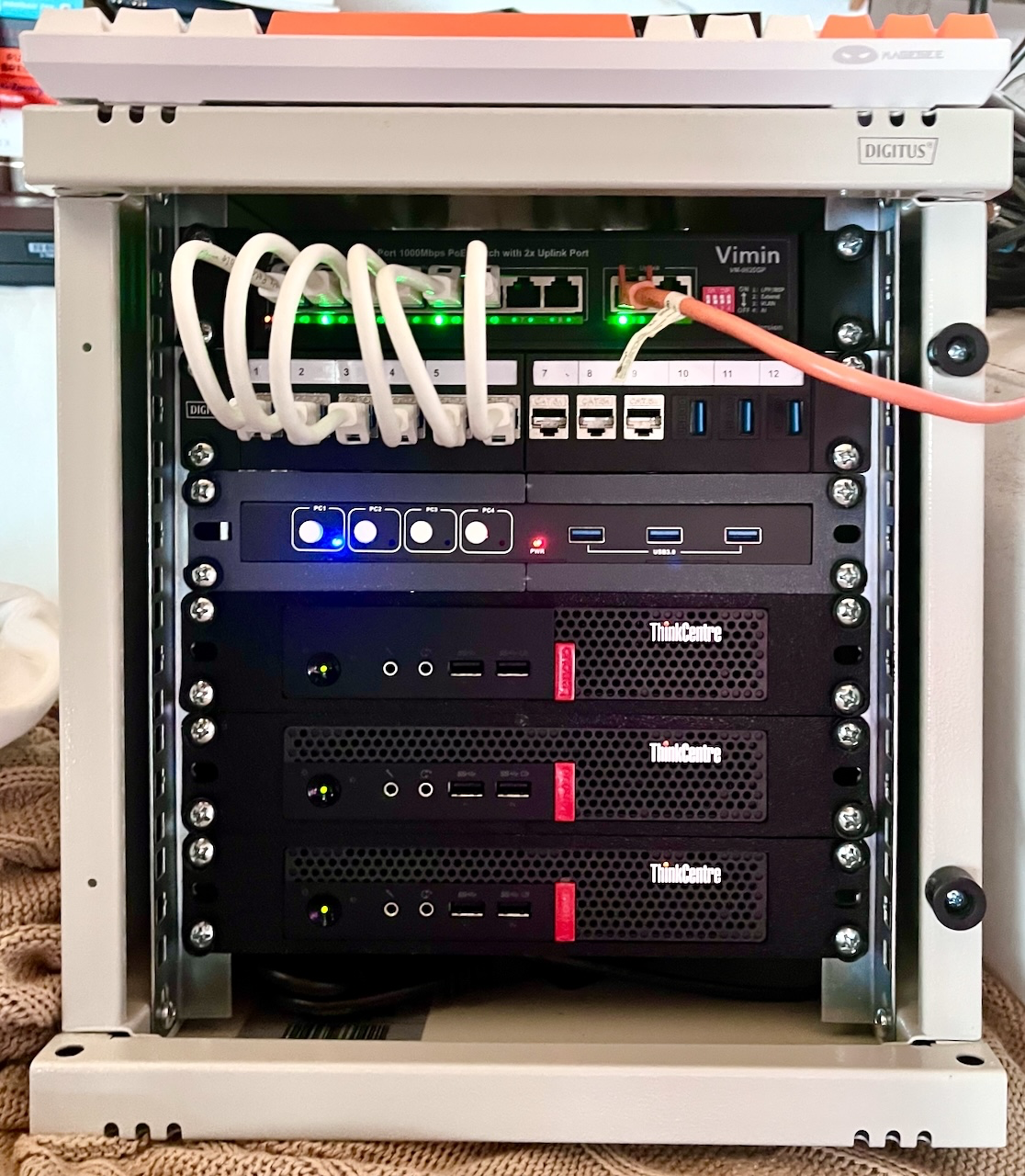
Because I notice an uptick in posts about buying used/refurbished mini-PCs in these times of exploding prices for hardware, here is a link to my cute homelab, explaining how I use several of these and have them working and looking nice :)
https://jan.wildeboer.net/2025/05/Cute-Homelab/
1/3
Alt...
My homelab. 3 Lenovo Tiny PCs in a 10" rack with a network switch, patch panel and 4 port KVM.
My #NAS rebuild is entering its 4th week. 3 shows daily, but it can't last! Get tickets while you still can.
The number of mistakes I have made in this is embarrassing in and comical. Here's a small sampling. This is how one keeps oneself humble: openly admit the stupid shit.
- I had a really shitty Molex to SAS/SATA power adapter. Drives weren't getting enough power.
- I managed to stick not one, but TWO SATA drives into a 6-drive array with 4 SAS drives. So I had SAS 12G/s drives, SAS 6G/s drives, and SATA 6G/s drives all in the same #TrueNAS array. You can do that!? Holy shit, I guess you can!
- I wasn't doing burn-in testing on used, crappy disks before putting them into service. Pay me now, or pay me later. Either take the hours and hours to test it now, or spend the hours and hours dealing with a failure later.
- I had both 4K logical sector and 512b logical sector drives in the same array. This, it turns out, is no big deal for TrueNAS / #ZFS. It just sets
ashift=12and you never have to think about the difference.
There is some good news. My backups work! I have lost no data at all, despite clownshoes system administration.
LFMF y'all. Learn from my fail.
Finally something positive today. The second Jellyfin instance works like a charm. Nothing can beat a local network 💪🏻
I also have set up a nextcloud instance. But this time, instead of trying to fit triangles into squares (not sure about the expression but you get the idea), I decided to tell the users, my family, to access this instance only via the web interface and sell them it's to share their pictures easily, nothing more.
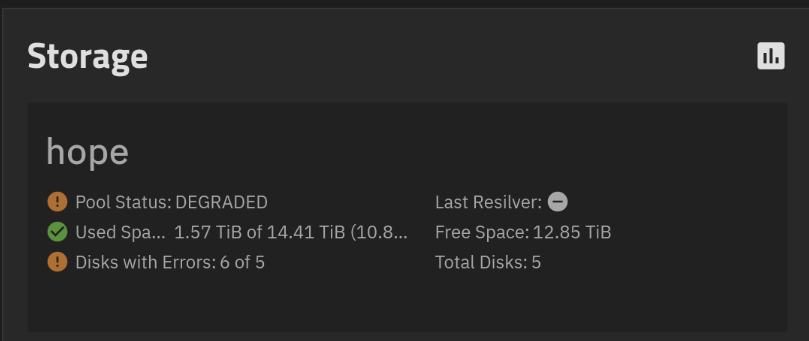
The repair of the #NAS continues. I suspect this is not a good sign.
#homelab #truenas #selfhosting
Alt...
Screenshot of a TrueNAS storage report. It says "Pool Status: DEGRADED
Used Space:1.57 TiB of 14.41 TiB (10.88%) Disks with Errors: 6 of 5. Total Disks: 5" I have more disks with errors than I have disks? There are seven physical drives in this system.
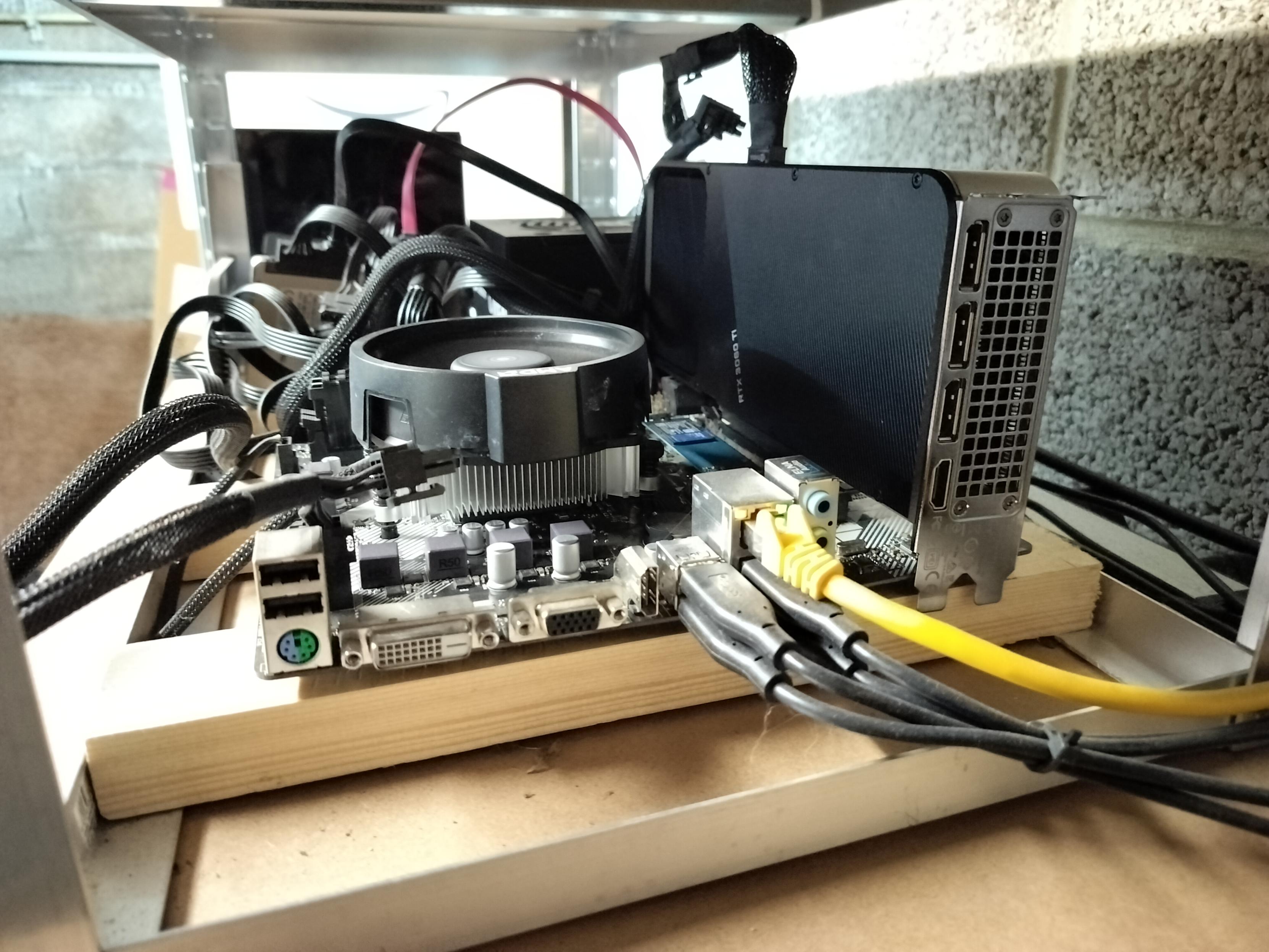
Still stuttering... The bottleneck seems to be either my upload bandwidth or the 1 core VPS in between. I'll move the service locally and probably try some AI stuff on the 3060 Ti now that it's installed #selfhosting #homelab #jellyfin
Look at this ghetto setup #homelab #selfhosting #jellyfin
Alt...
Picture of an open case home made computer with the CPU fan on the left and the vertically mounted GPU hanging on its connector. Ethernet and USB cables on the bottom are fleeing to the side of the picture. This open case is mounted on a garage rack in the basement.
Surprise, I don't even need to use the USB disks. There is an empty 2TB NVMe drive on that box. Let me LUKS that thing, let's go!
so the wisdom of crowds is batting 500. 2 right, 2 wrong. The answers were:
- 33 drives
- 64TB
- 12.6 kg
- 18 Gb
That 18GB drive was the mail server’s only drive for like 20 years. Quantum Atlas V SCSI.
I am glad to say that I have more drives working than I have dead. 32 in the rack and 7 inside in the NAS (not counting random laptops and such)
#selfhosted #selfhosting #homelab
📚 Nouvel article sur mon wiki !
Comment configurer un datastore S3 (MinIO) sur Proxmox Backup Server — que ton PBS tourne en VM ou sur du matériel physique déjà bien rempli ?
👉 https://wiki.blablalinux.be/fr/proxmox-backup-server-datastore-s3-minio
My Jellyfin server works like a charm at home but it's very buggy remotely. I see OpenVPN sucking 20% of CPU and ffmpeg at 10%. Tomorrow, I'll move the instance to a more beefy server with a 3060 Ti to offload transcoding and it has a more powerful CPU. But the data disks are on USB. If that doesn't work, I'll create a second Jellyfin instance in the remote LAN directly to have full bandwidth.
I'm having NAS fun with failing drives and such. My #TrueNAS is a much bigger mess than I realised. I had a bunch of drives fail at the same time. It has caused me to look very carefully at each drive, its specs, and how it is behaving. It is shocking that it works at all. I have made embarrassing errors that I"ll admit after I've fixed them. 😀
Nothing with multi-TB NASses is fast. (at least none of MINE are). So replacing drives, resilvering, replacing, resilvering, etc. will take days.
I have dead drives I need replacing AND I have live drives that need to be replaced once it's safe to do. Ugh.
First off, how many drives do you think are in the box? Since the right answer has to be in the list, I put a lot of options in to raise the difficulty a bit.
#selfhosting #homelab #selfhost
| 25: | 1 |
| 27: | 8 |
| 29: | 7 |
| 31: | 5 |
| 33: | 15 |
| 35: | 9 |
| 37: | 10 |
Closed
Ok. It's always fun to post stuff like this here, because there will be some #selfhosting afficionado who replies "You are like little baby. This is what real man has." But here goes.
When hard drives die on me, I don't throw them away and I don't take them to the county e-waste dropoff. There's a company nearby that will take them, certify that they destroy them, and dispose of the waste properly. So I have this box in my garage that accumulates dead drives until I'm ready to go drop them off. It's getting kinda full.
When I went to add a couple to the box tonight, I took an inventory. Wanna guess some stats about the box of dead drives? Remember that some of these are old enough to vote. Others are old enough to walk to school. None are in diapers.
Here are some fun polls related to all my dead drives. First, a couple photos. Polls will be in replies.
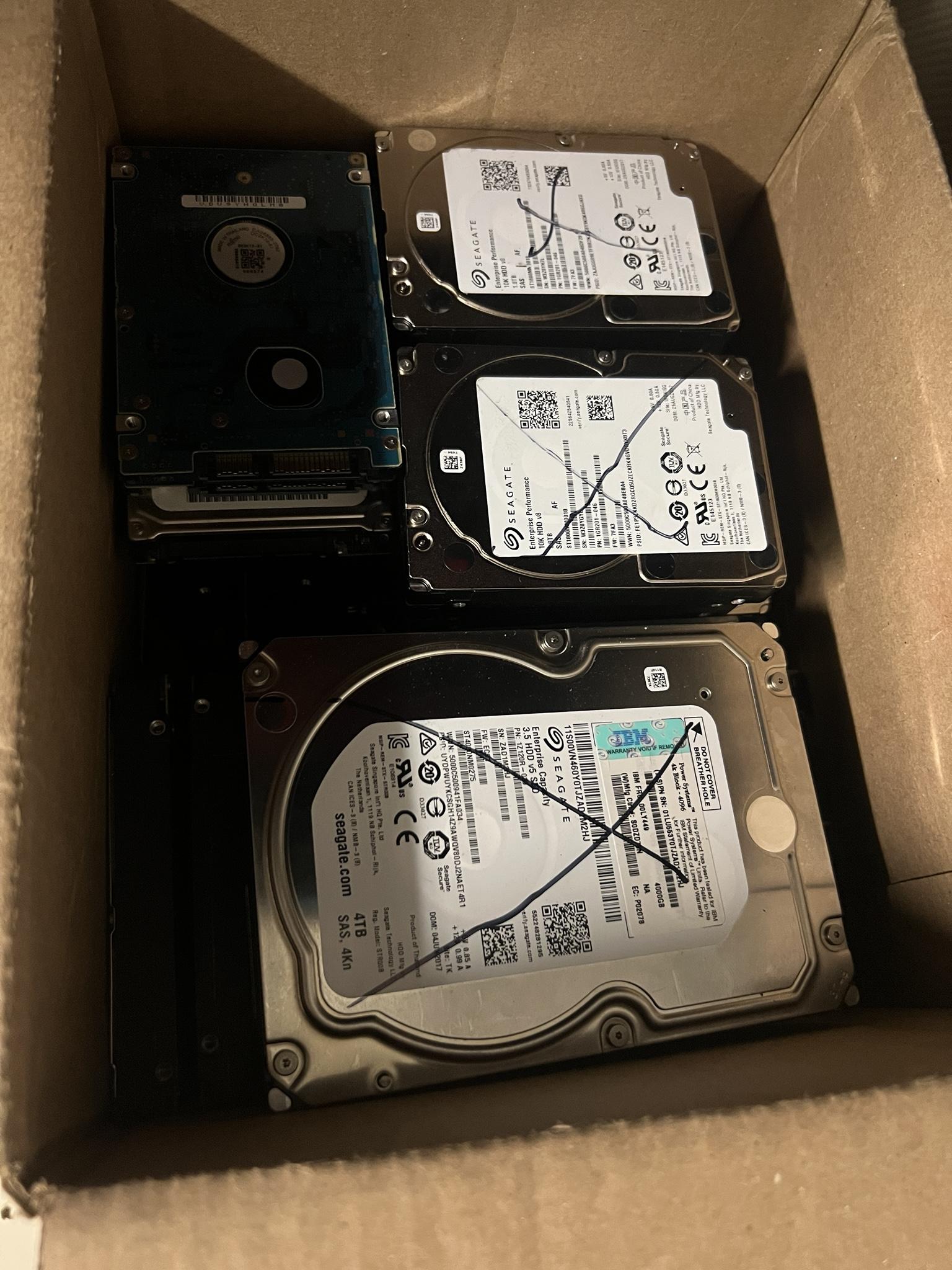
Alt...
Photo of a cardboard box with a bunch of hard drives neatly stacked. On top are 2 2.5 inch drives that are Seagate 1.8 terabytes and a Hitachi SAS drive that is 4 terabytes.
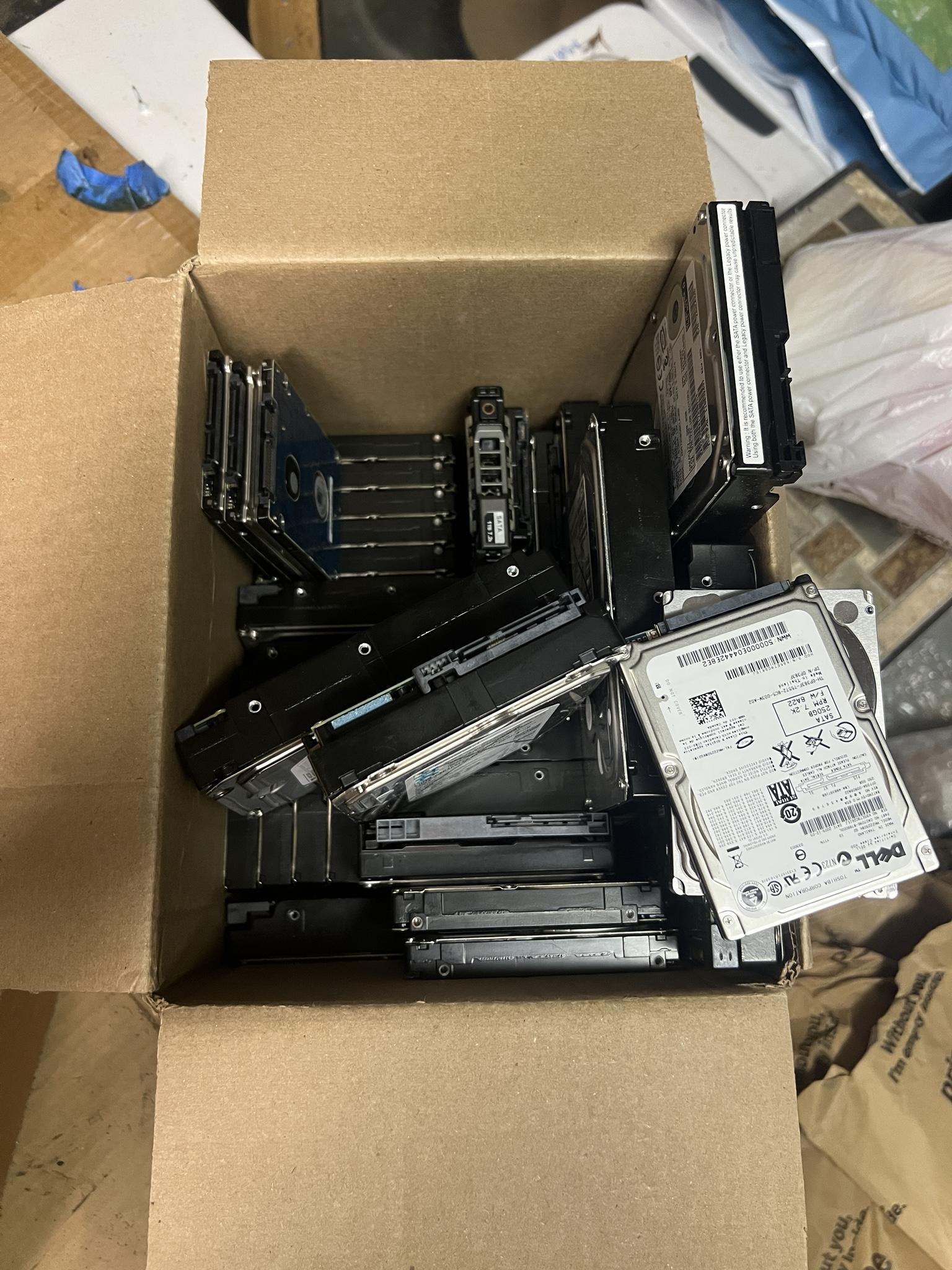
Alt...
A more jumbled photo of the same box of hard drives. In this case you can see a wide variety of 2.5 inch drives and 3.5 inch drives. They're at angles and stuff to make it a bit easier to see just what the variety is like.
This is streetmentioner.dmz.icant.alt. It knows what time it is because it knows what time it isn't. It calculates this by un-becoming the time it previously will be. The local daemon, chrony, then applies a corrective slew to drive the temporal state from a time that it isn't, toward a present that is progressively less absent.
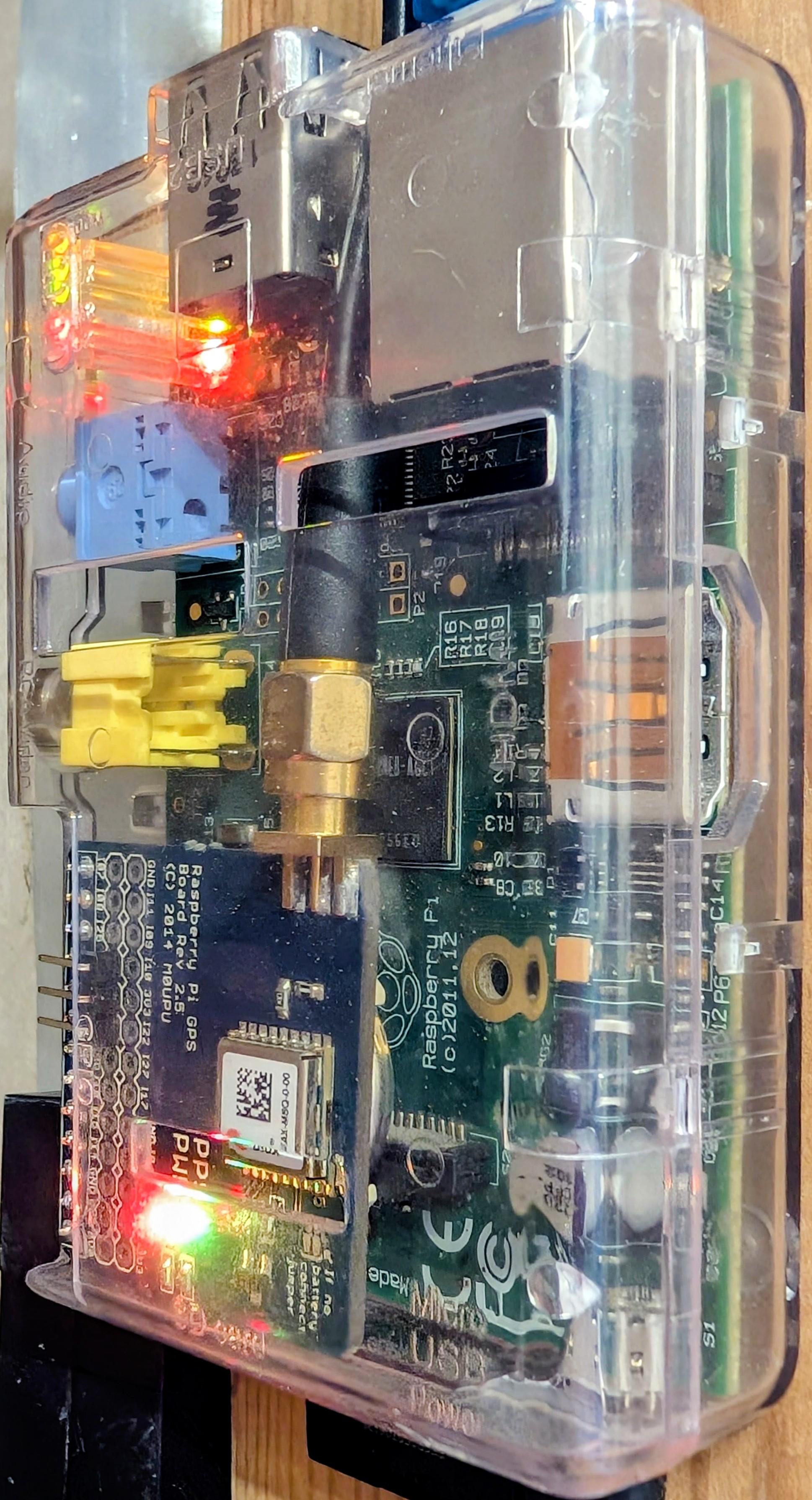
Alt...
A close-up, vertical photograph of a Raspberry Pi Model B Rev 2 enclosed in a clear, transparent plastic case. Attached to the main board's GPIO pins is a blue expansion board labeled 'Raspberry Pi GPS Board Rev 2.5'. This add-on board features a silver uBlox MAX-M8Q GPS module, a small coin cell battery, and a gold SMA connector with a black coaxial antenna cable attached. Several status LEDs are illuminated, including glowing red and green lights on the GPS board, and bright red and yellow lights near the USB and Ethernet ports of the main Raspberry Pi.
![[?]](https://media.hachyderm.io/accounts/avatars/110/939/565/697/835/073/original/91e999741b2a5a6e.png)
Kubernetes (and k3s) is a damn headache.
So many moving parts and pitfalls.
So easy and quick to seriously mess up.
So difficult and time-consuming to repair.
Thousands of hours of my life spent babying a kubernetes homelab. Little actual usefulness produced. I don't want this kind of life.
Instead I want to put less time and effort towards tending digital infra, and more time towards organizing community around that digital infra; so our communities can move away from big tech.
Do y'all have suggestions for FLOSS k3s alternatives?
For my use case, it needs to:
- run distributed on a cluster of old linux computers
- run linux containers
- be able to schedule workloads to specific nodes, and reschedule if the node drops off
- be resilient to nodes dropping off and rejoining (both cluster, apps and databases should be fine)
- have deterministic configuration / use git as a source of truth for cluster config and app config. I like the nix method (compute derivation in isolation, only deploy if it will work, immutable) better than the ansible method (commit changes directly to the live system, try to roll back if something breaks. Mutable)
- be easier than k3s
- be more resilient to cluster admin screwups than k3s
Nice to have:
- self-healing
- simple disaster recovery
- geo-distribution
- delay-tolerance
- tolerance towards low inter-node bandwidth
- ability to use transport-agnostic p2p networking (like reticulum)
Your suggestions are very welcome 
(Meme nabbed from https://lemmy.world/post/13302376)
#fedihelp #kubernetes #k3s #coopcloud #incus #homelab #IT #techcoop #riseAgainstBigTech #reticulum

Alt...
Comic with 4 panels. First panel shows a horsedrawn wagon on the praire, with a banner draped along its side with the writing "fortune telling". From inside the wagon comes the speech bubble " I see a small apartment...". Second panel: a guest and a fortune teller are sitting around a fortune telling ball. The fortune teller says "I see you... ...alone...". Third panel: the fortune teller says " and a lot of YAML". fourth panel: close-up of the guest face, clearly distressed. The fortune teller says "Jesus that's a lot of YAML..."
I have only been using #FreeBSD more regularly now for the past couple months. One of its well known features is the clean separation of the base system and third party packages. Without a lot of experience, I just accepted it and figured that's their engineering choice, whatever, no big deal. And I kept using it.
And then fast forward to this past weekend when I installed #Debian on a spare server. When I had to configure something (I forgot what it was at this point and it's irrelevant) I went to /etc.
And that's when it hit me. /etc is just a dumping ground for config files. The total lack of distinction between base and third party was a total mess and, honestly, a nuisance.
The cleaner design really does make for a better learning tool and helps build a mental model of how the OS functions.
Yup, I can definitely say I prefer the FreeBSD way! 😀
![[?]](https://files.mastodon.social/accounts/avatars/112/885/103/931/679/364/original/416256c90ddeef7b.png)
Do you use #OpenZFS? Do you ship a product or service with #ZFS in it? Do you work on a storage- or filesystem-related project and are interested in how ZFS could make it better? Are you interested in the future of software-defined storage?
If any of these are you, you should consider presenting at the OpenZFS User and Developer Summit 2026! Our CfP is open until September 11, and we'd love to hear from you!
https://openzfs.org/wiki/OpenZFS_User_and_Developer_Summit_2026
🐧 Nouveau jouet dans le homelab !
Mon Proxmox Backup Server 4.2.5 sait maintenant parler S3 avec mon instance MinIO auto-hébergée (SILO) 🪣
Résultat : mes sauvegardes filent directement dans mon propre cloud objet, sans dépendre d'un provider externe. 100% souverain, 100% libre.
Bilan de la soirée : quelques erreurs 400 bien tenaces, un disque racine trop petit découvert juste à temps, et un datastore S3 opérationnel avant minuit 🌙
#SelfHosting #Proxmox #MinIO #LogicielLibre #Homelab


![[?]](https://static.piaille.fr/accounts/avatars/111/164/716/869/179/459/original/3c294dac27c858be.png)
```
$ cd /srv/nextcloud/
$ sed -i s/:33/:34/ compose.yaml # [0]
$ docker compose up
```
Well, that was an easy upgrade, as always.
[0] I made this up, in reality I use SaltStack to manage this https://blog.narf.ssji.net/2023/12/28/saltstack-maps-as-objects/, but the resulting change in the compose.yaml is the same.
This morning I tested my backup recovery in my #homelab @homelab
I restored FreshRSS into a separate namespace to avoid conflicting with the live deployment.
* Velero restored the k8s resources and the app volumes (extensions)
* Barman (CNPG) rebuilt the database from its own backup
* I logged into FreshRSS, checked my data, and everything worked as expected
Restoring is the only way to know a backup works!
![[?]](https://files.mastodon.social/accounts/avatars/117/069/611/580/132/570/original/900e2e26c1d6e844.png)
Nouvelle instance (comment ça 10 jours ?), nouvelle intro !
Admin sys Linux/BSD et adepte du logiciel libre.
Je bricole et, code en Python
je parle parfois de science.
Je préfère l’intelligence artisanale à l’intelligence artificielle.
Héberger ses données plutôt que de les offrir aux GAFAM.
Team #ergol et je m'interresse aux #poticlavier
#Linux #BSD #FOSS #SelfHosting #Python #Homelab #introduction
![[?]](https://assets.bne.social/accounts/avatars/108/238/559/457/458/544/original/4da3e4bd073f1808.png)
Anyone #SelfHosting a Postgres DB server from a residential internet connection? How could/should I set that up? #HomeLab
IT WORKS!
Radxa ROCK 5 ITX booting GRUB -> ZFSBootMenu -> Debian with native encrypted and mirrored ZFS root filesystem on dual SATA SSDs.
Single passphrase entry.
The last piece was adding rootdelay=15 to the kernel command line since the SATA controller is a little slow to initialize.
I've been spending a lot of my time building software with #FreeBSD's Ports system. Sure, I could just install packages but Ports is an incredible learning experience. Poudriere especially.
It's definitely not as straightforward as initially thought and builds will fail for various reasons, but....I haven't had this much fun troubleshooting in a long time.
One question I do have for the folks in the room is:
When it comes to the frequency of pulling down new versions of the Ports tree via git pull, how frequently do people recommend?
The Handbook does not mention it and it's definitely an important operations-related task.
I tried connecting the dead Intel D3-S4610 480GB SSD I have into my new USB bridge. Power light turns on, the turns right back off.
It was working fine six months ago, not sure what happened to it.
My multimeter doesn't show a short on the external pins, I made a brief attempt at board level diagnostics and then decided it wasn't worth the effort.
Free to anyone willing to pick it up around Liverpool Street station in London.
I bought four Intel D3-S4610 480GB SSDs on eBay.
Three from some dude for £55 each, and one from a refurbisher for £70.
The £55 drives were pretty much prestine, the £70 drive had logged over three petabytes of writes and showed 27% lifetime remaining.
Also, I now have a USB-C SATA bridge that can issue ATA Security commands.
Trying to get Debian to boot on my Radxa ROCK 5 ITX with a mirrored and encrypted ZFS root filesystem.
Current status:
EDK2 boots UEFI GRUB, with working serial console
UEFI GRUB boots ZFSBootMenu, with working serial console
ZFSBootMenu imports pool and accepts the passphrase, but then fails to find the kernel.
This feels like progress?
![[?]](https://mastodon-media.objects.km6g.us/accounts/avatars/108/396/174/457/775/827/original/4afdc8214c36cd18.jpg)
I'm considering self-hosting Pocket ID to use as an OIDC identity provider for various other self-hosted services. It's small and simple and easy to understand, but there's a big gap: high availability. If I set up an instance on a machine somewhere, and that machine dies, every service using it as an IdP is temporarily inaccessible until the situation is cured.
How do other self-hosters address this situation? I understand at some point there are single points of failure, but I'd like to avoid this being one.
![[?]](https://masto.bike/system/accounts/avatars/109/298/328/498/155/315/original/70dbdf0cef9f4ef2.png)
One of my repositories on my self-hosted forgejo instance is being hit by Anthropic crawlers. They have an infinite loop to download a tar archive of the repository leading to somewhat like 200GB of archives. My backup process struggled to send snapshots remotely on my 6 Mbps upload line. I've made the repository private. And now I'm considering putting Anubis in front of the service.
![[?]](https://cdn.fosstodon.org/accounts/avatars/109/293/365/754/542/610/original/3a98e6f01b1b165e.jpg)
#homelab @homelab Hi. Test building: #supermicro #x11spwft
https://www.supermicro.com/en/products/motherboard/X11SPW-TF
#SuperServer5019PWTR
https://www.supermicro.com/products/system/1u/5019/SYS-5019P-WTR.php
WD #SN850X 2TB SSD
https://amzn.eu/d/ez8cYXZ
#SLG32 AOC-SLG3-2 2x m2 board
https://amzn.eu/d/4roeQkw
#S3008LL8E AOC-S3008L-L8E RAID https://amzn.eu/d/ig4RhoF + cables
https://amzn.eu/d/5CA2vkW
#xeon6254 #Intel #Xeon #Gold 6254 CPU 18-Core 3.10 GHz (4.00 GHz Turbo) https://www.servershop24.de/en/intel-xeon-gold-6254-cpu/a-126340/
2 x WD SN850X 4TB SSD
https://www.galaxus.de/en/s1/product/wd-black-sn850x-powered-by-sandisk-4000-gb-m2-2280-ssd-21635315 / https://amzn.eu/d/f9Yy7hs 4xHDD #NixOS
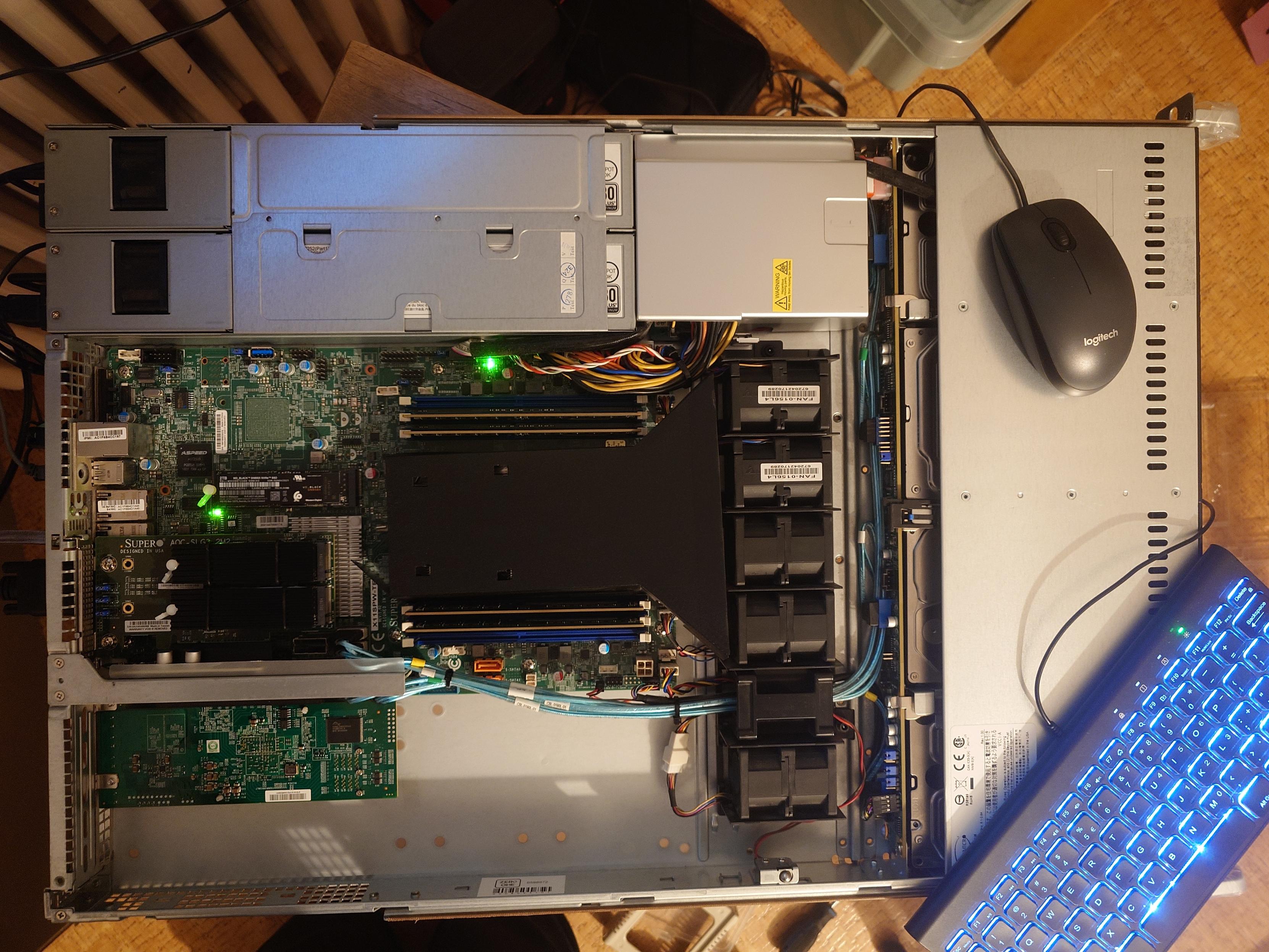
Alt...
Supermicro x11spwft under construction ....
![[?]](https://media.bsd.cafe/bsdmmedia01/accounts/avatars/112/128/517/396/540/486/original/8309cfc719e55203.png)
My homelab has been upgraded to 11.0 🎉
#NetBSD #NetBSD11 #homelab #selfhosting #RUNBSD
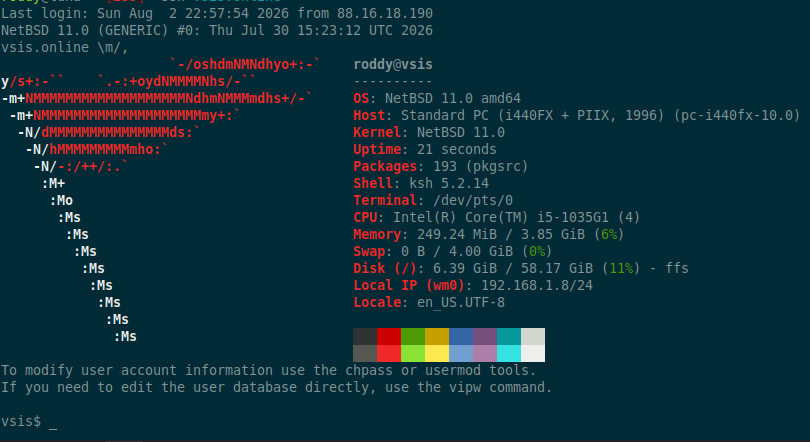
Alt...
A screenshot of a NetBSD 11.0 system.
![[?]](https://gyptazy.com/fedi/gyptazy/s/avatar-1aa83a84ee47c864bc90216a89d0efcf.png)
The "let's call it homely" got a way too hot, even it's already running caseless... It's not stupid if it works - #onlyfans!
#homelab #temperature #hot #computers #minipcs #lab #labs #fans

Alt...
"Only fans" solution for the homelab
PegaProx for #Proxmox VE and #XCPng clusters made a huge step and is finally out of beta!
The first stable release also comes around with companies providing enterprise support. If you need SLA-backed help running PegaProx in production (or training sessions) you can now find a support partner at:
Enterprise Support & Sponsors: https://pegaprox.com/sponsors.html
Release: https://github.com/PegaProx/project-pegaprox/releases/tag/v1.0
Website: https://pegaprox.com
#homelab #virtualization #opensource #community #python #virtualization #enterprise #business #support

Alt...
PegaProx v1.0 Release
✅ Nettoyage automatisé des vieilles sauvegardes de config
Tuto complet, avec explications et code à jour 👉 https://wiki.blablalinux.be/fr/script-gestion-watchtower
#Proxmox #Watchtower #Docker #SelfHosted #Homelab #FOSS #Linux
I have a #FreeBSD #VM set up in my #homelab for #Poudriere and #Ports. I've dabbled in the Ports system in the past - it's a useful feature, but there's a lot of work in manually managing builds, especially for n=1 systems. Still, it didn't stop me from wanting to use it.
First impressions with Poudriere? Wow, this makes life so much easier. In the context of #IT #Operations, whoa...this goes well beyond just automating builds in dedicated jails, Poudriere now becomes the enterprise package management repo system.
Wicked sick.
![[?]](https://files.mastodon.social/accounts/avatars/115/742/434/865/105/205/original/ba2fa15026c28d18.jpeg)
Want to detect intruders before they reach your real systems?
OpenCanary is a free, open-source network honeypot that emulates common services and sends instant alerts when someone interacts with them. It's lightweight, easy to deploy, and works on Linux, macOS, Docker, and Raspberry Pi.
More details: https://digitalescapetools.com/tools/tool.html?id=opencanary
#OpenSource #CyberSecurity #InfoSec #Honeypot #SelfHosting #Privacy #Linux #Homelab #FOSS
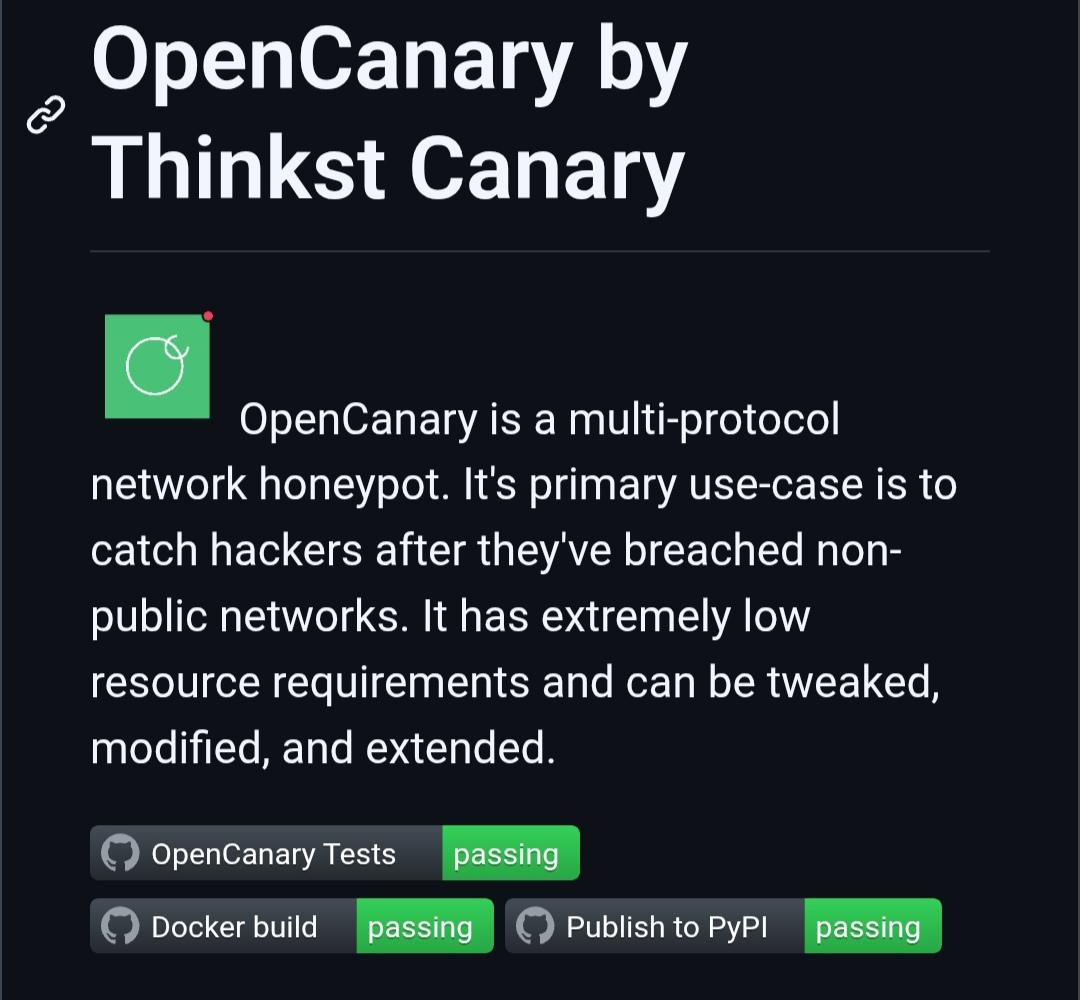
Alt...
Screenshot of the OpenCanary project page describing the lightweight network honeypot with passing GitHub test, Docker build, and PyPI badges.
What's the point of having a home lab designed to solve problems but you end up having more problems than the ones that it should solve?
Decision made to uninstall one of the three storage servers at my in-laws. No matter how much electricity it costs, even if it costs a kebab a year, if it seems useless, they will always challenge the cost.
I'm pretty sure that the second storage server at my dad's will retire too for the same reason anytime soon.
![[?]](https://fsn1.your-objectstorage.com/drum/accounts/avatars/109/337/709/103/817/254/original/13fc1022b4126907.jpg)
Are there any #networking and/or #homelab types out there who can offer an answer to a question I have?
![[?]](https://media.craftopi.art/media/20/6b/ca/206bcaaf100985aa62394419448ea50e178a0b66d223ea4a73fc62d5a236a755.jpg)
In 2024, I went to LA to give a talk about how I made my own cloud storage to backup my pictures, documents, but also the ones of my family. I have chosen Seafile but it didn't work as expected. It filled the disk of my dad. At that time, I was suggested to try Nextcloud.
Today's the day, after 2 years. I've set up the latest docker image, spawned a PostgreSQL database, created some users, directories and uploaded files. Everything went well.
Then I started to install the mobile app to sync pictures from my phone and the desktop app to sync my documents. And things got spicy. The mobile app has uploaded 1200 files in... a day, with hundreds of errors I had to dismiss. The desktop app has uploaded 6 files in an afternoon, out of 1700, then stopped with failure. Why can't we have the performance of rsync with the user fiendly interface of nextcloud?
 ✅
✅  ✅
✅  ✅
✅ ![[?]](https://pxscdn.com/cache/avatars/789980589548961657/avatar_4v14.jpg)
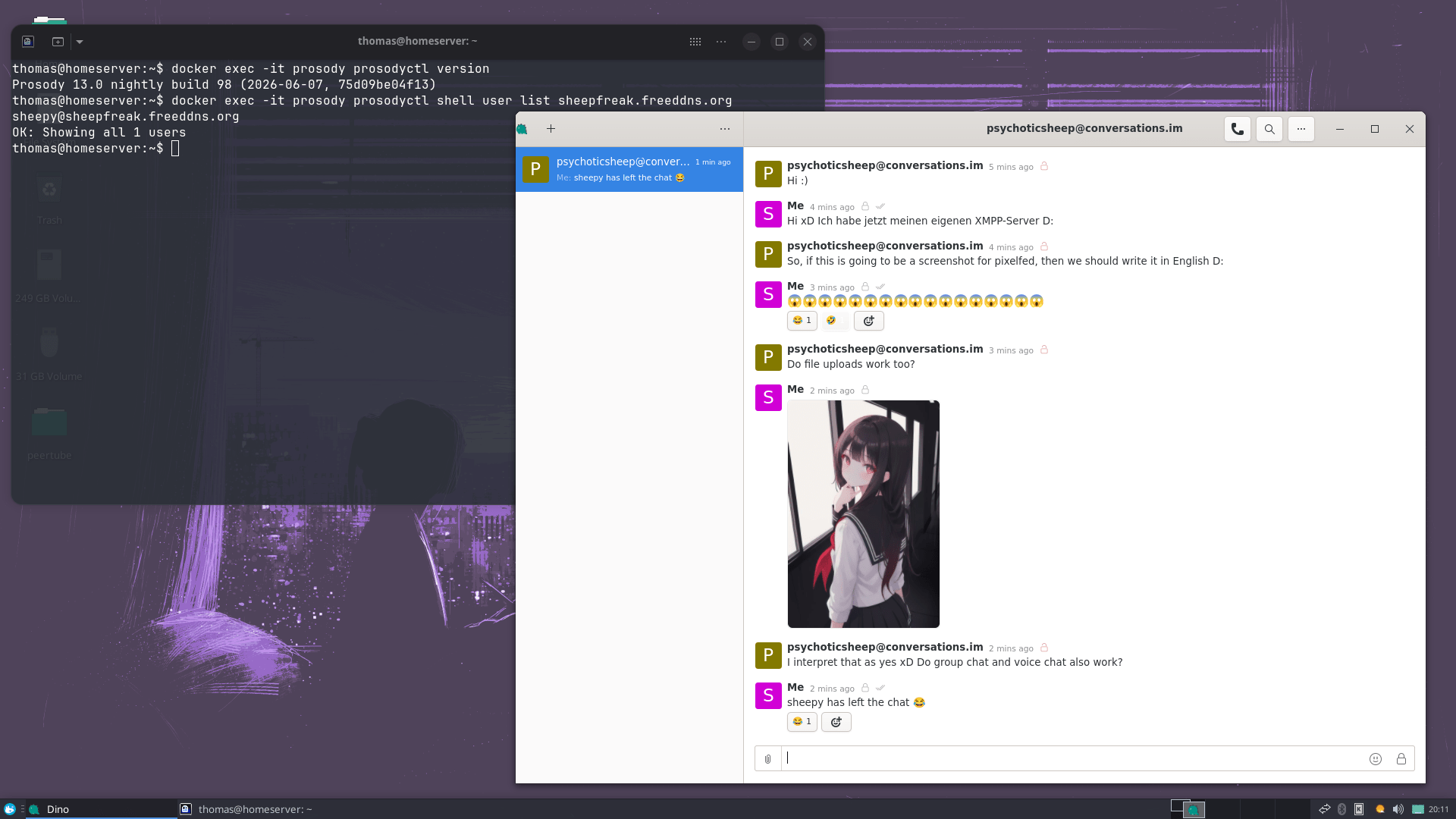
What I find fascinating is that you can almost see how the protocol evolved over time. XMPP has been extended for more than two decades and many of those additions are still visible today.
Direct messages and file attachments work well, which is all I really need. I haven't set up group chats or VoIP and honestly, I probably never will.
One thing I underestimated was the setup. Different services often require their own subdomains and I never managed to get file uploads working reliably behind my reverse proxy. Direct messages worked fine, but as soon as I enabled file uploads, everything started breaking. After spending way too much time troubleshooting it, I eventually gave up and exposed Prosody directly instead.
For clients I'm using Conversations on Android and Dino on my Linux desktop, and I've been really happy with both.
It's been fun exploring another decentralized communication protocol.
If anyone wants to test federation or just say hello, feel free to message me :)
JID: sheepy@sheepfreak.freeddns.org
#XMPP #Prosody #SelfHosted #Homelab #Linux #OpenSource #FOSS #FreeSoftware #Privacy #DigitalSovereignty #DigitalIndependence #Decentralization #Federation #Fediverse #Matrix #Docker #OpenStandards #OwnYourData

![[?]](https://toots-storage.glitchy.social/accounts/avatars/115/541/879/940/528/080/original/0a4f998bf51fecad.jpeg)
 🇺🇦
🇺🇦I’m thinking about turning my #VPS in a #Proxmox node and adding it to my #homelab cluster. All other nodes are at my home. They will communicate through #WireGaurd. How bad is this idea? Anyone tried this?
#AskFedi #SelfHosted #selfhost #selfhosting #proxmoxve #ProxmoxCluster
well well well... had to bump this instance to 4.6.x but it required #ruby 3.3.x which does not come natively with #Ubuntu 24.04
Against what i normally do, I did upgrade the server to 26.04 BEFORE the .1 usual update.
All went well, then had to fk about a bit with the new ruby version on the old instance.
Done all this on a #proxmox backup clone and now I am posting this to a newly updated #mastodon v4.6.3
You've got to love Proxmox for this shit.
![[?]](https://cdn.transfem.social/files/924626f8-e7e0-479c-8dd7-c8f5cb0ed9d5.webp)

 [
[
Quand tu relances ton cluster Proxmox et que ton serveur Gotify se transforme en sapin de Noël ! 🎄✨
Le doux bruit des services qui reviennent à la vie les uns après les autres... Uptime-Kuma et Watchtower sont au taquet ! Y a pas à dire, ça fait toujours plaisir de voir tout ce beau monde repasser au vert 🟢💪
Et chez vous, ça donne quoi le monitoring après un reboot ? 🚀
#SelfHosted #Proxmox #SysAdmin #Gotify #UptimeKuma #Docker #OpenSource #Homelab
![[?]](https://media.bsd.cafe/bsdmmedia01/accounts/avatars/115/004/535/892/913/622/original/e80ba6db0e3eb41e.png)
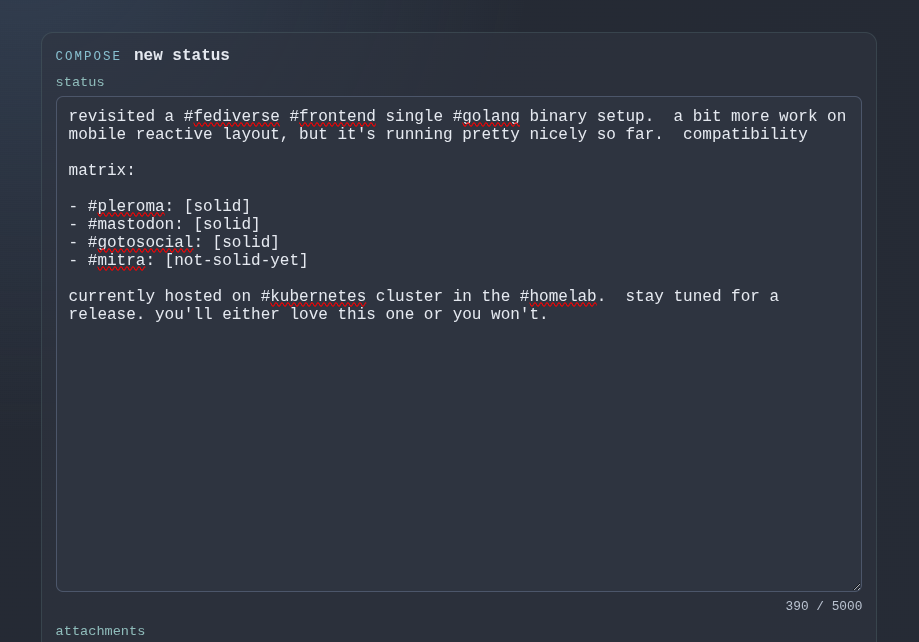
revisited a #fediverse #frontend single #golang binary setup. a bit more work on mobile reactive layout, but it's running pretty nicely so far. compatibility
matrix:
- #pleroma: [solid]
- #mastodon: [solid]
- #gotosocial: [solid]
- #mitra: [not-solid-yet]
currently hosted on #kubernetes cluster in the #homelab. stay tuned for a release. you'll either love this one or you won't.

![[?]](https://media.bsd.cafe/bsdmmedia01/accounts/avatars/114/932/322/584/208/816/original/e8177168b64868c0.jpeg)
Next project: The Cover-up
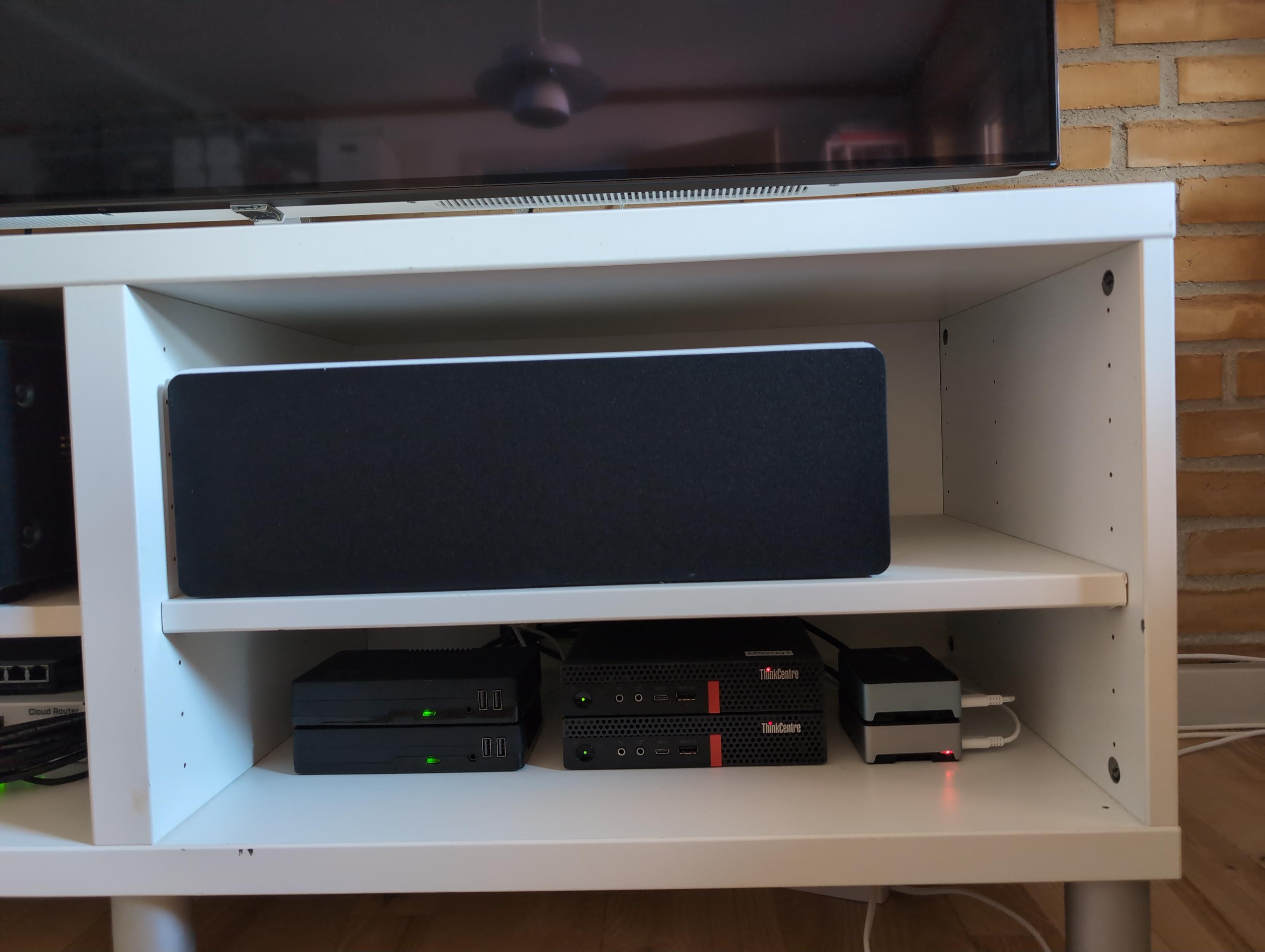
Homelab is sitting on the two lower shelves of an IKEA BESTÅ TV bench.
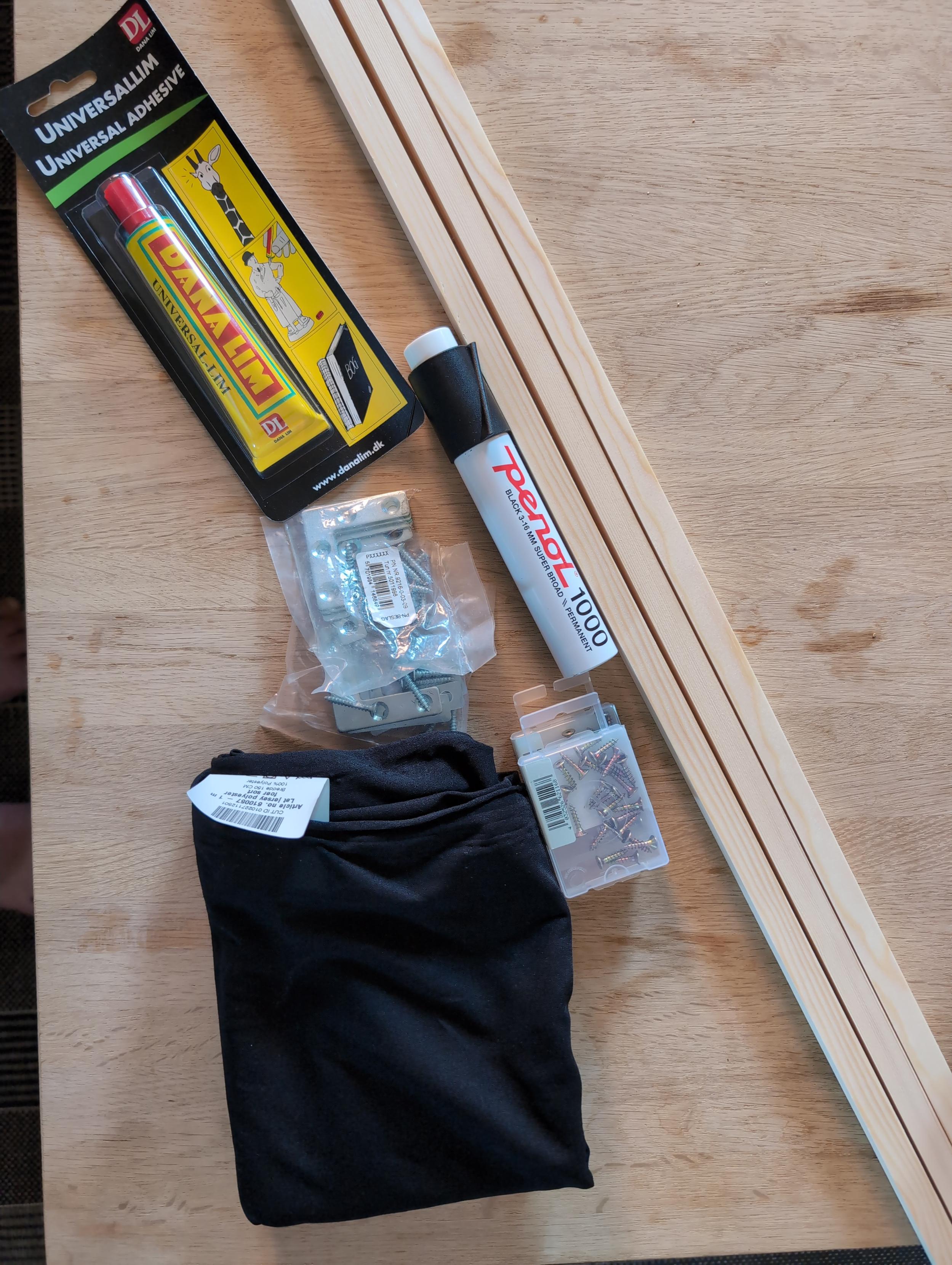
I'm going to make two wooden frames and cover them with black fabric, like a speaker front.
First iteration is just to balance/press them in place, next iteration will use some sort of magnetic or velcro fixture
Alt...
Photo of IKEA BESTÅ TV bench, with a center speaker on top, and a few servers at the bottom.
Alt...
Photo of materials used in The Cover-up: black fabric, glue, wooden strips, corner brackets with screws and a black permanent marker
![[?]](https://media.phpc.social/accounts/avatars/109/286/374/993/928/583/original/c2b61546c008fbef.jpg)
 🇨🇦
🇨🇦![[?]](https://cdn.masto.host/socialgrowyourownservices/accounts/avatars/107/729/744/625/286/769/original/81f869582bb4abda.jpeg)
"Homelabs" are where people set up and run their own physical servers at home. It's the most difficult way to self-host services, but also gives you total control over the server.
If you've got a homelab or are interested, you can follow one (or both) of the homelab discussion groups:
🌱 !@homelab (in English)
🌱 !@homelab_de (in German)
After you follow, the group's posts will start showing up in your timeline. You can post to a group by mentioning it in your own posts.
![[?]](https://cdn.fosstodon.org/accounts/avatars/000/186/507/original/d6235003bb2d678e.jpg)

📼 What was your first real “server”?
An old beige box under your desk? A salvaged Pentium III? Something even older?!
Share your earliest homelab setup.
#ThrowbackThursday #homelab #retrocomputing

![[?]](https://social.mitexleo.one/system/accounts/avatars/115/271/953/765/819/112/original/19a815118e11e122.jpg)
I'm stuck with Proton for another year. After that, self-hosting email and VPN. They don't care about Linux users, and there's only so many times you can make a mistake and apologize before it stops meaning anything.
Need to buy some used servers or mini-PCs for the homelab, which I can't afford right now.
Stalwart for email. Always wanted to use Nextcloud but it's not reliable. OpenCloud is fine but lacking.
😑
![[?]](https://cdn.masto.host/enosmtown/accounts/avatars/109/341/527/116/255/990/original/16fee146425349c3.jpg)
Today's Jack[1]:
* Oh, cool, at work we stack the DB sizes, I must do the same at home!
* No data? This was working yesterday!
Narrator: No, it wasn't.
* My Ansible is not working on this machine (but I ignore this one).
* Prometheus is properly configured.
* The exporter is running, but yes, no data, scrape not successful (and no alert!)
* The exporter is trying to auth with user `prometheus`!
2 B Continued...
[1] All my jaks are called Jack. Most are bald by now.
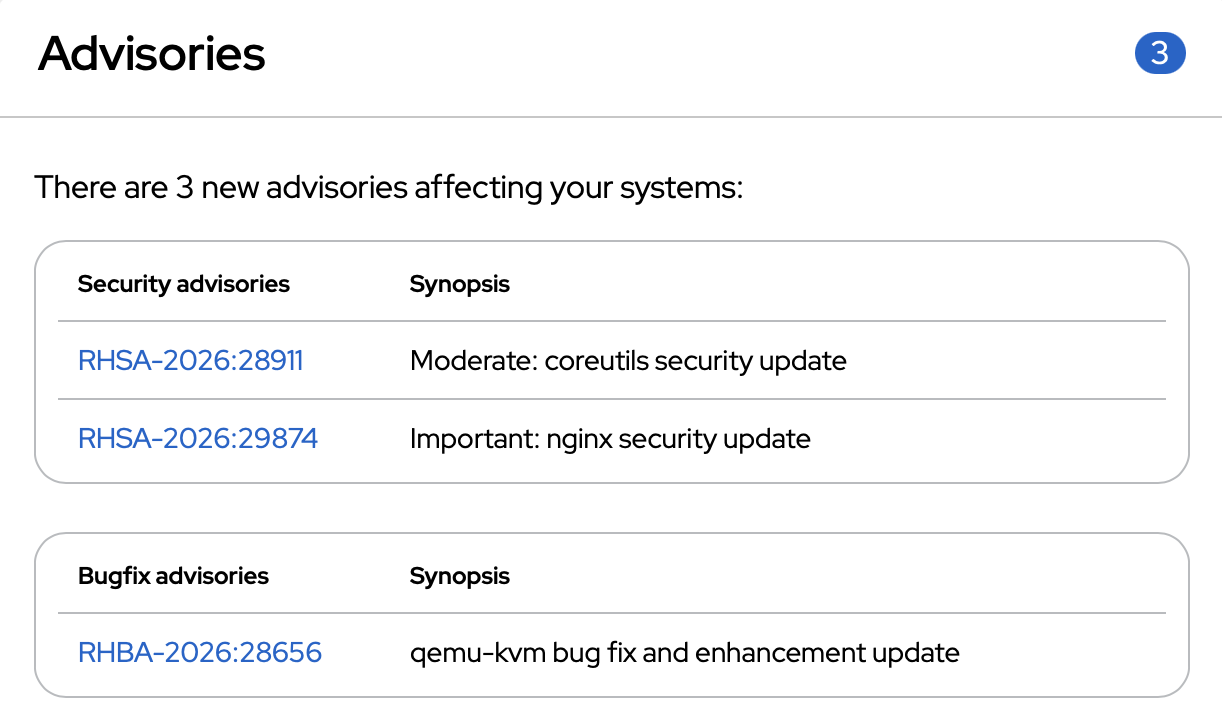
Friday is update time for my homelab and public servers. Because, should something fail, I have the weekend to fix it. But, as always, nothing failed. All 9 RHEL (Red Hat Enterprise Linux) servers got their `dnf update`, followed by a `reboot`. This time the security updates included important nginx fixes, moderate coreutils stuff. Also a emu-kvm bugfix. All is good, machines and services are up and running again. 20 minutes of well invested time. Coffee next :)
#SysAdminLife #Homelab @homelab
Alt...
Advisories 3
There are 3 new advisories affecting your systems:
Security advisories Synopsis
RHSA-2026:2891 Moderate: coreutils security update
RHSA-2026:29874 Important: nginx security update
Bugfix advisories Synopsis
RHBA-2026:28656 gemu-kvm bug fix and enhancement update
I upgraded Grafana from v12 to v13 and the new unified storage migration for dashboards/folders was a pain in the ass to debug.
If you run Grafana with a hardened securityContext like `readOnlyRootFilesystem: true`, it can fail because backend plugins need writable temp space.
Fix: mount an emptyDir on /tmp.
But I'm not a big fan of that.
Thank you, @hughsie for all your work on #lvfs and fwupdmgr. Thank you, Lenovo, for supporting firmware and UEFI updates through this mechanism. And thank you, Red Hat, for making all of this readily usable. All my Lenovo Tiny PCs in my homelab are now up2date and can continue to SecureBoot for years to come :)
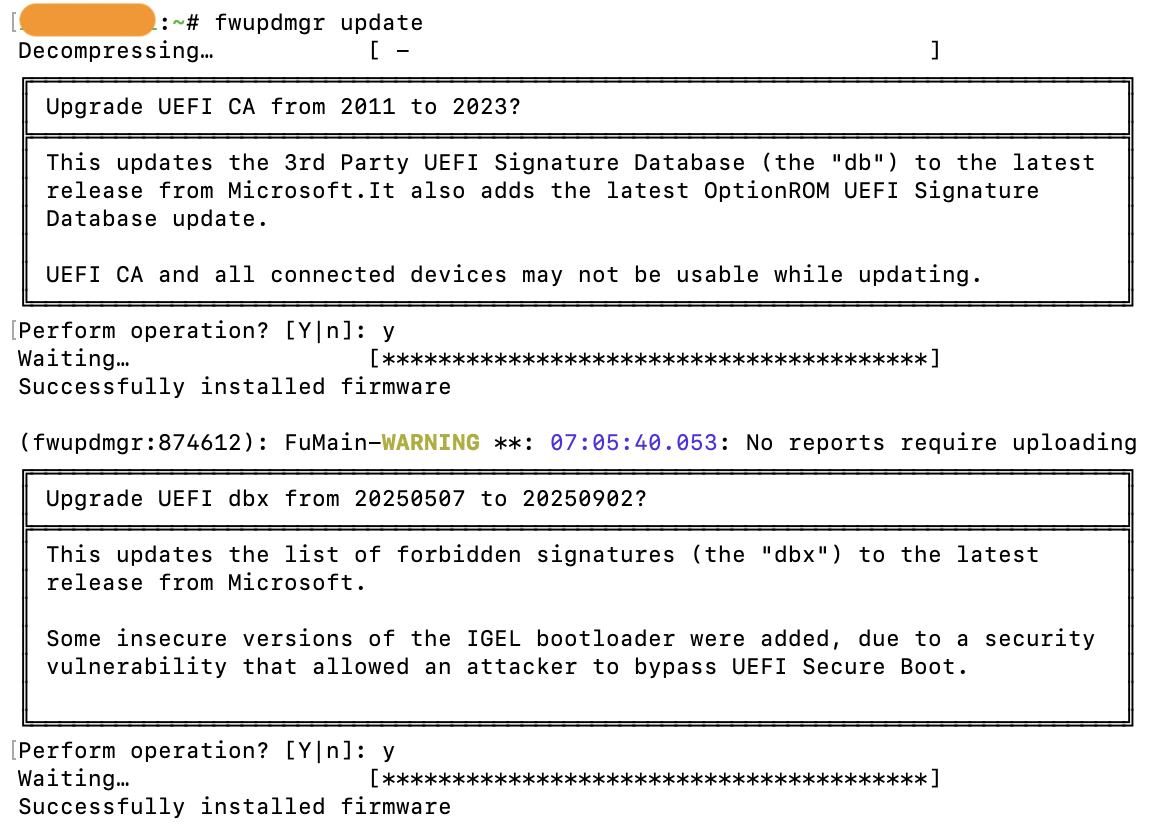
Alt...
Screenshot of one of my Lenovo Tiny PCs successfully updating the UEFI CA and dbx, making sure that SecureBoot keeps on working after the expiration of one of the Microsoft certificates. All done with the fwupdmgr command, no need to do some weird DOS based stuff with bootable USB sticks.
💊 Erreur dans la Matrice ?
J'ai personnalisé toute ma gestion d'erreurs sur Nginx Proxy Manager pour que chaque "bug" ait son propre style :
🔹 Domaine inconnu ? Le système ne le trouve nulle part dans la simulation.
🔹 Service arrêté ? Il a existé, mais il a été retiré de la Matrice.
Quand la technique rencontre le style, même mes pages 404 ont de la gueule 😎
#SelfHosted #Nginx #Proxmox #Matrix #TechLife #BlablaLinux #Homelab
![[?]](https://media.infosec.exchange/infosec.exchange/accounts/avatars/109/247/124/039/184/160/original/146df763b25d6fba.png)
![[?]](https://static.piaille.fr/accounts/avatars/115/841/974/456/994/930/original/37b8e57039f4c112.jpg)
Est-ce que vous connaissez un site pour trouver des PC que les particuliers/entreprises revendent, car ils sont incompatibles avec Windows 11 ? 🚮
Histoire de dénicher un trésor inexploité pour mon #homelab
Peut-être que l' @aprilorg a une idée dans le cadre de #adieuWindows ?
Le retoot contribue au recyclage de matériel ""périmé"" ♻️
So the federation is working on my #Wanderer instance, and you can actually follow me there from any #ActivityPub instance: @yehor@wanderer.glitchy.social
The issue was actually in my #Mastodon instance: https://mastodon.glitchy.social/@yehor/116713584141417614
I have #Wanderer up and running again. This time it's not in #Docker. I installed it from source, but created a systemd service for each of the components. It just works and even imported my trails from #komoot. I made two of them available publicly: https://wanderer.glitchy.social/trails
The federation is not working properly. You can see my profile here: @yehor@wanderer.glitchy.social, but without trails. Also, you can try to follow me there, but the request goes somewhere into the void.
- j'ai réussi à ne pas me mettre sur mon pc le 1er mai (j'ai craqué le 2 au soir...)
- le jardin avance bien,sauf mes plans de tomates qui ne prennent vraiment pas... il me reste des graines, je vais retenter.
- j'ai installé #postfixadmin sur mon #homelab et j'en suis plutôt content, pas de fonctionnalité manquantes... reste que côté sécurité c'est peut etre pas top de laisser ca accessible directement sur internet ( ca sens le mot passe supplémentaire en .httpacces en dehors de la maison).
le champ des possibles est infini (ou presque)
Bon dimanche, prennez soin de vous et aujourd'hui surtout : faites vous plaisir !
![[?]](https://cdn.masto.host/mastodonuno/accounts/avatars/113/781/249/466/991/026/original/d1228293ce043d0c.png)


Il mio approccio a GNU/Linux.
#gnu #linux #unolinux #gnulinuxitalia #unix #opensource #foss #floss #homelab
je réfléchi encore à la solution technique pour le backup, mais je pense que je vais partir sur un double backup :
#borg en local, #restic en distant...
je crois que je vais allez contre la faq et faire quand même un rsync du borg local (en plus.…)
déjà que je suis un peu foufou et que je suis parti avec borg2 au lieu de borg stable...
et bien j'aurais aimer que quelqu'un me parle btrfs-convert avant que je m'ennuie à lvresize/resize2fs et déplacement des octets...
#backup #selfhosting #homelab