Search results for tag #backup
![[?]](https://horche.demkontinuum.de/photo/profile/hoergen.webp?ts=1788525856)
BTRFS ein Überblick, Snapshots & Rollbacks
hyperblog.de/hoergen/posts/202…
#demhoergen #hyperblog #btrfs #linux #snapshots #snapper #grub #backup #dateisystem #subvolume #defragmentieren #tuxedocomputers #manjaro
Eine Einführung in BTRFS und Snapshots unter Linux - von Copy-on-Write, Subvolumes, Snapper, Rollback, grub-btrfs, Defragmentierung und automatischer Bereinigung.

Location: Aqtobe
![[?]](data:image/png;base64, iVBORw0KGgoAAAANSUhEUgAAAEAAAABAAQAAAACCEkxzAAAAUUlEQVQoz43R0QkAMQwCUDdw/y3dwEvsvzlL4X1IoQkAisKmwfAFT3RgJHbQezpSRoXEqeqCL9BJBf7h3QbOCCxV5EVWMEMwG7K1/WODtlvxAYTtEsDU9F34AAAAAElFTkSuQmCC)
@borgmatic entirely fwiw and feel free to ignore: https://gist.github.com/bigntallmike/c46032e742c4a29ee9d78f64e1f5a8c5
#borg #backup #sysadmin
![[?]](https://media.troet.cafe/troet/accounts/avatars/117/327/767/875/148/094/original/f8ebdcf972aa2325.png)
Datensicherung vor dem Wechsel: Dokumente, Fotos, Browser-Lesezeichen, Passwörter, E-Mails. Am besten auf eine externe Festplatte und einmal testen, ob sich die Dateien öffnen lassen.
![[?]](https://cdn.masto.host/floss/accounts/avatars/114/406/827/151/266/767/original/698a07e8937d61a0.png)
borgmatic 2.1.10 has been released with support for making many options repository specific, command-line flags to disable hooks, and relative path support for ZFS, LVM, and Btrfs.
#borgmatic #borgbackup #backup
Release notes: https://projects.torsion.org/borgmatic-collective/borgmatic/releases/tag/2.1.10
![[?]](https://social.anoxinon.de/system/accounts/avatars/000/079/552/original/231fc6938aaf9353.png)
Ralf regt sich auf über: Murenas /e/OS Backup
SeedVault wurde durch die Murena-Backup-Lösung ersetzt. Deshalb funktioniert das Android-Backup zu meiner Nextcloud nicht mehr. Ich bin in einer Login-Schleife gefangen.
https://gnulinux.ch/ralf-regt-sich-auf-ueber-murenas-e-os-backup
![[?]](https://ftp.ieji.de/accounts/avatars/117/194/252/515/912/359/original/f936299e9cfdbc93.png)
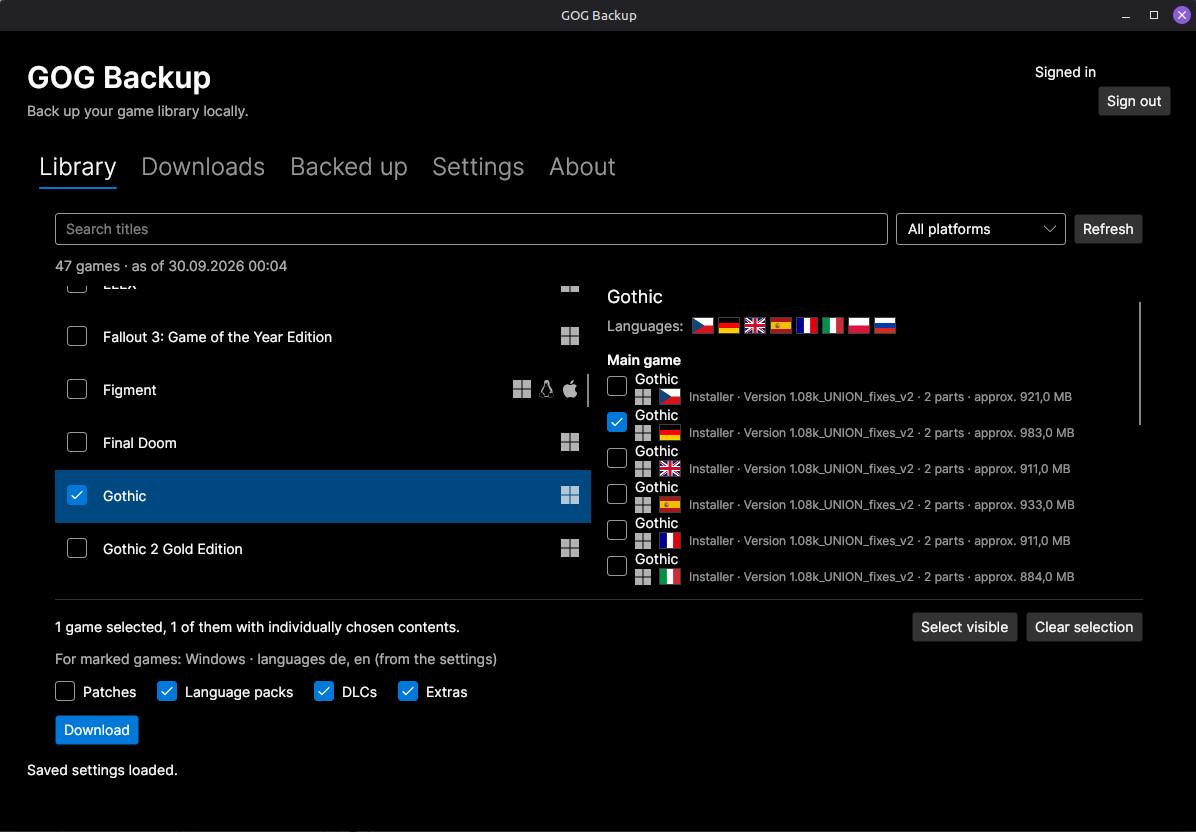
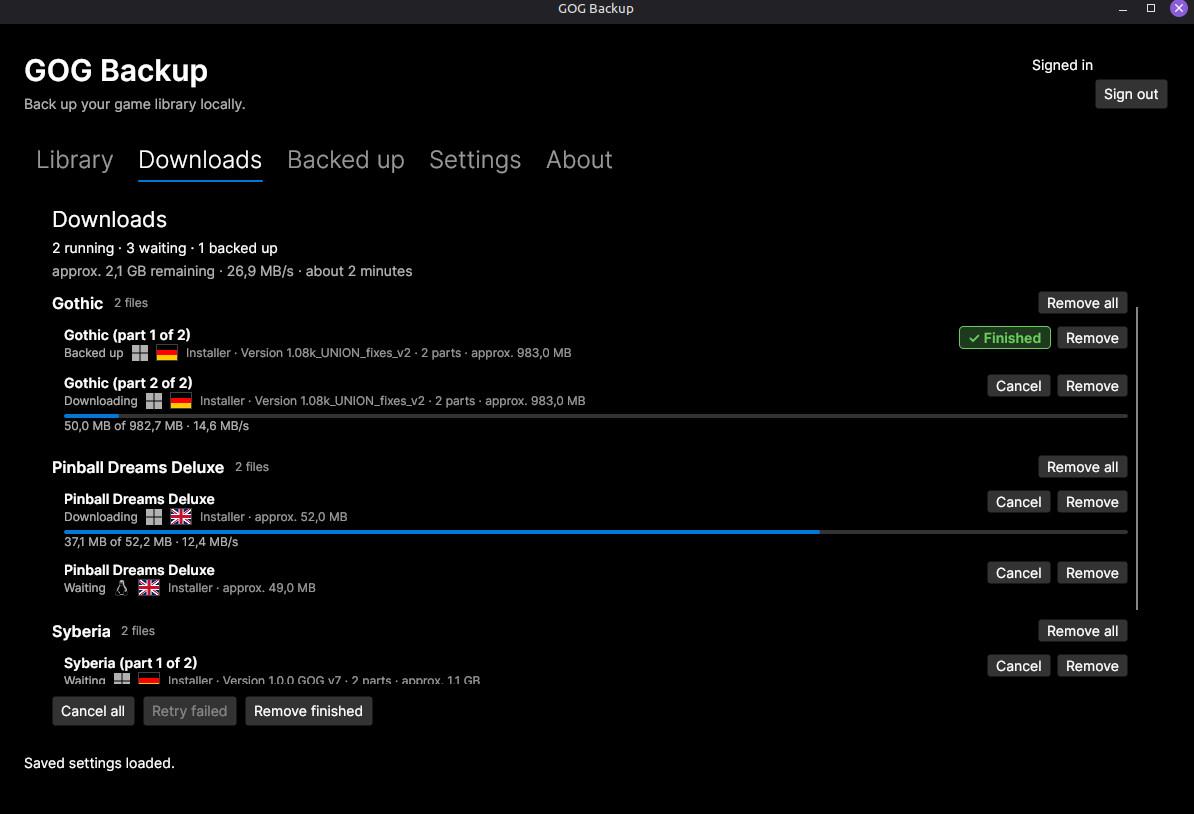
Last night, I released version 1.0.0 of GOG Backup tool. This tool features a simple GUI that allows you to connect to your GOG account and download the files of the games you’ve purchased there.
It is explicitly not intended to install or launch the games. As the name suggests, its purpose is to create backups of your purchases.
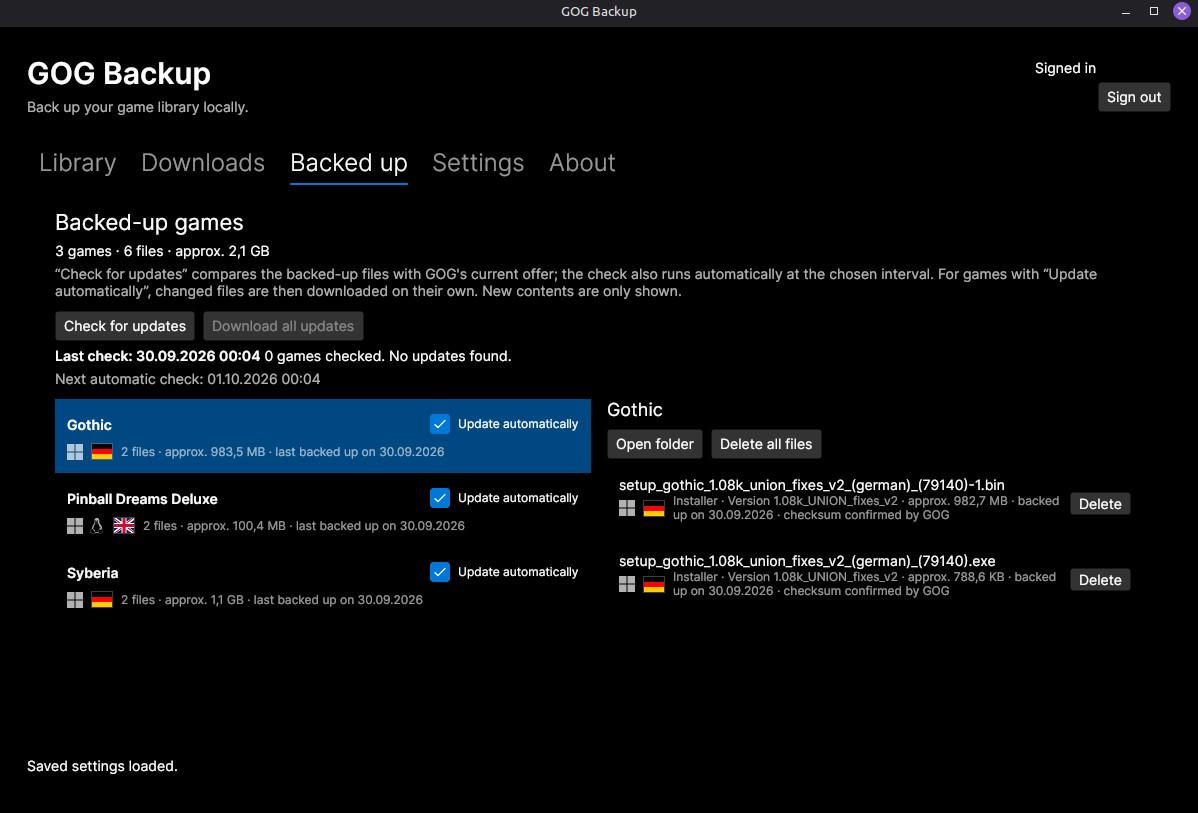
The tool attempts to detect when files on GOG have been updated and to back up the new versions of programs that have already been backed up.
It was developed in C# using AvaloniaUI, runs on Linux and Windows, and is licensed under the MIT License.
I hope this is helpful to some of you.
https://codefloe.com/OpenVibes/GogBackup/releases
#gog #backup #datensicherung #games #videospiele #linux #windows #vibecoding #csharp #avaloniaui
Alt...
The image shows the “Gog Backup” program window on the “Library” page, which displays all games purchased from GOG.
Alt...
The image shows the “Gog Backup” program window on the “Downloading” page, which displays the downloads currently in progress.
Alt...
The image shows the “Gog Backup” program window on the “Backed up” page, which displays the games that have already been downloaded.
borgmatic 2.1.8 has been released with an InfluxDB database hook, a 1Password credential hook, and Borg 2 fixes.
#borgmatic #borgbackup #backup
Release notes: https://projects.torsion.org/borgmatic-collective/borgmatic/releases/tag/2.1.8
![[?]](https://object.ceph-waw3.hswaw.net/mastodon-prod/accounts/avatars/109/360/274/978/913/890/original/30fe75c6bcdfe430.gif)
![[?]](https://files.mastodon.social/accounts/avatars/000/255/026/original/3a861232b25b8ee2.png)
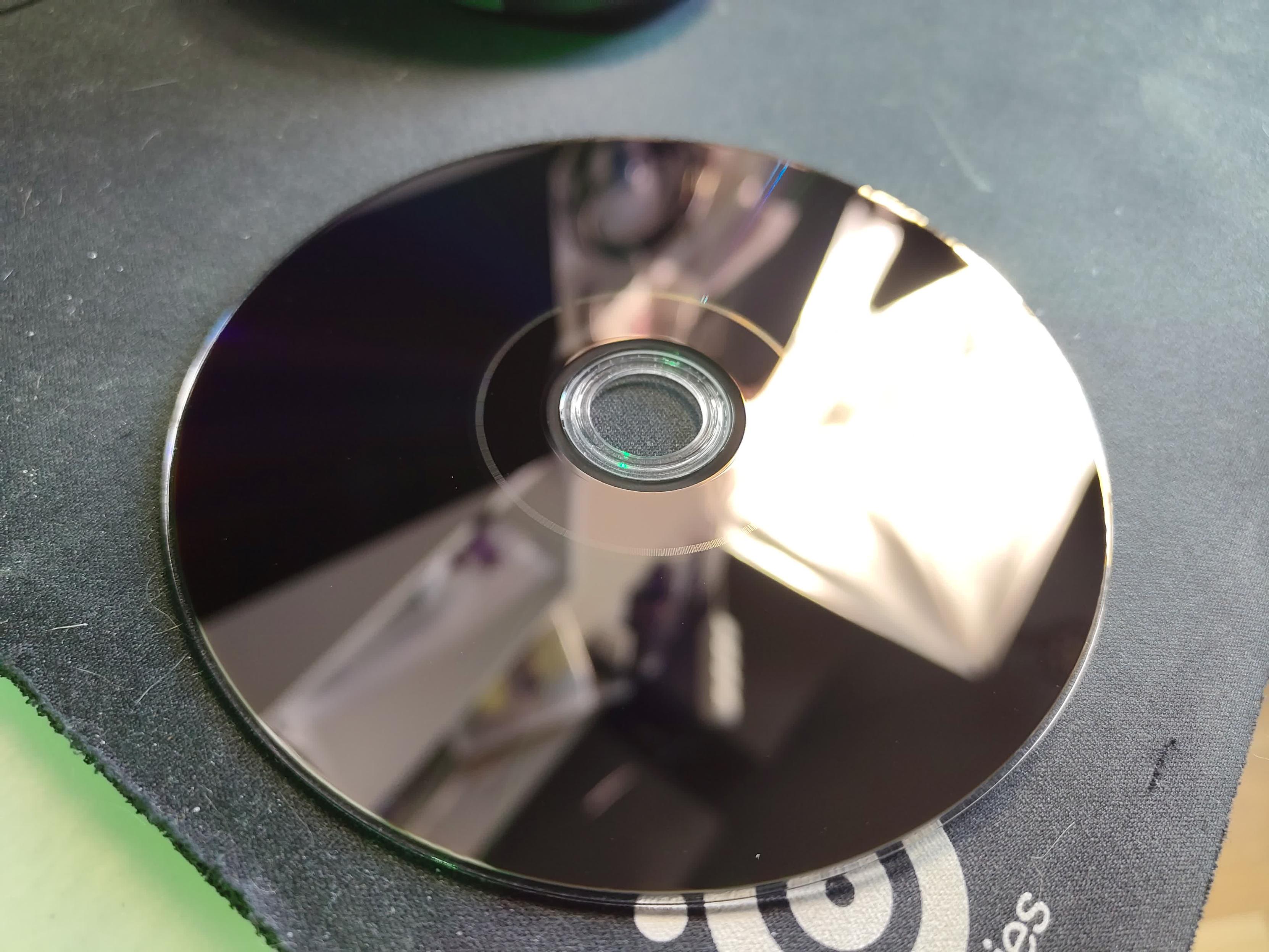
Got my first ever batch of... #MDisc !
25 GB BD-R. They are black on reverse. So awesome! Now I just need a compatible writer :D
#Backup #DataArchival #DataStorage #DataHoarders #OpticalMedia #BluRay #Verbatim

![[?]](https://mastodon.blablalinux.be/system/accounts/avatars/113/675/429/104/963/472/original/6baf4240c1614c5a.jpg)
Quand tout est au vert, c'est le bonheur parfait.
Rien de plus satisfaisant que de voir ses notifications #Gotify confirmer que la vérification des #datastores #Proxmox #Backup Server s'est déroulée sans le moindre accro.
Sauvegardes vérifiées et validées : je vais pouvoir dormir sur mes deux oreilles.


![[?]](https://social.sengotta.net/fileserver/01BPHAZAFC32V2RXFVMS3VY72P/attachment/original/01KWKPN8DTSW7JGHPWCYZ13CQS.jpg)
Did take a couple of hours but i reworked some parts of my Borgbackup scripts yesterday. Instead of having one big setup i splitted it so that every service has its own script, which starts / stops the dockers and has the correct patterns to only backup what is really necessary. Althought i am not quite done, because that was only one of my servers 😭️
@homelab #selfhosting #backup #borgbackup
![[?]](https://cdn.masto.host/mastodongamedevplace/accounts/avatars/109/124/033/154/053/996/original/90ff75fd7310bc86.png)

 🎃👻
🎃👻Friends and foes, I have updated my blog post about backing up your data: https://taffer.ca/posts/2024/backups/
(Please back up your data regularly!)

![[?]](https://media.bsd.cafe/bsdmmedia01/accounts/avatars/110/740/169/477/916/693/original/dfa8f1b9beefa405.png)
With Apple phasing out AFP in macOS 27 and Time Capsules officially reaching end-of-life, it's time to move network backups to proper SMB.
If you run a FreeBSD server, you can build a fast, rock-solid, and secure Time Machine target powered by ZFS and Samba - neatly isolated inside a FreeBSD jail using Bastille.
https://it-notes.dragas.net/2026/01/28/time-machine-freebsd-jail/
Keep your macOS backups running smoothly via SMBv3 (with full vfs_fruit support) and full dataset quota control on ZFS!
#FreeBSD #macOS #TimeMachine #ZFS #BastilleBSD #Samba #SysAdmin #Backup #OwnYourData #SelfHosted #BSD #RunBSD #OwnYourData
With Apple phasing out AFP in macOS 27 and Time Capsules officially reaching end-of-life, it's time to move network backups to proper SMB.
If you run a FreeBSD server, you can build a fast, rock-solid, and secure Time Machine target powered by ZFS and Samba - neatly isolated inside a FreeBSD jail using Bastille.
https://it-notes.dragas.net/2026/01/28/time-machine-freebsd-jail/
Keep your macOS backups running smoothly via SMBv3 (with full vfs_fruit support) and full dataset quota control on ZFS!
#FreeBSD #macOS #TimeMachine #ZFS #BastilleBSD #Samba #SysAdmin #Backup #OwnYourData #SelfHosted #BSD #RunBSD #OwnYourData
![[?]](https://mastodon.sdf.org/system/accounts/avatars/113/059/004/569/382/369/original/1b5ae86850d2461a.png)
I just found out that @borgbackup #Borg #BorgBackup is vibe coded now. That's a tragedy. Really upsetting, to be honest.
I've been safeguarding priceless data with Borg for years, but I obviously can't entrust something so important to code that wasn't written by skilled hands and reviewed by skilled minds.
What full-system #backup software for #Linux do people recommend instead?
![[?]](https://assets.chaos.social/accounts/avatars/000/000/304/original/bd71b5bd06051046.png)
![[?]](https://f2.tchncs.de/accounts/avatars/000/077/482/original/4fd76606703b46dd.png)
#Linux #Bash
Gestern hab ich gezeigt wie man ein Backup von seinen Github Repositorys macht.
Ein 1-Zeiler der funktioniert
Heute zeige ich wie man Ein Github #Gist #Backup machen lässt mittels AI-Prompt
Es ist eine Codekatastrophe aber funktioniert.
https://gist.github.com/dewomser/9e7d278dd31718f47594cfbf7e1a4c85
![[?]](https://cdn.fosstodon.org/accounts/avatars/109/293/365/754/542/610/original/3a98e6f01b1b165e.jpg)
 👾
👾Wie aus einem #Backup-Problem #BackupPilot entstand.
#BackupPilot entstand aus dem Wunsch, die Nutzung des #Proxmox #Backup Clients für #Linux-Anwender einfacher zugänglich zu machen.
Backups gehören zu den Themen, über die man sich meist erst Gedanken macht, wenn etwas schiefgelaufen ist. Eine versehentlich gelöschte Datei, ein defekter Datenträger oder ein nicht mehr startendes System reichen oft aus, um die eigene Backup-Strategie kritisch zu hinterfragen.
https://gnulinux.ch/wie-aus-einem-backup-problem-backuppilot-entstand
Wie aus einem Backup-Problem BackupPilot entstand
BackupPilot entstand aus dem Wunsch, die Nutzung des Proxmox Backup Clients für Linux-Anwender einfacher zugänglich zu machen. Der Artikel erzählt, wie aus einem internen Werkzeug der OneSystems GmbH ein Open-Source-Projekt für Desktop- und Server-Systeme wurde.
#Proxmox_Backup_Server #PBS #BackupPilot #Backup #UI #CLI #Linux
https://gnulinux.ch/wie-aus-einem-backup-problem-backuppilot-entstand
![[?]](https://mastodon.cipherbliss.com/system/accounts/avatars/000/000/001/original/6388tykayn.gif)
![[?]](https://files.mastodon.social/accounts/avatars/000/026/540/original/688a18e6fda6c753.jpg)
New big release in Plakar-land!
One of the best backup/restore software I've used just had a big release(s)!
Alte NAS-Festplatten mit Linux auslesen
Stecken in einem alten NAS noch Speichermedien, die man gerne anderweitig verwenden möchte? Oder hat das NAS-Hardware Fehler und man muss Daten retten? In solchen Fällen kann ein Linux-System in Kombination mit einer Docking-Station hilfreich sein.
![[?]](https://feinste-netzwerke.de/cc/s/1b719b8cd6550a6269e62950c3629ff2.png)
Die Bedrohungslage hat sich fundamental verändert. KI-Systeme decken täglich neue, oft kritische Schwachstellen auf – in einem Tempo, mit dem selbst die größten Softwarehersteller kaum Schritt halten können. Zero-Day-Lücken bleiben oft tagelang oder wochenlang ungepatcht. Patchmanagement ist wichtig – aber es reicht längst nicht mehr aus.
Die unbequeme Wahrheit: Es ist keine Frage mehr, ob ein Unternehmen Ziel eines Angriffs wird – sondern wann.
Umso entscheidender ist der Aufbau einer widerstandsfähigen IT-Infrastruktur. Was das konkret bedeutet:
- Netzwerksegmentierung mit moderner Firewall-Technologie – z. B. mit OPNsense: eine Open-Source-Lösung, die enterprise-taugliche Features wie IDS/IPS, VPN und granulares Regelwerk mitbringt – ohne Enterprise-Preisschild.
- Konsequentes Need-to-Know-Prinzip bei Zugriffsrechten
- Moderner Virenscanner mit Prozesserkennung & Verhaltensanalyse
- Backup & Verfügbarkeit durch den Einsatz von Linux/Unix-Systemen mit nativen Snapshot-Funktionen und dem bewährten Dateisystem ZFS – extrem stabil, selbstheilend und ideal für ein mehrstufiges, an die jeweilige Kritikalität angepasstes Backup-Konzept.
- Regelmäßige Schwachstellenscans zur proaktiven Risikoerkennung
- Pentests durch externe Partner, weil ein frischer Blick von außen oft das aufdeckt, was intern übersehen wird
Wichtig dabei: Ein guter Partner muss nicht zwingend aus dem Ökosystem der großen internationalen Anbieter kommen. Im Gegenteil – wer auf Linux/Unix-affine Lösungen setzt (z. B. FreeBSD auf Servern, OPNsense als Firewall, ZFS als Storage-Backbone), reduziert Abhängigkeiten, Lizenzkosten und Angriffsfläche gleichzeitig. Eine pragmatische Mischung bleibt natürlich möglich: Windows auf Clients, offene Systeme im Serverbereich.
Gerne tausche ich mich dazu aus. Wie ist eure Organisation aufgestellt?
#ITSecurity #Cybersecurity #OPNsense #Linux #FreeBSD #ZFS #ZeroDay #Pentest #Backup #OpenSource

![[?]](https://social.dk-libre.fr/social/oldsysops/s/7e93fa6bf16b47da4f57ddf9072aff8c.png)
et bien j'aurais aimer que quelqu'un me parle btrfs-convert avant que je m'ennuie à lvresize/resize2fs et déplacement des octets...
#backup #selfhosting #homelab