Search results for tag #jellyfin
![[?]](https://media.infosec.exchange/infosec.exchange/accounts/avatars/000/070/798/original/d20ead2f85c91066.jpg)
Amusing. I wrestled and wrestled several evenings this week and finally got #ente installed #selfhosted. Much like #JellyFin before it, as soon as I got working with it I disliked it. I"m going to shut it down and try #immich.
The two deal breakers for me were:
- No tags. Ente literally doesn't let you tag photos. It has facial recognition and "favourites." But no tags.
- No hierarchy. I don't understand how someone puts 60,000 photos into a series of albums that have no hierarchy. No folders, no nested albums. Just a straight, flat topology of albums.
JellyFin was like that with video. No way to organize MY way. Only their way or the highway.
![[?]](https://files.mastodon.social/accounts/avatars/109/315/888/570/105/395/original/7c611d5b18ea51cd.gif)
#Jellyfin question
New version broke something for me. I understand why but I need a new approach.
Normally you have to put episodes in a specific show folder to get it picked up. But previous version you could dump a file into the root of the shows folder and it would at least show in the recent episodes list. For ephemeral episodes who cares?
Now they don't show anywhere.
Trying to think of the best place to put ephemeral episodes and have them show up easily
![[?]](https://cdn.masto.host/peppleus/accounts/avatars/109/619/998/363/574/478/original/fa914a45025de85f.jpg)


Spent a little time updating #Jellyfin to 12.0, and it was pleasantly uneventful. 
Thanks to all the devs that worked on this release!
![[?]](https://social.thelab.uno/system/accounts/avatars/115/452/842/009/459/746/original/e03f8feb07ed87b0.jpg)
After a month of testing I can say that this player is the best I've ever found for self hosted servers such as navidrome and jellyfin (it also has plex but I have abandoned). On the site reports that there is also a linux desktop version but not yet tested. That will be my paradise for self hosted music 🥹
@selfhostingsh @homelab #selfhost #homelab #navidrome #jellyfin #music
![[?]](https://gnulinux.social/system/accounts/avatars/109/296/430/358/252/790/original/cc8a99fb944ed95a.jpg)
 Haack's Networking
✅️ I am currently in my 20th year in education and over the years I've worked in both secondary and college. I've been a sysadmin longer, having started at the NM Coalition for Literacy in 2000 while finishing college on the "long plan." I pivoted in 2018 back to the private sector and then back again to education in 2022. I've maintained this side company/DBA, Haack's Networking, throughout the entirety and I still have clients to this day that I began with in the early 2000s.
✍️ I've always been struck by the prohibitive cost of software. As a young kid, I remember my father purchased me MetroWorks CodeWarrior for learning C for my LC475 68K mac. I read somewhere in 1992 that I should learn C so that's why I asked for it. Over those next few months, it's hard to explain the frustration I felt at trying to keep the abstractions separated. Open firmware, vs. mac's OS at that time, vs., the IDE and C I was supposed to be learning. It helped at disambiguating abstractions, but was useless at teaching me C. I still suck at C. The package was pretty costly nevertheless.
📻️ While in my early days as a sysadmin, I remember the Adobe suites, Microsoft suites, etc., that we were obligated to keep up to date and purchase for our non-profit. We also had tons of macs, 5 laser printers, early flat panel displays, an early NAS, and a hard firewall (Sonic something). It was not sustainable for this non-profit whatsoever. After the prior Director left - who I still consider a mentor and friend to this day - others took over who made an effort to reduce spending and keep the tech lifts in line with reality. It was slow and painful, but/and I learned that costly is not better.
🔗 Public Services: https://haacksnetworking.dev
💡 It turns out that costly is still not better. In the link above, I share floss-based services I freely host for the community. Registration is open; there are associated and differing TOS/COC. I welcome community members to come by and/or join. We have a nice Matrix community and a small but dedicated Masto #community - Costs should not prohibit end users from using compelling solutions. And, of course, those solutions should also respect user freedom. Consider signing up!
🔗 Donate: https://liberapay.com/oemb1905/
#mastodon #matrix #peertube #castopod #navidrome #jellyfin #pixelfed #gitlab #nextcloud #floss #debian #opensource #linux #selfhosted #smallbusiness #educator #education #freesoftware
![[?]](https://media.hachyderm.io/accounts/avatars/110/951/731/365/927/189/original/b2c68992ae4f02d2.jpg)
Finally something positive today. The second Jellyfin instance works like a charm. Nothing can beat a local network 💪🏻
I also have set up a nextcloud instance. But this time, instead of trying to fit triangles into squares (not sure about the expression but you get the idea), I decided to tell the users, my family, to access this instance only via the web interface and sell them it's to share their pictures easily, nothing more.
Still stuttering... The bottleneck seems to be either my upload bandwidth or the 1 core VPS in between. I'll move the service locally and probably try some AI stuff on the 3060 Ti now that it's installed #selfhosting #homelab #jellyfin
Look at this ghetto setup #homelab #selfhosting #jellyfin
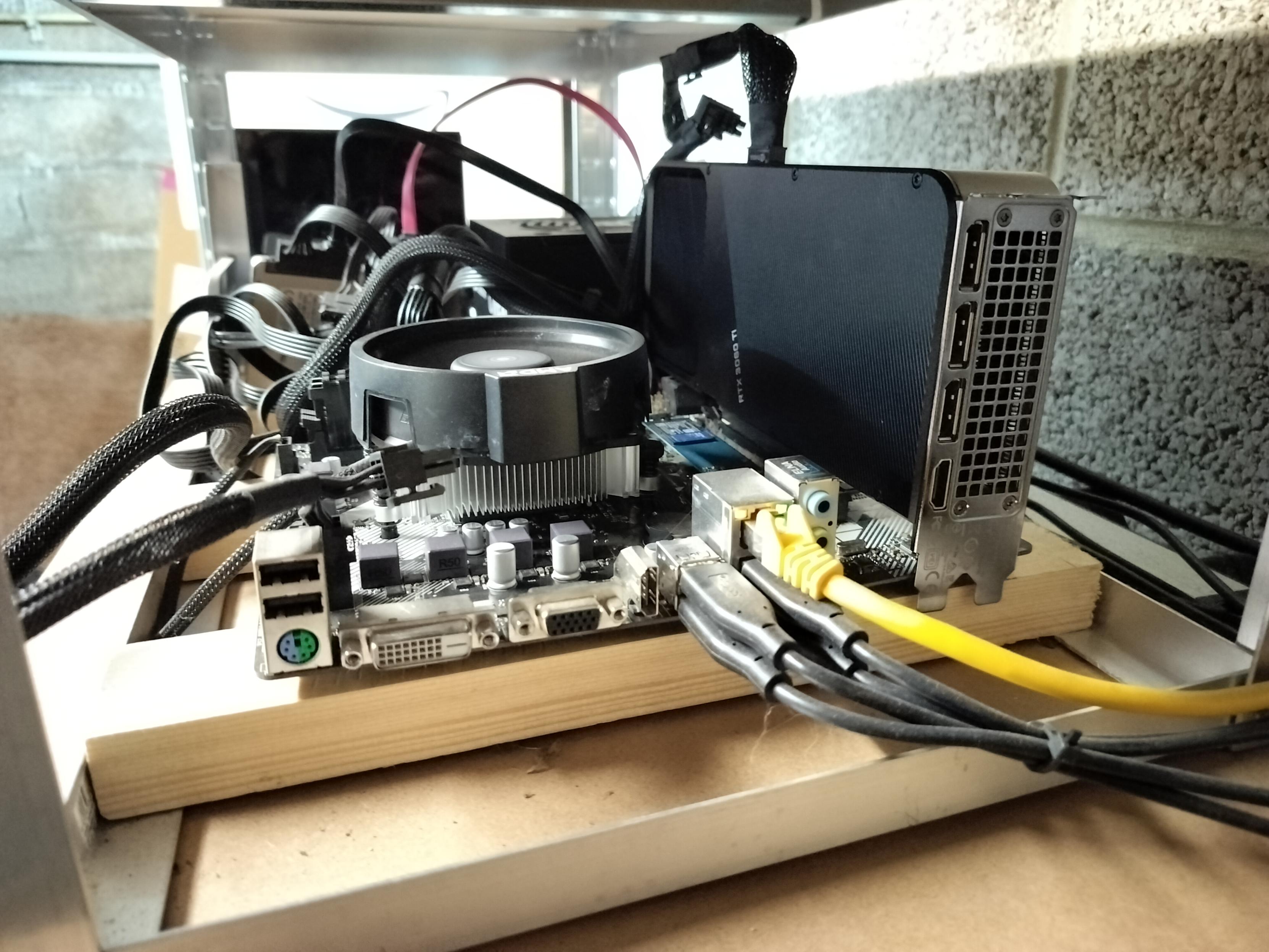
Alt...
Picture of an open case home made computer with the CPU fan on the left and the vertically mounted GPU hanging on its connector. Ethernet and USB cables on the bottom are fleeing to the side of the picture. This open case is mounted on a garage rack in the basement.
Surprise, I don't even need to use the USB disks. There is an empty 2TB NVMe drive on that box. Let me LUKS that thing, let's go!
My Jellyfin server works like a charm at home but it's very buggy remotely. I see OpenVPN sucking 20% of CPU and ffmpeg at 10%. Tomorrow, I'll move the instance to a more beefy server with a 3060 Ti to offload transcoding and it has a more powerful CPU. But the data disks are on USB. If that doesn't work, I'll create a second Jellyfin instance in the remote LAN directly to have full bandwidth.
![[?]](https://rgw.nbg.nsc.noris.cloud/swift/v1/AUTH_77799432edb5445ba561777c8a7f715b/mastodon-media/accounts/avatars/109/433/166/490/334/337/original/6f9ffc55abeb86dd.jpg)
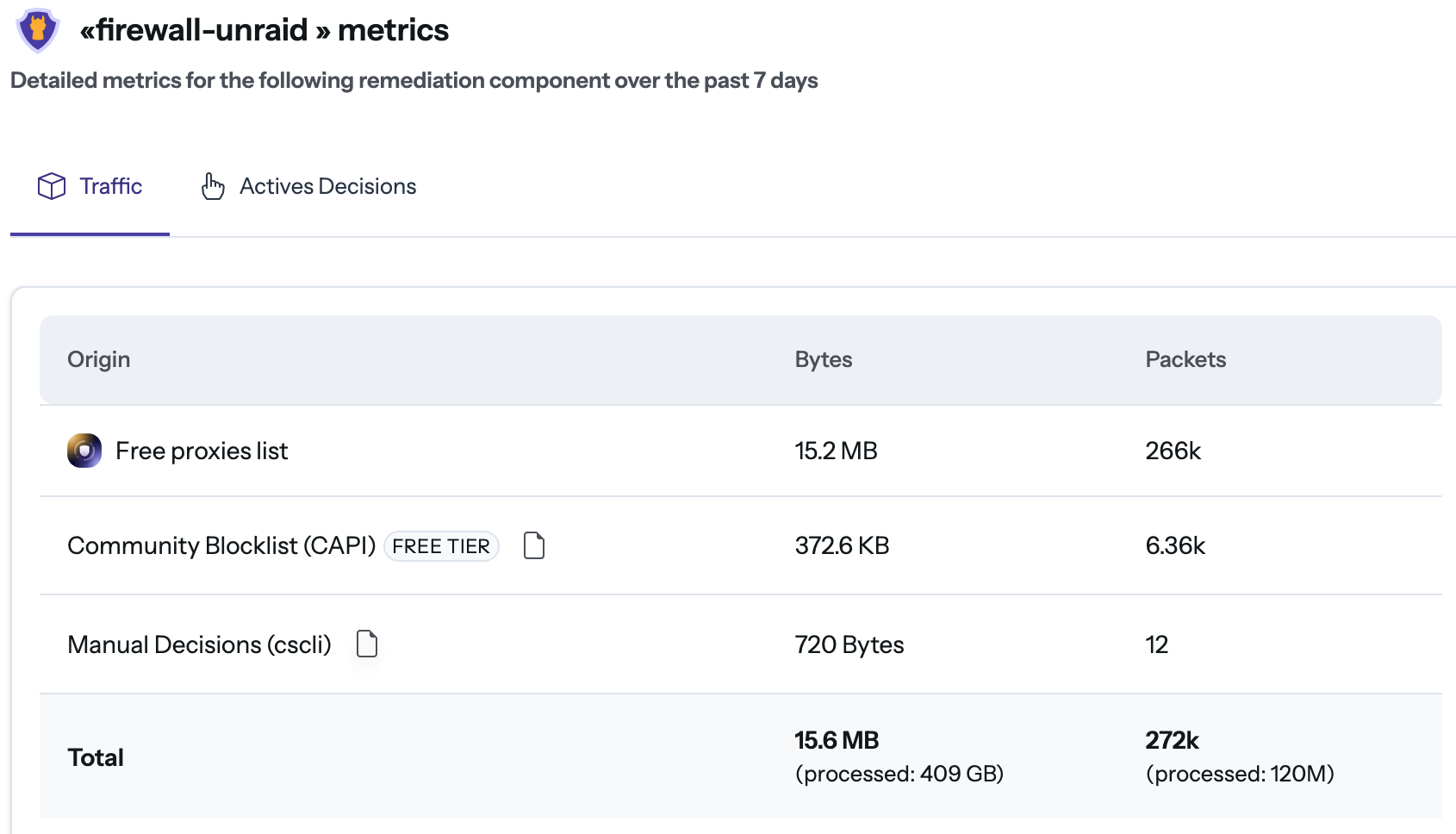
Didn't know CrowdSec until recently, but I'm quite impressed. Thought I'd share: I'm protecting my Jellyfin and audiobookshelf via nginx logs for a few days now and it's very promising, especially the proactive blocking via the global community list.
Now looking for a nice GUI (alerts/stats/unbanning) since the official panel's pricing isn't for home users. Please only recommend tools you've actually used (I know how to Kagi 😊!).
#SelfHosted #CrowdSec #Jellyfin #audiobookshelf
Alt...
Screenshot of a CrowdSec web dashboard titled "«firewall-unraid» metrics". It displays a table showing traffic data for the past 7 days, categorized by origin.
The table lists three sources: "Free proxies list" (15.2 MB, 266k packets), "Community Blocklist (CAPI)" (372.6 KB, 6.36k packets), and "Manual Decisions (cscli)" (720 Bytes, 12 packets). The totals row at the bottom indicates that 15.6 MB and 272k packets were blocked, out of a total 409 GB and 120 million packets processed.
![[?]](https://files.mastodon.social/accounts/avatars/001/079/171/original/ddd098f4a1bf4690.jpg)
So there seems to be a null pointer dereference bug in certain #Linux kernels, like 7.1.x, that has been causing issues with my #Jellyfin server on #Debian. I'm not enough of an expert to fully understand it, but one indication was that htop would also have issues when the issue began, and it has something to do with the movement, translation or compaction of memory during GPU workloads, like transcoding. The solution, for now, besides downgrading the kernel, seems to be to disable HMM or IOMMU.
After the epic failure of nextcloud, I continued my jellyfin setup.
The metadata system based on directory/file names doesn't work for me because I can't rename files (for those who know why), so I had to trick the system by using symlinks.
Some shows have bad database entries like 1923 returning a totally different show by default. I had to use the weird [imdb-ttNNNNNNN] title, including the IMDB id, to tell jellyfin where to find the show. I ended up using the id everywhere so I'm sure every show is the right one.
Now my library looks great!
![[?]](https://files.mastodon.social/accounts/avatars/000/007/112/original/388649acb2026701.webp)
Do you use #JellyFin? Would you like your browser tab to tell you which song it is playing?
Come help me!
![[?]](https://media.burningboard.net/accounts/avatars/109/892/422/024/311/931/original/f22e604f554272c0.png)

I was ill last week and discovered something uncomfortable: a huge Jellyfin library isn't entertainment, it's homework. Every time I opened it, it asked "what do you want?" and I just scrolled.
So I built a TV station instead.
ErsatzTV turns a media library into real linear channels with schedules and logos. It ships for Linux, Windows and macOS. My server runs FreeBSD.
Turns out the entire porting effort was one conditional. The code asked "is this Linux?" when it meant "is VAAPI available?" VAAPI is userspace, FreeBSD has it, and .NET has had OSPlatform.FreeBSD for years.
One || later: Intel hardware transcoding in a Bastille jail that can see exactly one GPU and one read-only dataset.
I now have a sci-fi channel. I don't know what's on tonight. That's the point.
Haack's Networking
👀 The consolidation and migration of the navidrome and jellyfin servers is now complete. I was able to collapse two virtual machines and save precious compute and ram.
✍️ The new instances are live and ready for use. Users can both listen/watch existing content as well as upload/edit new content. To listen:
➡️ https://gnulinux.studio
➡️ https://gnulinux.media
‼️ And to edit/upload new music, you can use the filebrowser instance, which allows users to populate both the navidrome and jellyfin as they see fit. To edit:
⬅️ https://upload.gnulinux.studio
⬅️ https://upload.gnulinux.media
💼 The credentials for public access are the same for all instances:
User - pubglug
Pass - musicisawesome
🔥 Hope everyone enjoys listening and seeing the filebrowser+media concept in production. For now, the full libraries are accessible but/and those will be closed down soon and restricted to only public contributions/libraries.
💡 If you are a music buff and/or know who Kogar the Singing Ape is ... or heard of the Lux & Ivy's favorites collection, you might also enjoy reading this post https://notorious.haacksnetworking.org/2025/06/01/lux-ivys-favorites/ - and the new instance proudly hosts the content.
#music #media #jellyfin #navidrome #selfhosted #debian #subsonic #subsonicapi #floss #opensource #freesoftware

Alt...
cover of lime's take the love release
Haack's Networking
✍️ Starting today at 5pm UTC-06/7, the following instances will go down for maintenance:
1) gnulinux.studio
2) gnulinux.media
👀 This maintenance will reduce total core consumption on the host by 8 vCPUs and reduce RAM usage by 16GB. Furthermore, these instances will switch from testing to production usage and public availability.
‼️It is expected that this transition should only take 6-12 hours, however, it could take as long as 72 hours if DNS caching gets delayed. Prepare for down time accordingly.
#sysadmin #selfhosted #linux #freesoftware #opensource #navidrome #jellyfin
RE: https://gnulinux.social/@oemb1905/116818157162562628
Just a heads up that this was delayed due to a foot injury that went from okay to terrible very quickly. We are resuming this project today and it should take roughly 48-72 hours to complete.
#navidrome #jellyfin #selfhosted #debian #floss #linux #opensource #freesoftware #sysadmin
✍️ Starting today at 5pm UTC-06/7, the following instances will go down for maintenance:
1) gnulinux.studio
2) gnulinux.media👀 This maintenance will reduce total core consumption on the host by 8 vCPUs and reduce RAM usage by 16GB. Furthermore, these instances will switch from testing to production usage and public availability.
‼️It is expected that this transition should only take 6-12 hours, however, it could take as long as 72 hours if DNS caching gets delayed. Prepare for down time accordingly.
#sysadmin #selfhosted #linux #freesoftware #opensource #navidrome #jellyfin
Haack's Networking
✍️ Starting today at 5pm UTC-06/7, the following instances will go down for maintenance:
1) gnulinux.studio
2) gnulinux.media
👀 This maintenance will reduce total core consumption on the host by 8 vCPUs and reduce RAM usage by 16GB. Furthermore, these instances will switch from testing to production usage and public availability.
‼️It is expected that this transition should only take 6-12 hours, however, it could take as long as 72 hours if DNS caching gets delayed. Prepare for down time accordingly.
#sysadmin #selfhosted #linux #freesoftware #opensource #navidrome #jellyfin
![[?]](https://files.mastodon.social/accounts/avatars/115/742/434/865/105/205/original/ba2fa15026c28d18.jpeg)
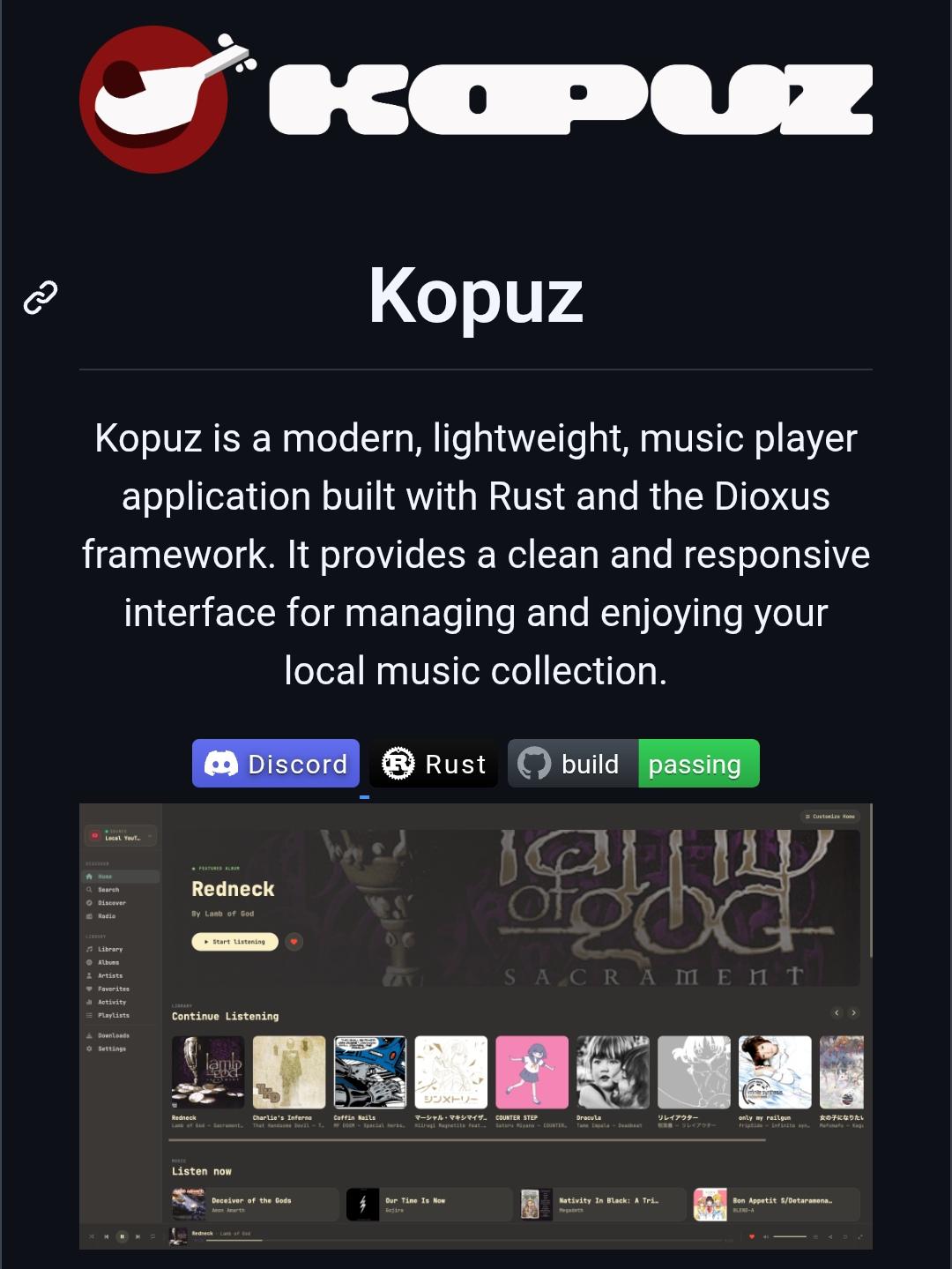
Kopuz is a free and open-source music player built with Rust.
It supports local music libraries, Jellyfin, Navidrome/Subsonic servers, synced lyrics, playlists, and equalizer controls across Windows, Linux, and macOS.
A privacy-friendly alternative to cloud-focused music players, with full support for self-hosted music collections.
More details: https://digitalescapetools.com/tools/tool.html?id=kopuz
#OpenSource #MusicPlayer #Jellyfin #Navidrome #SelfHosted #Privacy #Linux #Windows #macOS #FOSS
Alt...
Screenshot of the Kopuz project page. The top features the Kopuz logo and name, followed by a description stating that Kopuz is a modern, lightweight music player built with Rust and the Dioxus framework. The page highlights its clean and responsive interface for managing local music collections. Below are badges for Discord, Rust, and a passing build status. A large application screenshot shows Kopuz's dark-themed music player interface with album artwork, navigation sidebar, playlists, library sections, and music playback controls, demonstrating its focus on local and self-hosted music management.
![[?]](https://cdn.masto.host/enosmtown/accounts/avatars/106/529/855/269/405/584/original/b2cf3213062f4cf0.png)
Any suggestions / tips for a new #TV / monitor for watching TV shows / movies?
I have a #Jellyfin media centre on the internet. We'll be only watching things on that. So it needs some form of internet access. I really don't want all those rubbish adverts. I don't need inbuilt support for another streaming service (e.g. Netflix).
What can I / should I get?
![[?]](https://aseachange.com/fileserver/01ENCW3D083ATDAP5WGJEMSJC8/attachment/original/01JG469Y8X2DXVNGTWEZ8BPAGX.jpeg)
Dear Fedi friends,
I had the honor of being interviewed for @hyde's series #OverUnder.
🔗: https://lazybea.rs/ovr-069/
Mentioned in the interview: #FOSDEM
@yunohost
@gotosocial
@veronica
#Jellyfin
@timbl
#LEGO
& pizza!
Thank you so much for this wonderful opportunity  ❤️
❤️
 boosted
![[?]](https://lazybear.social/system/accounts/avatars/000/000/001/original/3462887fef61ddb1.png)
#OverUnder 069 with @elena
She shares her thoughts about #FOSDEM, #Jellyfin, #Yunohost, #LEGO, and, being Italian, I have to ask her about #Pizzas.
She also replied to @daj 's question.
She recommended two #books I will definitely read.
#bloggers #bookstodon #book #blog #fediverse #toys #streaming #movies #music #bloggers #mastodon