Search results for tag #arch

Adieu macOS et Windows : Omarchy 4.5 s’installe sur les MacBook Apple Silicon, adopte un dock classique et parle français
Remplacer macOS sans perdre son dock ni ses fenêtres ? Omarchy 4.5 arrive sur les MacBook Apple Silicon (M1 à M3), parle enfin français et s'installe en une ligne de commande. [SENSITIVE CONTENT]
Remplacer macOS sans perdre son dock ni ses fenêtres ? Omarchy 4.5 arrive sur les MacBook Apple Silicon (M1 à M3), parle enfin français et s’installe en une ligne de commande !
💡 En résumé : la mutation d’Omarchy 4.5
- Installation native sur Mac : déploiement direct sans support USB externe sur les ordinateurs portables MacBook équipés de processeurs M1, M2, M3 et Neo, y compris via le gestionnaire Homebrew.
- Le retour du bureau flottant : bascule instantanée par le raccourci
Super + Lentre la disposition en mosaïque (tiling), le défilement et les fenêtres flottantes traditionnelles avec barres de titre et dock d’applications. - Ouverture internationale : traduction complète de l’interface en 50 langues avec bascule immédiate des menus et des notifications, couplée à des méthodes de saisie textuelle adaptées.
- L’IA agentique au premier plan : tableau de bord étendu à 23 fournisseurs d’IA (Claude, Codex, Grok, Ollama) et terminal déroulant disponible d’une seule touche.
740 requêtes de fusion ont été intégrées en seulement douze semaines. Ajoutez à cela un installateur autonome capable de greffer un système d’exploitation complet aux côtés de macOS sans toucher à la moindre clé USB. Jusqu’ici cantonnée aux processeurs x86 traditionnels et réputée pour sa gestion austère des fenêtres en mosaïque, la distribution basée sur Arch Linux imaginée par David Heinemeier Hansson (DHH) franchit un cap spectaculaire.
Pour mesurer la trajectoire de cet environnement singulier, retrouvez nos précédents éclairages : Clavier roi, milliardaires, idées de génie et sécurité : c’est quoi Omarchy, le Linux qui divise la tech ? et comment le système s’est forgé une place sur le matériel mobile dans Pas de Windows, écran secondaire et Linux Arch : comment le Qwen Book d’Alibaba veut réinventer le PC portable.
Quattro RS : les nouveautés
La sortie officielle d’Omarchy 4.5, surnommée « Quattro RS », transforme l’environnement en un concurrent frontal des systèmes grand public : installation native en un clic sur les puces Apple Silicon, apparition d’un dock d’applications conventionnel et prise en charge intégrale de 50 langues, dont le français.

Omarchy 4.5 livre également sa première ISO ARM, accompagnée d’une prise en charge préliminaire des machines ARM de NVIDIA : l’ordinateur de bureau DGX Spark et les portables équipés de la puce N1X, comme le Dell XPS 16 Creator Edition et l’ASUS ProArt P14. Toute la gamme des machines ARM sous Snapdragon sera également supportées prochainement, assurent les développeurs.
Finir le travail d’Asahi : Linux s’installe sans friction sur Apple Silicon
« C’est ce que nous nous étions fixé comme objectif en septembre : finir ce qu’Asahi a commencé », souligne David Heinemeier Hansson dans les notes de publication du projet. S’appuyant sur le travail de rétro-ingénierie conduit par l’équipe d’Asahi Linux, la division Omarchy M livre un installateur graphique téléchargeable directement sous macOS. L’outil configure les partitions et amorce le système sur les MacBook dotés de silicium M1, M2, M3 et Neo. Les adeptes du terminal peuvent même initier la procédure d’une simple ligne de commande :
brew install omacom/mac/omarchyLes équipes techniques travaillent activement à l’adaptation des générations matérielles plus récentes (M4, M5 et M6). Parallèlement, le projet inaugure sa première image ISO officielle pour architecture ARM, apportant une compatibilité préliminaire avec le supercalculateur compact NVIDIA DGX Spark ainsi que les ordinateurs portables équipés de circuits N1X (Dell XPS 16 Creator Edition, ASUS ProArt P14), avant un déploiement planifié sur les puces Qualcomm Snapdragon.
Le compromis parfait entre fenêtrage classique et productivité clavier
Historiquement verrouillé sur un pavage strict des fenêtres piloté exclusivement au clavier, Omarchy gomme sa principale barrière à l’entrée. Grâce au raccourci clavier Super + L, chaque espace de travail peut adopter indépendamment un agencement en mosaïque, en défilement continu ou en mode flottant traditionnel. Dans cette configuration familière pour les transfuges de macOS ou de Windows, les fenêtres retrouvent leurs barres de titre thématisées et se réduisent d’un geste (Super + M) vers un dock inférieur affichant les programmes épinglés et les applications actives.
Fonctionnalité
Comportement dans Omarchy 4.5
Bénéfice utilisateur
Mode bureau flottant
Fenêtres libres avec barre de titre et dock graphique
Transition douce pour les habitués de macOS sans forcer la mosaïque
Prise en charge linguistique
50 langues (dont français) et 5 méthodes de saisie (CJK)
Adoption internationale immédiate des menus et notifications
Temps d’installation (F1)
Extraction d’image racine préconstruite (record à 7 secondes)
Déploiement deux fois plus rapide en évitant les 940 paquets unitaires
Portails captifs Wi-Fi
Détection automatique dans la barre avec bouton direct
Connexion instantanée dans les hôtels, gares et espaces de travail
Le système d’exploitation parfait également son ancrage professionnel débridé, y compris en proposant l’intégration des services Microsoft 365 (Word, Excel, PowerPoint, Teams, OneDrive) sous la forme d’applications web conteneurisées dans des fenêtres dédiées.

Côté bureautique, la suite d’outils par défaut accueille Hype pour transformer des notes Markdown en présentations visuelles.

Signed permet d’apposer des signatures électroniques sur des fichiers PDF, et l’utilitaire d’inspection de disque Disktree.
La plaque tournante de l’IA locale
Cette mise à niveau matérialise la vision d’un environnement pensé pour collaborer en continu avec des modèles synthétiques, un terrain sur lequel la distribution affine ses garanties techniques comme nous le relations dans Omarchy : face aux doutes, DHH muscle son Linux pour l’IA locale.
Le panneau dédié aux agents logiciels supervise désormais 23 services et fournisseurs (Cursor, OpenCode, GitHub Copilot, Devin, Qwen, DeepSeek, OpenRouter et Ollama), intégrant Grok aux côtés de Claude et Codex avec des jauges de quotas en temps réel.

D’une simple pression sur Super + ~, une console descendante de style Quake se déploie par-dessus l’écran pour dialoguer instantanément avec son assistant par défaut. La dictée vocale native est désormais confiée à Superwhisper (activable via Alt + Espace), capable d’exécuter un modèle entièrement local et hors ligne pour préserver la confidentialité des échanges.
🌐 L’actualité de l’open source et des technologies éthiques dans votre flux
🐘 Fediverse / Mastodon : suivez notre profil officiel @redaction@goodtech.info depuis votre application ou votre instance favorite.
🦋 Bluesky (AT Protocol) : retrouvez nos actualités condensées et abonnez-vous à @goodtech.info.

Alt...
Bureau Linux Omarchy 4.5 en mode fenêtres flottantes avec gestionnaire de fichiers et navigateur sur fond spatial

Alt...
Adieu macOS et Windows : Omarchy 4.5 s’installe sur les MacBook Apple Silicon, adopte un dock classique et parle français

Alt...
Adieu macOS et Windows : Omarchy 4.5 s’installe sur les MacBook Apple Silicon, adopte un dock classique et parle français

Alt...
Adieu macOS et Windows : Omarchy 4.5 s’installe sur les MacBook Apple Silicon, adopte un dock classique et parle français

Linux-Distributionen: Wie aus dem Kernel ein nutzbares Betriebssystem wird
Fedora, Debian oder openSUSE: Sie alle gehören zur Linux-Welt, unterscheiden sich aber in ihrer Softwareauswahl, Verwaltung und Weiterentwicklung. Der gemeinsame Linux-Kernel bildet die technische Grundlage. Erst die zusätzlichen Programme, Werkzeuge und Dienste machen daraus ein vielseitig nutzbares Betriebssystem. Eine Distribution stellt diese Komponenten als abgestimmtes Gesamtpaket bereit. Sie entscheidet nicht nur, welche Software verfügbar ist, sondern auch, wie diese installiert, […] [SENSITIVE CONTENT]
Fedora, Debian oder openSUSE: Sie alle gehören zur Linux-Welt, unterscheiden sich aber in ihrer Softwareauswahl, Verwaltung und Weiterentwicklung. Der gemeinsame Linux-Kernel bildet die technische Grundlage. Erst die zusätzlichen Programme, Werkzeuge und Dienste machen daraus ein vielseitig nutzbares Betriebssystem.
Eine Distribution stellt diese Komponenten als abgestimmtes Gesamtpaket bereit. Sie entscheidet nicht nur, welche Software verfügbar ist, sondern auch, wie diese installiert, konfiguriert, aktualisiert und gepflegt wird.
Was ist eine Linux-Distribution?
Der Linux-Kernel verwaltet grundlegende Ressourcen wie Prozessorzeit, Arbeitsspeicher und Hardwarezugriffe. Für die tägliche Arbeit benötigt ein System jedoch weitere Bestandteile: Bibliotheken, Verwaltungswerkzeuge, Dienste und Anwendungen. Eine Distribution führt diese Komponenten zusammen.
Vereinfacht lässt sich der Zusammenhang so darstellen:
Linux-Distribution
├── Linux-Kernel
├── Systembibliotheken und grundlegende Werkzeuge
├── Systemdienste
├── Paketverwaltung und Softwarequellen
└── Anwendungen und gegebenenfalls eine Desktopumgebung
Die Distribution ist dabei nicht einfach eine weitere technische Schicht oberhalb des Kernels. Sie bezeichnet die gesamte Zusammenstellung einschließlich ihrer Pflege und Bereitstellung.
Was leisten die Entwickler einer Distribution?
Die einzelnen Bestandteile eines Linux-Systems entstehen häufig in unterschiedlichen Projekten. Eine Distribution übernimmt die Aufgabe, daraus ein zusammenhängendes System zu machen.
Dazu gehören unter anderem:
- Software als installierbare Pakete bereitzustellen,
- Abhängigkeiten zwischen Paketen zu berücksichtigen,
- verfügbare Versionen aufeinander abzustimmen,
- Aktualisierungen zu veröffentlichen,
- einen nachvollziehbaren Veröffentlichungs- und Pflegeprozess festzulegen.
Wie aufwendig diese Integration ist, zeigt beispielsweise Debian: Neue Paketversionen werden nicht beliebig in den Entwicklungszweig „testing“ übernommen. Dafür müssen unter anderem Abhängigkeiten erfüllbar sein und bestimmte Fehlerkriterien eingehalten werden.
Eine Distribution ist deshalb mehr als eine Sammlung von Downloadlinks. Sie übernimmt Verantwortung für das Zusammenspiel der Komponenten.
Die Paketverwaltung: Software zentral verwalten
Eine wichtige Aufgabe der Distribution ist die Bereitstellung von Softwarepaketen. Ein Paket enthält neben Programmdateien auch Informationen, die für Installation und Verwaltung benötigt werden. Die Paketverwaltung verfolgt, welche Pakete installiert sind, und unterstützt deren Aktualisierung oder Entfernung.
Häufig kommt die Software aus zentralen Paketquellen, den sogenannten Repositories. Über diese Quellen kann ein System Programme beziehen und aktualisieren, statt jede Anwendung einzeln von einer Webseite herunterladen zu müssen.
Dabei lohnt sich die Unterscheidung zwischen Paketformat und Verwaltungswerkzeug. Fedora und Red Hat Enterprise Linux verwenden beispielsweise RPM-Pakete. Werkzeuge wie DNF arbeiten mit Paketquellen und lösen benötigte Abhängigkeiten auf. Das niedrigere Werkzeug rpm dient dagegen unter anderem zum Installieren und Abfragen einzelner Pakete.
Die Distribution legt somit nicht nur fest, welche Programme angeboten werden. Sie schafft auch den organisatorischen Rahmen für deren Pflege.
Warum gibt es unterschiedliche Distributionen?
Nicht alle Systeme müssen dieselben Anforderungen erfüllen. Ein Entwicklungsrechner profitiert möglicherweise von neuer Software. Für einen produktiven Server können lange Pflegezeiträume und möglichst vorhersehbare Änderungen wichtiger sein. Distributionen gewichten solche Ziele unterschiedlich.
Das zeigt sich besonders bei:
- der Aktualität der bereitgestellten Programme,
- dem Veröffentlichungsmodell,
- der Länge der Wartung,
- dem Umfang kommerzieller Unterstützung,
- der vorgesehenen Zielgruppe.
Es gibt deshalb nicht die eine Distribution, die für jede Aufgabe automatisch am besten geeignet ist.
Feste Veröffentlichungen und Rolling Release
Ein wesentlicher Unterschied liegt darin, wie neue Softwareversionen beim Benutzer ankommen.
Feste Veröffentlichungen
Bei einem versionsbasierten Modell erscheint zu bestimmten Zeitpunkten eine neue Distributionsversion. Innerhalb einer Veröffentlichung bleibt die Softwarebasis vergleichsweise kontrolliert, während Fehlerbehebungen und Sicherheitsaktualisierungen eingepflegt werden. Größere Änderungen werden häufig mit dem nächsten Versionswechsel gebündelt.
Fedora veröffentlicht beispielsweise ungefähr alle sechs Monate eine neue Version und pflegt jede Veröffentlichung etwa 13 Monate. Das bedeutet: Wer Fedora dauerhaft mit Sicherheitsaktualisierungen betreiben möchte, muss regelmäßig auf eine neuere Distributionsversion wechseln.
Rolling Release
Bei einem Rolling-Release-Modell wird das installierte System fortlaufend durch neue Pakete weiterentwickelt. Statt auf einen klassischen Wechsel zwischen großen Distributionsversionen zu setzen, folgt die Installation dem aktuellen Paketbestand. Arch Linux ist ein bekanntes Beispiel.
Das bedeutet allerdings nicht, dass keine Wartung nötig wäre. Änderungen an Paketen und Konfigurationen müssen weiterhin berücksichtigt werden. „Fortlaufend aktualisiert“ ist kein Synonym für „wartungsfrei“.
Was bedeutet „stabil“ bei einer Distribution?
Im Alltag wird „stabil“ häufig mit „stürzt nicht ab“ gleichgesetzt. Bei Distributionen beschreibt der Begriff aber auch eine möglichst konstante Softwarebasis: Funktionen und Versionen ändern sich innerhalb eines Veröffentlichungszweigs weniger stark.
Debian Stable setzt beispielsweise auf eine getestete Zusammenstellung. Die Pakete sind dadurch nicht zwingend die neuesten verfügbaren Versionen. Trotzdem werden Sicherheitsprobleme und wichtige Fehler im Rahmen der Pflege behandelt.
Eine ältere sichtbare Versionsnummer bedeutet daher nicht automatisch, dass ein Paket ungepflegt oder unsicher ist. Entscheidend ist auch, welche Korrekturen die Distribution für diese Version bereitstellt.
Drei Beispiele für unterschiedliche Schwerpunkte
Distribution
Charakteristischer Schwerpunkt
Debian Stable
Getestete Zusammenstellung mit vergleichsweise wenig Veränderung innerhalb einer Veröffentlichung
Fedora
Moderne Software und neue Technologien bei regelmäßigem Versionswechsel
Red Hat Enterprise Linux
Unternehmenseinsatz mit kommerzieller Unterstützung und langen Pflegezeiträumen
Diese Einordnung beschreibt Schwerpunkte, keine festen Einsatzgrenzen. Sie hilft aber, die unterschiedlichen Ziele hinter den Projekten zu verstehen.
Auch die Beziehungen zwischen Projekten sind wichtig: Fedora steht in einer vorgelagerten Entwicklungsbeziehung zu Red Hat Enterprise Linux. Beide sind dennoch eigenständige Systeme mit unterschiedlichen Veröffentlichungs- und Supportmodellen. RHEL ist deshalb nicht einfach „Fedora mit anderem Namen“.
Desktop und Distribution sind nicht dasselbe
Die sichtbare Oberfläche ist nur ein Teil des Betriebssystems. Eine Distribution umfasst ebenso die darunterliegenden Dienste, Werkzeuge, Bibliotheken und Paketquellen. Zwei Systeme können ähnlich aussehen und trotzdem unterschiedlich verwaltet werden. Umgekehrt kann dieselbe technische Grundlage mit unterschiedlichen Softwarezusammenstellungen genutzt werden.
Wer Distributionen nur anhand von Bildschirmfotos vergleicht, übersieht daher wesentliche Unterschiede. Für den langfristigen Betrieb sind Paketverwaltung, Aktualisierungen und Pflegezeiträume oft wichtiger als das voreingestellte Erscheinungsbild.
Was bedeutet das für die Linux-Administration?
Beim Lernen hilft es, allgemeine Konzepte und distributionsspezifische Werkzeuge auseinanderzuhalten.
Die Aufgabe „Software installieren“ bleibt beispielsweise gleich. Das verwendete Paketformat und die dafür eingesetzten Befehle können sich jedoch unterscheiden. Ähnliches gilt für die Organisation von Softwarequellen und Aktualisierungen.
Auch die Wartungsplanung hängt von der Distribution ab. Ein System mit ungefähr 13 Monaten Pflege pro Veröffentlichung erfordert eine andere Upgradeplanung als eine Enterprise-Distribution mit deutlich längeren Supportzeiträumen.
Für die Administration reicht es deshalb nicht, nur den Namen der Distribution zu kennen. Ebenso wichtig sind die installierte Version, deren Wartungsstatus und die vorgesehenen Aktualisierungswege.
Fazit: Die Distribution macht Linux zu einem betreibbaren Gesamtsystem
Der Kernel stellt grundlegende Betriebssystemfunktionen bereit. Die Distribution ergänzt ihn um Software, Verwaltungswerkzeuge, Paketquellen und einen Pflegeprozess. Erst dieses Zusammenspiel ermöglicht einen dauerhaft nutzbaren und wartbaren Linux-Rechner.
Die entscheidenden Unterschiede liegen daher nicht nur im Aussehen. Sie betreffen vor allem die Frage, wie Software integriert wird, wie häufig sich das System verändert und wie lange es Unterstützung erhält. Wer diese Zusammenhänge versteht, kann Linux-Systeme gezielter auswählen und zuverlässiger administrieren.

Alt...
Linux-Distributionen: Wie aus dem Kernel ein nutzbares Betriebssystem wird

🕹️ Title: Nugget Doom
🦊️ Idea: A libre & improved game engine for Doom 1 & 2 (and FreeDoom 1 & 2)
🏡️ https://www.doomworld.com/forum/topic/125256-nugget-doom-500-now-with-true-color-lighting-updated-march-23rd-2026/
🐣️ https://github.com/MrAlaux/Nugget-Doom
🔖 #LinuxTool #LibreEngine #FPS #Doom
📦️ #Libre #Arch #RPM #AppIm
📕️ https://lebottinlinux.vps.a-lec.org/LO.html
🥁️ Update: 6.1.0
👍️ Nice changelog (clear)
⚗️ Major release(Stable)🍎️
📌️ Changes: https://github.com/MrAlaux/Nugget-Doom/releases
🦣️ From: https://mastodon.social/@holarse/117496277279755948
🐹️ https://www.youtube.com/embed/aq44msZ3eO8
🎮️ https://www.youtube.com/embed/saZ5ZK2TdZg
🎮️https://www.youtube.com/embed/knj7zGiP92M
🎮️https://www.youtube.com/embed/n553qwB8sNU
🎮️ https://www.youtube.com/embed/gIA4w-gOKFw
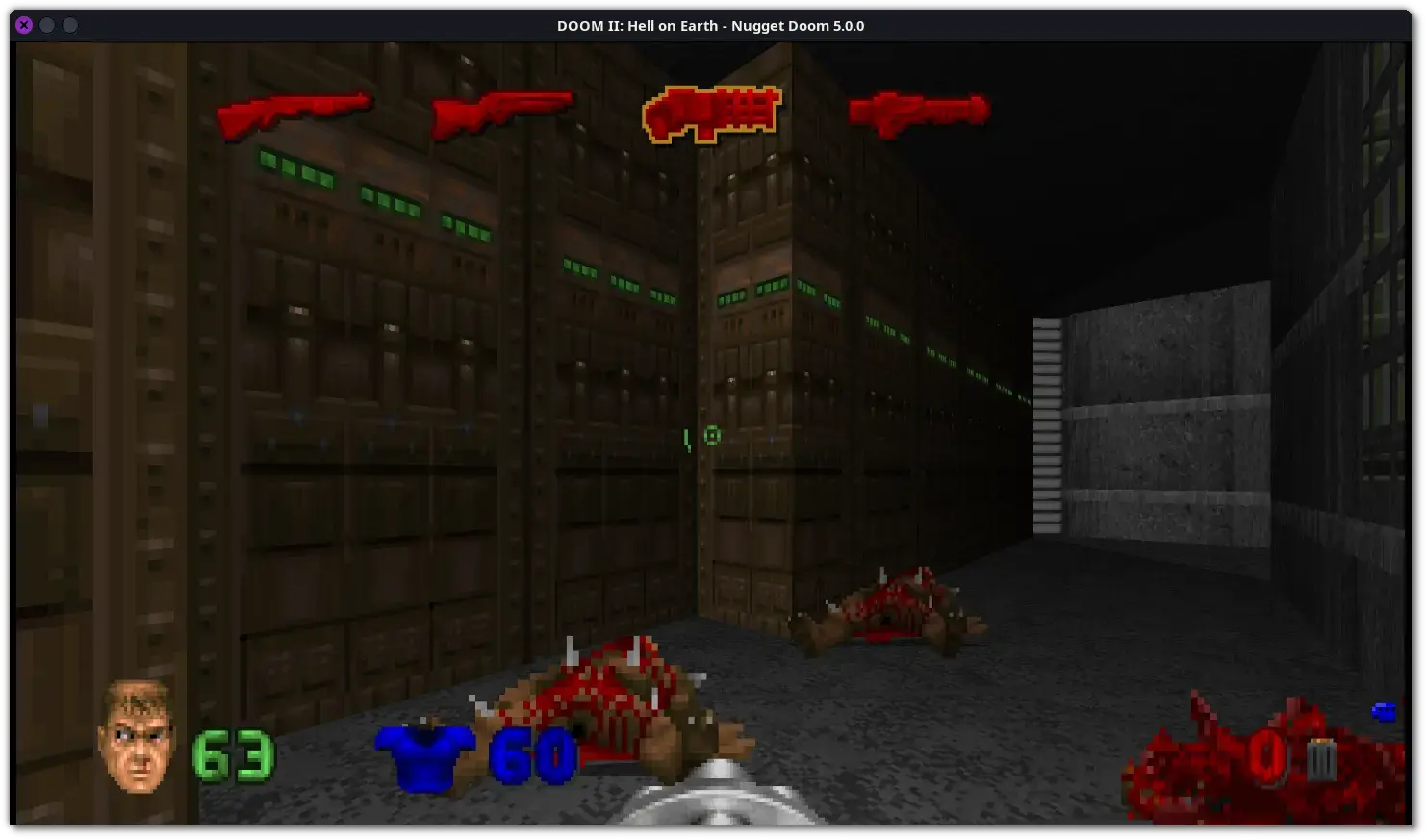
Alt...
🕶️ A view of its user interface (v. 5.0.0, on my Linux PC) in Doom 2 (after about an hour of play, on “Hurt Me Plenty” difficulty) in a slightly dimly lit room (though there are much darker areas in the game, without being completely black). The top of the screen shows the weapon selector (it appears for 1 or 2 seconds when switching): I’ve eliminated all the monsters, but my current weapon (machine gun) is out of ammo, and I only have a little left for the others, and I’m already pretty battered (this doesn’t bode well for what’s to come :)).
📚️ Nugget Doom is a libre, multiplatform, and improved game engine for Doom 1 & 2 (also compatible with FreeDoom 1 & 2). It is derived—though not exclusively—from the Woof! engine, itself derived from the WinMBF engine, which in turn was derived from MBF and the Eternity Engine, and before them from Boom (whose goal was to remove the limitations of the vanilla Doom version while preserving its look and feel). So no compatibility with Hexen or Heretic, but numerous improvements while maintaining compatibility with the many mods developed for the Boom engine. Among the (extremely numerous) improvements are careful work on lighting, adding a creepy atmosphere to dimly lit rooms, and on the HUD (highly customizable). A great engine!
🕵 5.0.0: 👏️⭐⭐⭐⭐
🟠️ It lacks a selector for choosing which recognized content to launch at startup.
🟢️ I really like how it automatically recognizes content installed in system directories (one more step toward simplification).
🟢️ I really like all the customization options available (there are quite a few).
🟢️ An excellent engine that delivers on the goals it sets for itself.
🛠️ Title: GPU Screen Recorder
🦊️ Idea: A very fast libre screen recorder for Linux thanks to an exclusive use of the GPU
🏡️ https://git.dec05eba.com/gpu-screen-recorder/about/
🐣️ https://git.dec05eba.com/gpu-screen-recorder/tree/
🔖 #LinuxTool #Screencast
📦️ #Libre #Arch #RPM #Deb #Flatpak
📕️ https://lebottinlinux.vps.a-lec.org/LO.html
🥁️ Update: 6.1.6
⚗️ Signific. vers. 🦍️
📌️ Changes: https://git.dec05eba.com/gpu-screen-recorder/log/
🦣️ From: https://mastodon.social/@playingtux/117518960646661276
🦉️https://www.youtube.com/embed/n5tm0g01n6A
🐹️ https://www.youtube.com/embed/a3OAXyR1G4s
🕵️ https://www.youtube.com/embed/kf_zKpBRRNI
🎮️ https://www.youtube.com/embed/ljUC0nGumzA
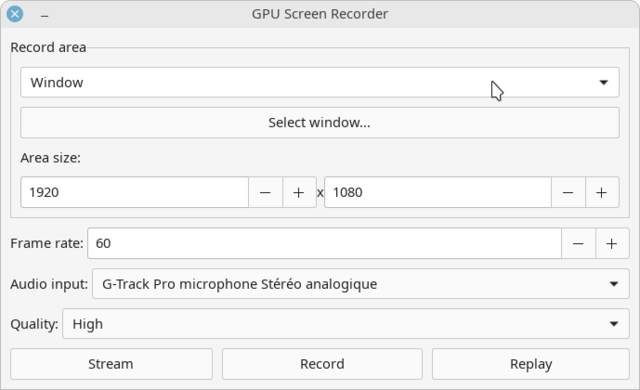
Alt...
🕶️ A view of its UI (v. r32.08c76fc-1, on my Linux PC, using a light theme) with a “Record area” section at the top (the first dropdown is set to ‘Window’ and the others to “1920x1080”), below that a “Frame rate” section (60 is selected), then “Audio input” (“G-Track Pro Stereo Analog Microphone,” my mic), then “Quality” (“High” is selected), and below that three buttons (Stream, Record, and Replay).
📚️ GPU Screen Recorder is the fastest free screen recorder for Linux thanks to exclusive use of the graphics card GPU (minimizing the use of the slower CPU), similar to Shadowplay on Windows. It can be used for recording offline desktop, for live streaming and for nvidia-like instant replay, where only the last few seconds are recorded.
🕵 r32.08c76fc-1: 👏️⭐⭐⭐⭐
🟢️ On my system, and with the package from the repositories in this version, only Window mode works (allows you to record a desktop window), which is already great.
⚪️ To be continued for the other modes (I haven't tested compiling the tool, and therefore haven't tried other, more recent versions).

 𝕤𝕖𝕝𝕖𝕒


Let's settle this once and for all! 👻
Linux vs. BSD! 😈
Which side are you on? 🐧🐡
#Linux #Debian #Arch #ArchLinux #Fedora #FedoraLinux #BSD #OpenBSD #FreeBSD #NetBSD
| Linux (Debian, Arch, Fedora, etc.): | 343 |
| BSD (OpenBSD, FreeBSD, NetBSD, etc.): | 237 |
Closed


40 geniale #Apps und #Tools für euer #Linux - quelloffen und kostenlos
Über 40 geniale und vor allem kostenlose Tools, Apps und Anwendungsprogramme für Linux, die seht Ihr hier in diesem Video, alle sind dann auch noch Open Source, also quelloffen und die kann sich jeder für sein Linux in Sekunden runterladen, ganz egal ob das #Linux #Mint ist, #Zorin #OS, #Ubuntu, #Debian, #Arch-Linux, #MX-Linux, #PopOS oder eine ganz andere #Linux #Distro.
🛠️ Title: Zed
🦊️ Idea: A libre IDE
🏡️ https://zed.dev/
🐣️ https://github.com/zed-industries
🔖 #LinuxGameDev #Flagship #Programming #IDE
📦️ #Libre #Bin #Arch #Flatpak
📕️ https://lebottinlinux.vps.a-lec.org/LO.html
🥁️ Update: 1.18.1➜1.21.0
⚗️ Huge vers. 🦬️
📌️ Changes: https://github.com/zed-industries/zed/releases
🦣️ From: 🛜️ https://github.com/zed-industries/zed/releases.atom
🐹️ https://www.youtube.com/embed/2e7SkqzBAYk
🐹️ https://www.youtube.com/embed/Z-KhZHVut1c
🕵️ https://www.youtube.com/embed/BCQwMXZ4Cy8
🕵️ https://www.youtube.com/embed/Fk08oNi0j1Y
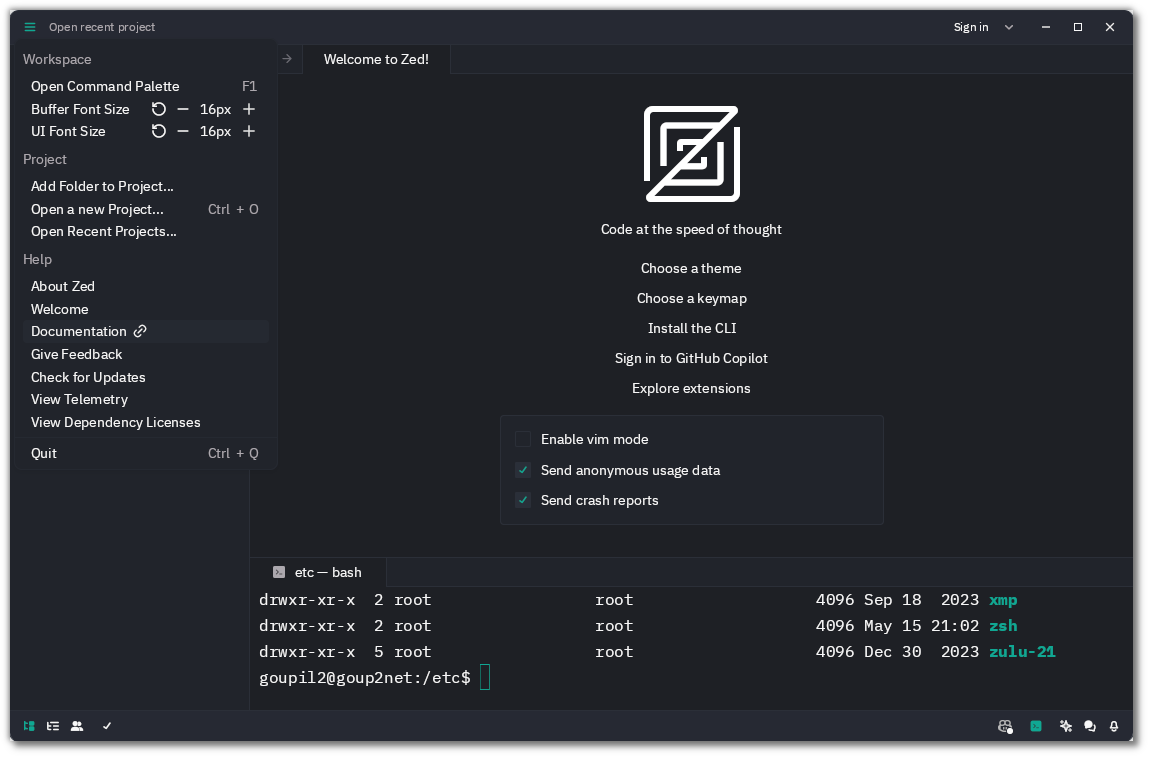
Alt...
🕶️ A view of its UI (on a dark theme) at startup: the interface is uncluttered, with each icon leading to a menu. The main tab displays its icon and below it offers the option of enabling or disabling Vim mode, sending anonymous usage data, and crash reports.
📚️ Zed is a libre, multi-platform IDE written in Rust by the authors of the Atom IDE. It is designed to be extremely fast and powerful (using all CPU cores and the GPU), stable (developers experienced in this type of tool, deliverables fully tested), and collaborative (low-latency collaborative editing in shared space, including on code not yet saved, virtual desktop, shared document for note-taking, audio and text chat). It also features assisted editing (Copilot, GPT-4), autocompletion and syntax highlighting with diagnostics and refactoring, an integrated terminal, a Vim mode with assistance, and themes.
🕵 0.143.6: 🙏️⭐⭐⭐⭐⭐
🟢️ A real gem. It’s well on its way to becoming yet another game-changer.
🟢️ I haven’t had time for a more in-depth test yet, but from what I’ve seen so far, it seems to be of excellent quality.
WTAF
#Trump says planned #arch will be a #military complex for #drones, #snipers
Trump’s post about the arch planned near #ArlingtonNationalCemetery comes as #veterans groups, #historic preservationists & others attempt to stop the project.
His announcement on Sunday echoed his justification for the White House #ballroom∶ that the project was necessary for national security.
#law #architecture #preservation #UrbanPlanning #vanity #narcissism
https://www.nytimes.com/2026/09/20/us/politics/trump-dc-arch-snipers-drones-military-complex.html?unlocked_article_code=1.ClE.raEI.H9nVSZhmW6EG&smid=nytcore-ios-share


I had a perfectly respectable Red Hat Ansible Automation Platform.
So naturally, I built an Arch Linux Execution Environment, taught pacman to answer to microdnf, and used it to patch RHEL systems.
Surprisingly, it worked.
This is evidence, not a recommendation.
https://blog.hofstede.it/ansible-execution-environment-arch-btw/
This muther f⁕⚠︎er
#Trump is breaking ground on his 250-foot-tall “triumphal” #arch, before a review panel has approved the project.
#DougBurgum, the #interior secretary, announced plans to start work on the site of the 250-foot-tall triumphal arch. Final approval of the project is still pending.
#law #UrbanPlanning #DC #architecture #GreenSpace #PublicLands
https://www.nytimes.com/2026/09/03/us/politics/trump-triumphal-arch-plans-approval.html?unlocked_article_code=1.-VA.wQzX.Zl0mdz45s3iR&smid=nytcore-ios-share

“These amendments redefine the term “operating system provider” to exclude any person or entity that distributes an OS or application “under license terms that permit a recipient to copy, redistribute, and modify the software.” Any software distributed under the GPL, MIT, BSD, and Apache licenses satisfies that test, which removes the likes of #Debian, #Fedora, #Ubuntu, #Arch, and the #BSD family from AB 1856’s scope.”

My Friend Lunic: #omarchy
...
My Friend @khm helped me draw this picture. It would not exist without him.
#linux #art #comic #fediart #mastoart #arch @nixCraft #unix_surrealism
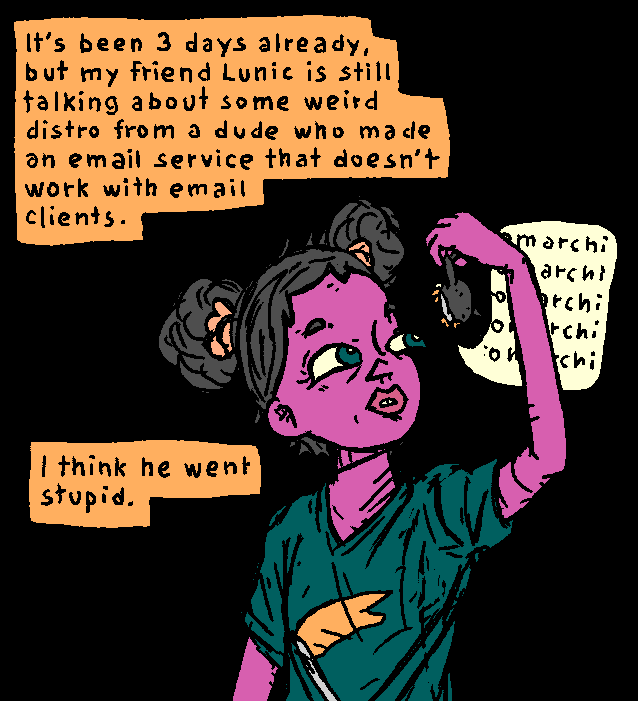
Alt...
it's been 3 days already, but my friend Lunic is still talking about some weird distro from a dude who made an email service that doesn't work with email clients.
I think he went stupid.
Lunic: omarchi omarchi omarchi omarchi
🛠️ Title: evtest-qt
🦊️ Idea: A libre GUI for testing a gamepad
🏡️ -
🐣️ https://github.com/Grumbel/evtest-qt
🔖 #LinuxTool #Setup #Gamepad
📦️ #Libre #Arch #Flatpak
📕️ https://lebottinlinux.vps.a-lec.org/LO.html
🥁️ Update: 0.3.0
⚗️ No changelog 🙈️🙉️🙊️
📌️ Changes: https://github.com/Grumbel/evtest-qt/releases
🦣️ From: https://flathub.org/apps/details/io.gitlab.evtest_qt.evtest_qt
Alt...
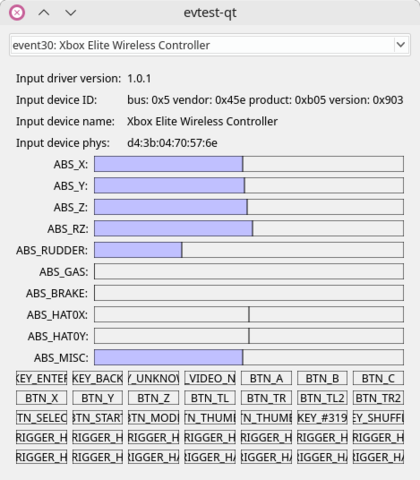
🕶️ A view of its UI (v. r99.a6049a4-1 from 02/28/2022 (0.2.0), on my Linux PC) showing the response from my Xbox Elite Wireless gamepad. In the top quarter of the screen, a drop-down menu lets you select the detected hardware (if multiple gamepads are connected), along with technical information about the hardware and driver (version, device ID, name, address); the middle half of the screen shows the response of the activated joysticks (bar graphs); and the bottom quarter shows the response of the pressed buttons.
📚️ evtest-qt is a libre and simple graphical tool to test a gamepad. It provides a list of connected joysticks (via a drop-down menu) and an interface that allows to see which buttons are pressed and which directional axes are activated. The interface only allows to view the axes, not to calibrate them (see also jstest-gtk - from the same author, which also allows to calibrate the gamepads).
🕵 v. r99.a6049a4-1 du 28/02/2022 (0.2.0): 🤗️⭐⭐
🟠️ Personally, I prefer jstest-gtk (by the same author), which also lets you adjust the response range of the sticks (my old Logitech gamepad has drift on the right stick, and this utility lets me correct that drift).
🟢️ Still, it does the job: it displays the response of my game controllers.
🛠️ Title: M.A.M.E.
🦊️ Idea: A libre emulator of video game arcade cabinet, consoles, ..
🏡️ https://mamedev.org
🐣️ https://github.com/mamedev/mame
🔖 #LinuxEmulation #Flagship #ArcadeCabinet
📦️ #Libre #Arch #RPM #Deb #Flatpak #Snap #AppIm
📕️ https://lebottinlinux.vps.a-lec.org/LO.html
🥁️ Update: 0.289
⚗️ Major release (Unst.)🍏️
📌️ Changes: https://www.mamedev.org/
🦣️ From:
https://www.youtube.com/embed/m-zZWD3AuYk?start=58
https://www.youtube.com/embed/rAhMV7dpCbc
https://mastodon.social/@holarse/117020663247737648
🐹️ https://www.youtube.com/embed/JJef1ZK23MY
🎮️ https://www.youtube.com/embed/7pkx19m02x4
🎮️ https://www.youtube.com/embed/a1Rh3n0pL1Y

Alt...
🕶️ A view of its built-in UI in version 0. 246 with a simplified menu (favorites, save, search, information and exit) at the top of the screen, underneath on the left a pre-defined ROMs ranking (Favorites is selected), in the center a scrolling list of found ROMs (the one of the game Metal Slug Super Vehicle is selected), on the right the screenshot of the selected game (Metal Slug Super Vehicle), at the bottom of the UI the result of the test (by the UI) of the selected ROM (date, function: Overall, Graphics, Sound).
📚️ M.A.M.E. (for "Multiple Arcade Machine Emulator") is a libre and multi-platform emulator, single-player / multi-player (up to 10 in hotseat, with several gamepads), of arcades machines and of a large number of game consoles, microcomputers and other calculators (since the absorption of its sister project called M.E.S.S., for "Multi Emulator Super System"). The objective is to faithfully reproduce the functioning of arcade games and systems in order to preserve the history of video games and thus avoid that certain titles sink into oblivion. It has a graphical interface and can work in command line. The content is huge (several tens of thousands of games) and of very high quality. Most of them are commercial and require the ROM of the game + the ROM of the emulated game machine (e.g.: neogeo).
🕵 0.246: 🙏️⭐⭐⭐⭐⭐
🟢️ The interface works like a charm. I've only scratched the surface of its capabilities. If you try it out, you might end up spending thousands of hours on it... pure bliss :)

«Neue Malware-Welle — Arch Linux blockiert AUR-Updates:
Erneut verbreitet sich Malware über Arch User Repositorys. Daher gibt es vorerst überhaupt keine Updates für AUR.»
Das Linux einfach per-se sicherer ist glauben keine vernüpftige Admins und doch viele Nutzer*innen aber sicherlich nicht alle.
🐧 https://www.heise.de/news/Neue-Malware-Welle-Arch-Linux-blockiert-AUR-Updates-11395880.html
#linux #aur #maleware #itsicherheit #arch #archlinux #update #updates #itsec #opensource
#Arch #Linux zieht die Notbremse nach Angriffen auf das #AUR
#Arch_Linux reagiert auf #Sicherheitsvorfälle im AUR. Die Übernahme verwaister #Pakete bleibt vorerst deaktiviert.
Die Entwickler griffen nach einer Serie verdächtiger #Paketübernahmen ein. Hintergrund sind manipulierte Änderungen an bislang verwaisten AUR-Paketen. Bis auf Weiteres können deshalb keine neuen Pakete übernommen werden.


 🍵
 boosted
The AUR situation:
"We have now disabled pushes altogether as well for the moment, while we
handle the situation. Sorry for the inconvenience."
#Arch #Linux verliert langjährigen #Entwickler und #Sicherheitsexperten
Unter dem Namen #Foxboron gehörte Morten Linderud jahrelang zu den bekanntesten Gesichtern des Projekts. Er arbeitete als Entwickler, #Paketbetreuer, #AUR-Maintainer und Mitglied des Sicherheitsteams. Nun zieht er einen Schlussstrich und verabschiedet sich von Arch Linux.
Während seiner Zeit übernahm Linderud zahlreiche wichtige Aufgaben. Er verantwortete unter anderem die #Debug #Pakete.
https://fosstopia.de/arch-linux-verliert-langjaehrigen-entwickler-und-sicherheitsexperten/

Paketverwaltung für #ArchLinux  : #Shelly setzt künftig auf #Zig statt .NET | iX Magazin https://www.heise.de/news/Shelly-Ein-Werkzeug-fuer-Pacman-AUR-AppImages-und-Flatpak-11385187.html #dotNET #Linux
 #OpenSource #Arch #Flatpack
Serie: #Arch - #bootbare #Btrfs #Snapshots mit #UKI und #Rollbackfunktion (Teil 3)
Eine Tutorialreihe zur Einrichtung einer Rollbackfunktion in Arch #Linux unter Nutzung von Unified Kernel Images und systemd-boot.
https://gnulinux.ch/serie-arch-bootbare-btrfs-snapshots-uki-teil-3
Serie: #Arch - #bootbare #Btrfs #Snapshots mit #UKI und #Rollbackfunktion (Teil 2)
Eine Tutorialreihe zur Einrichtung einer Rollbackfunktion in #Arch #Linux unter Nutzung von Unified Kernel Images und systemd-boot.
https://gnulinux.ch/serie-arch-bootbare-btrfs-snapshots-uki-teil-2
Serie: #Arch - #bootbare #Btrfs #Snapshots mit #UKI und #Rollbackfunktion (Teil 1)
Eine Tutorialreihe zur Einrichtung einer Rollbackfunktion in #Arch #Linux unter Nutzung von Unified #Kernel Images und #systemd-boot.
https://gnulinux.ch/serie-arch-bootbare-btrfs-snapshots-uki-teil-1

Serie: Arch - bootbare Btrfs Snapshots mit UKI und Rollbackfunktion (Teil 1)
Eine Tutorialreihe zur Einrichtung einer Rollbackfunktion in Arch Linux unter Nutzung von Unified Kernel Images und systemd-boot.
#Arch #UKI # #systemd_boot #Tutorial #Linux
https://gnulinux.ch/serie-arch-bootbare-btrfs-snapshots-uki-teil-1
Serie: Arch - bootbare Btrfs Snapshots mit UKI und Rollbackfunktion (Einleitung)
Eine Tutorialreihe zur Einrichtung einer Rollbackfunktion in Arch Linux unter Nutzung von Unified Kernel Images und systemd-boot.
#Arch #UKI #Btrfs #Rollback #Tutorial #Linux
https://gnulinux.ch/serie-arch-bootbare-btrfs-snapshots-uki-einleitung
🕹️ Title: Tanglet
🦊️ Idea: A libre Boggle™game
🏡️ https://gottcode.org/tanglet/
🐣️ https://github.com/gottcode/tanglet
🦉️ https://floss.social/@gottcode
🔖 #LinuxGaming #Flagship #Puzzle #BoardGame #WordGame
📦️ #Libre #Arch #RPM #Deb #Flatpak
📕️ https://lebottinlinux.vps.a-lec.org/LO.html
🥁️ Update: 1.6.10
⚗️ Minor vers. 🐁️
📌️ Changes: https://github.com/gottcode/tanglet/releases
🦣️ From: https://mastodon.social/@holarse/116981029390836904

Alt...
🕶️ A view of its UI, with menus (Game, Settings, Help) on the left, and 2 tabs below ("Found" active, "Missed" inactive). In the current "Found" tab, the word "KEEL" has just been found. On the right-hand side of the UI, at the top the time remaining in the form of a bar-graph, and below a 4x4 grid containing the letters, and colored in blue, the letters forming the word "KEEL" with white arrows indicating the reading direction of the letters forming the word. Underneath are the current points (24 of 184 points"), and underneath the points scored according to the number of letters making up the words.
📚️ Tanglet is a libre, multi-platform Boggle™game, whose objective is to find the maximum of words of at least 3 (classic board) or 4 (large board) letters in a limited (adjustable) time, from letters randomly arranged on a grid. A time bonus is earned for each word found. Words are formed by assembling juxtaposed letters horizontally, vertically, or diagonally in any direction without reusing a letter cell within the same word.
🕵 xxx: (🧪️Not_tested)
🛠️ Title: Jamulus
🦊️ Idea: A libre tool for streaming Hifi audio over internet
🏡️ https://jamulus.io/
🐣️ https://github.com/jamulussoftware/jamulus
🔖 #LinuxTool #AudioCommunication #AudioProduction
📦️ #Arch #RPM #Deb #Flatpak
📕️ https://lebottinlinux.vps.a-lec.org/LO.html
🥁️ Update: 3.12.3
⚗️ Signific. vers. 🦍️
📌️ Changes: https://github.com/jamulussoftware/jamulus/releases
🦣️ From: 🛜️ https://github.com/jamulussoftware/jamulus/releases.atom
🏝️ https://www.youtube.com/embed/c8838jS2g3U
🕵️ https://www.youtube.com/embed/Os16e8ZJM6s
🕯️https://www.youtube.com/embed/atJ2b6PsTJY
🎮️ https://www.youtube.com/embed/iRM0MqYRlPg
🎮️ https://www.youtube.com/embed/F7BTDAjcElw

Alt...
🕶️ A view of its UI, which looks like a mixer with its straight and rotating potentiometers, and its leds. The top border of the window displays 6 users, and there are 6 sets of settings on the interface, each with a rotary potentiometer (PAN), a linear with a row of leds, 3 buttons (GRP, MUTE, SOLO), and a label with the name, a flag and a thumbnail of the instrument. Other settings/switches (Pan center, Reverb, Settings, Chat, Mute Myself) visibly intended for the current user are arranged on the left side of IU.
📚️ Jamulus is a libre, multi-platform, bi-directional, compressed, high-quality, low-latency music streaming software for playing, rehearsing, and jamming live with musicians located anywhere on the Internet. A Jamulus server collects incoming audio data from each Jamulus client, mixes this data and sends it back mixed to each client. A user can also host their own server. Jamulus can support a large number of clients (already proven with huge choirs) and its bandwidth requirements are modest.
🕵 xxx: (🧪️Not_tested)
🛠️ Title: SC Controller
🦊️ Idea: A libre GUI & driver for the Steam controller, the DS4 or similar
🏡️ -
🐣️ https://github.com/C0rn3j/sc-controller
🔖 #LinuxTool #Gamepad
📦️ #Libre #Arch #RPM #Deb #AppIm #Snap
📕️ https://lebottinlinux.vps.a-lec.org/LO.html
🥁️ Update: 0.4.8.13➜0.6.2
⚗️ Major release (Unst.)🍏️
📌️ Changes: https://github.com/C0rn3j/sc-controller/releases
🦣️ From: 🛜️ https://github.com/C0rn3j/sc-controller/tags.atom
🦉️ https://www.youtube.com/embed/WcW7GcRm9Dk
🐹️ https://www.youtube.com/embed/f8cAquKUEmY
🐧https://www.youtube.com/embed/tU8OyRJcHLw

Alt...
🕶️ A view of its UI with, in the center, an image of the selected controller model, at the top a profile selection button (here named "Tomb Raider 2013"), and on both sides of the controller drawing, the functions associated with the buttons.
📚️ SC Controller is a libre, multiplatform interface and driver for a wide range of game controllers (Steam, DualShock 4, Xbox 360, etc.), allowing users to adjust, configure, and use these controllers. The software supports switchable profiles (via the interface, a controller button, or automatically based on the active window), and handles the joystick, buttons, and gyroscope (for haptic feedback), as well as OSD, macros, button cycling, rapid fire, and more. It also allows for mouse, trackball, and keyboard emulation. In short, a very comprehensive tool!
🕵 xxx: (🧪️Not_tested)

#Debian!
I used #arch in 2007/8 and had so many troubles, I ditched it and went back to Debian based Distros. Since 2011 pure Debian and never looked back to the arch days.
🛠️ Title: Qtractor
🦊️ Idea: A libre, non-linear & non-destructive DAW, working with audio & MIDI
🏡️ https://qtractor.org
🐣️ https://github.com/rncbc/qtractor
🔖 #LinuxGameDev #Flagship #Music #DAW
📦️ #Libre #Arch #RPM #Deb #Flatpak #AppIm
📕️ https://lebottinlinux.vps.a-lec.org/LO.html
🥁️ Update: 1.6.2
⚗️ Signific. vers. 🦍️
📌️ Changes: https://qtractor.org/qtractor-downloads.html
🦣️ From: 🛜️ https://github.com/rncbc/qtractor/releases.atom
🕯️https://www.youtube.com/embed/iYyeHomJCUQ
🕯️[fr] https://www.youtube.com/embed/yXgQFpJha0c
🎮️ https://www.youtube.com/embed/l46_je_pGgE
🎮️ https://www.youtube.com/embed/pyUpg3ZwVCI

Alt...
🕶️ A view of the UI with several tracks representing the instruments (Drums1, Bass, Piano1, ...) that will be played. The UI is covered with other related Qtractor tool windows (Audio/MIDI bus, connections interface, sequencer, mixer).
📚️ Qtractor is a libre non-linear, non-destructive DAW for Linux for working with audio and MIDI. It allows to control, record, modify and execute complex acoustic configurations. It uses the JACK sound server for audio and ALSA for MIDI, and supports LADSPA, DSSI, native VSTi and LV2 plug-ins.

New #blog #post: Package Manager Tier List
https://rldane.space/package-manager-tier-list.html
1521 words
Note: this is a very off-the-cuff tier list, using speed as the main qualifier, but the article explains exceptions to that as it goes on.
cc: my wonderful #chorus: @joel @dm @sotolf @thedoctor @pixx @orbitalmartian @adamsdesk @krafter @roguefoam @clayton @giantspacesquid @Twizzay @stfn
(I will happily add/remove you from the chorus upon request! :)
#rlDaneWriting #blost #Linux #BSD #RunBSD #FreeBSD #OpenBSD #NetBSD #Debian #Arch #pacman #AUR #Fedora #homebrew #flatpak #snap #OpenSuSE #RPM
(Edit 2026-07-17: removed stray "DeadLikeMe" hashtag that had been left over from the previous post. Oops! ;)